Strategic Principles of Data Visualization
Department of Computer Science
University of the Philippines Cebu
Visual Design & Perception
"The greatest value of a picture is when it forces us to notice what we never expected to see."
-- John Tukey
Pre-attentive attributes, Gestalt principles, color theory, and accessibility.
Tufte's data-ink ratio, visual hierarchy, and minimalist frameworks.
Chart taxonomy, narrative structure, and strategic storytelling.
Moving from "making charts" to designing insights.
Two sessions covering professional visualization standards.
Our brains evolved to detect patterns instantly -- but we must design for how humans actually see, not how we think they see.
This section covers pre-attentive processing, Gestalt principles, color theory, and accessibility.
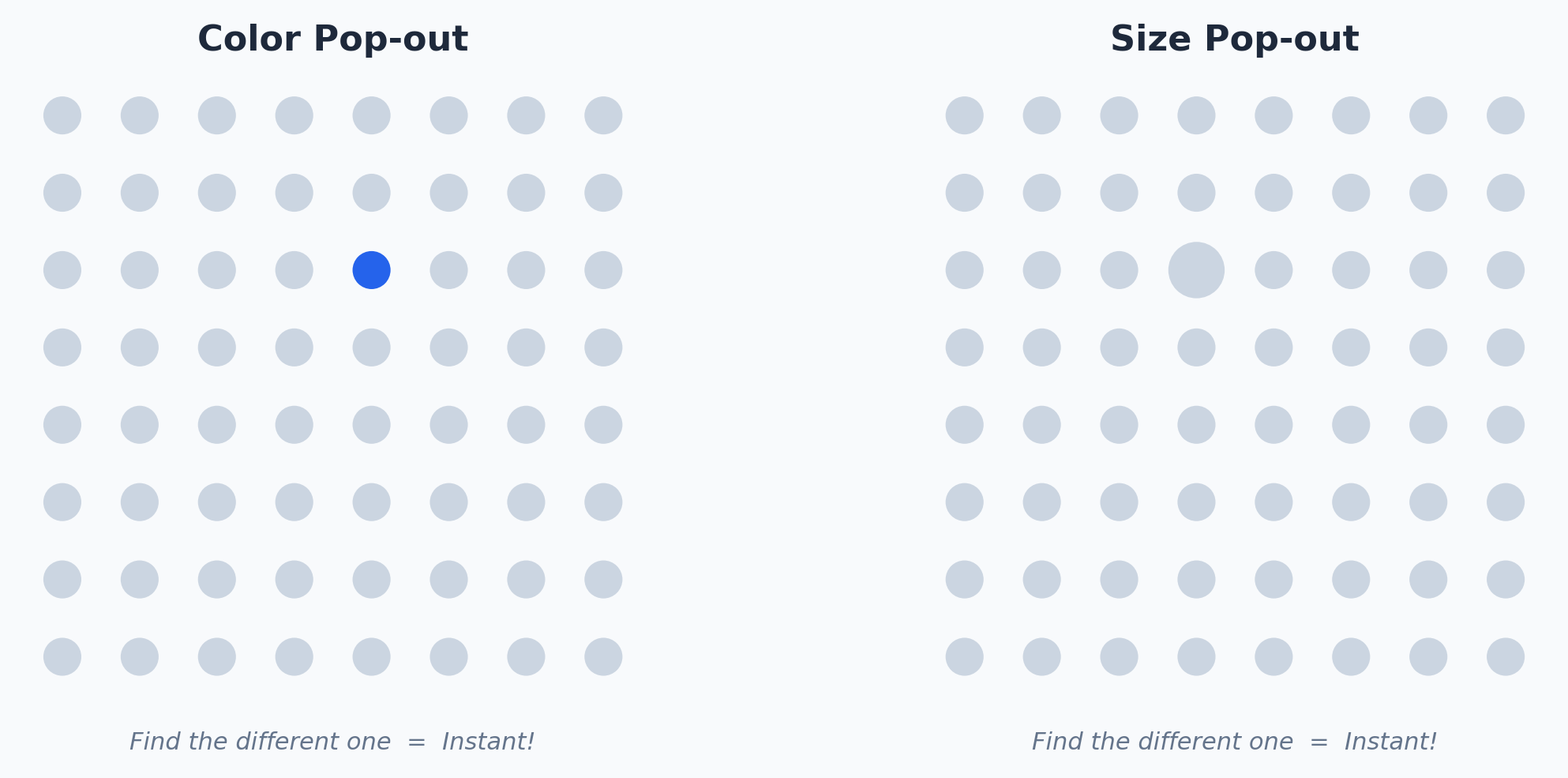
Visual attributes like hue, size, and position are processed in <200ms -- before conscious attention begins.
Effective visualization uses these attributes to highlight the "story" so the viewer perceives it instantly.
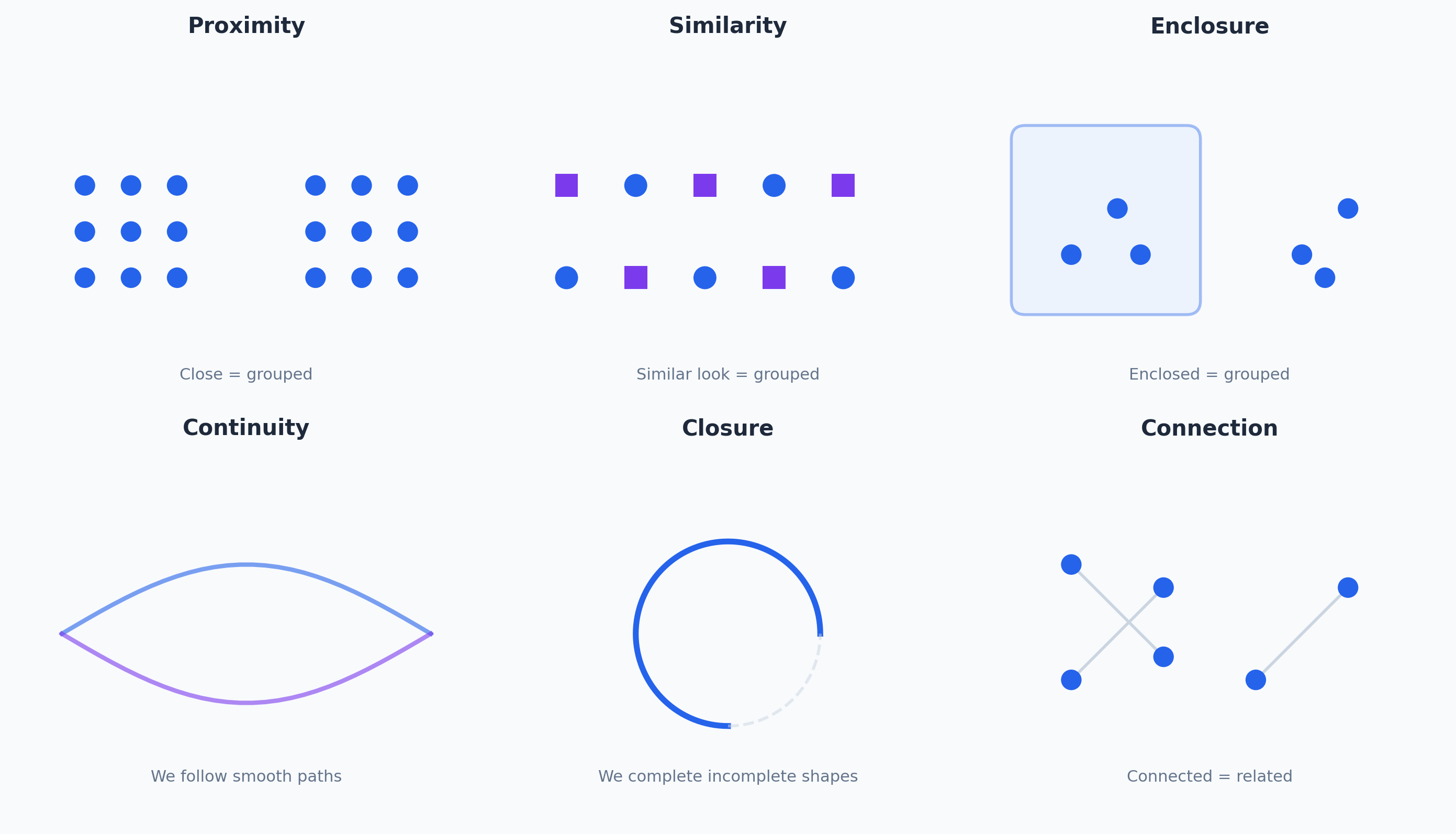
Humans naturally perceive holistic patterns. We group objects by proximity, similarity, and connection.
Use whitespace (proximity) to group related data without heavy boxes or borders.
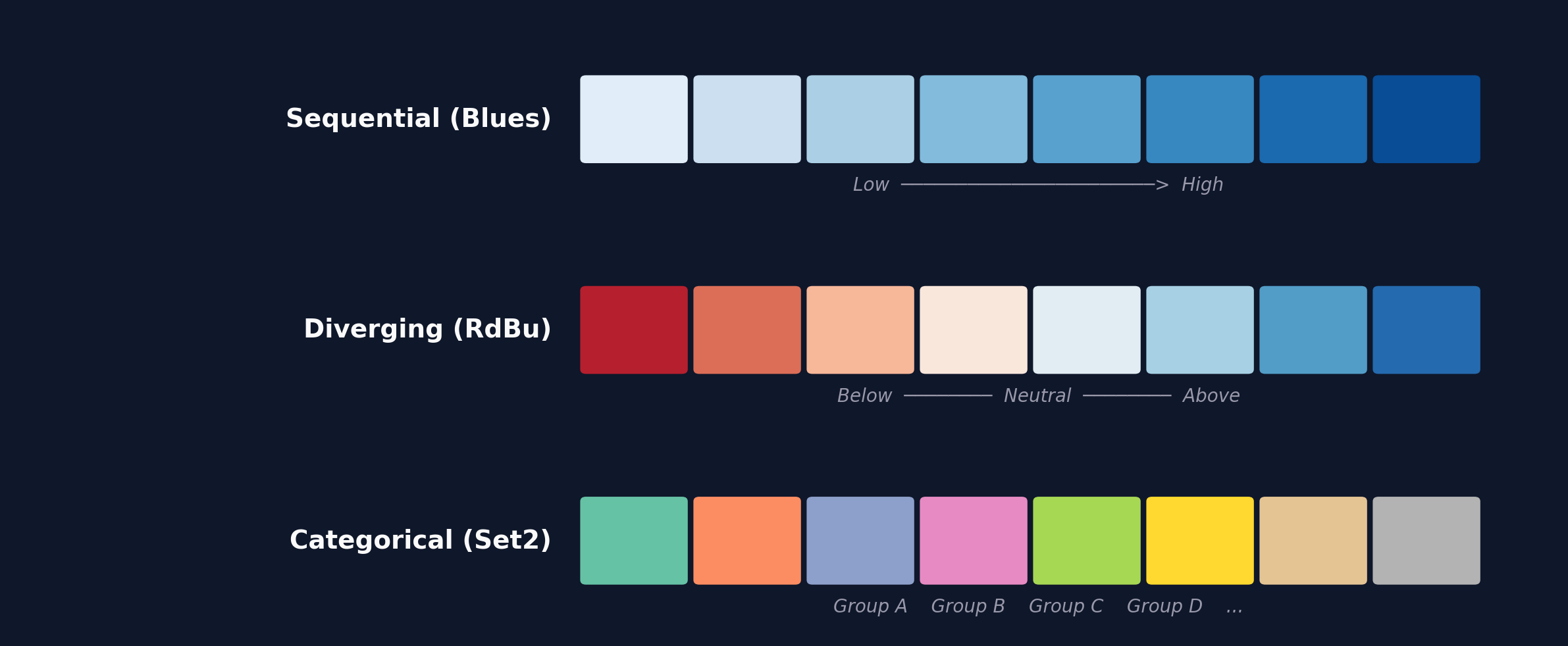
Low-to-high magnitudes. Use for population density, temperature, income.
Extremes from a midpoint. Use for profit/loss, above/below average.
Distinct unordered groups. Max 8-10 colors for readability.
The eye hates "ping-ponging" between a legend and the data.
Place labels directly next to lines or bars. Eliminate the legend entirely when possible.
Don't just show "Sales Dropped." Add context: "Sales dropped due to supply chain outage."
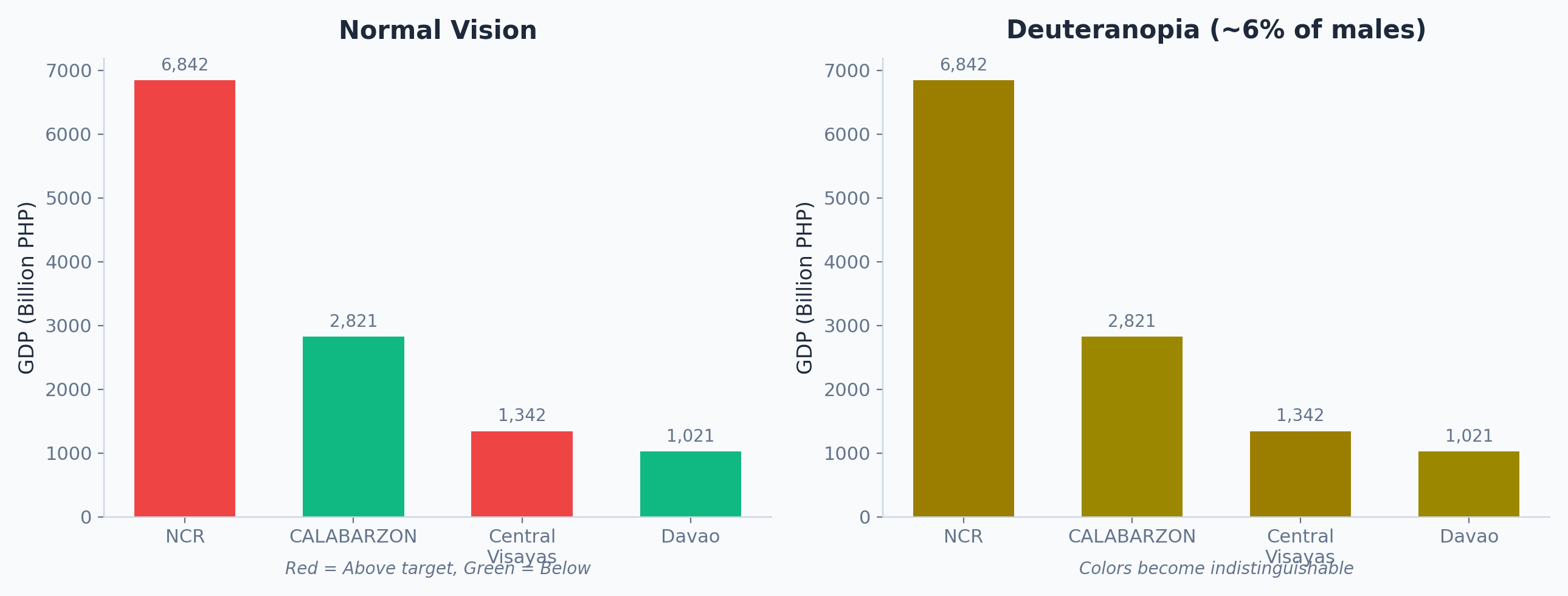
8% of males have color vision deficiency. Designing with red-green scales excludes a significant portion of your audience.
Never use color alone. Combine shape + color or pattern + color to ensure clarity for all viewers.
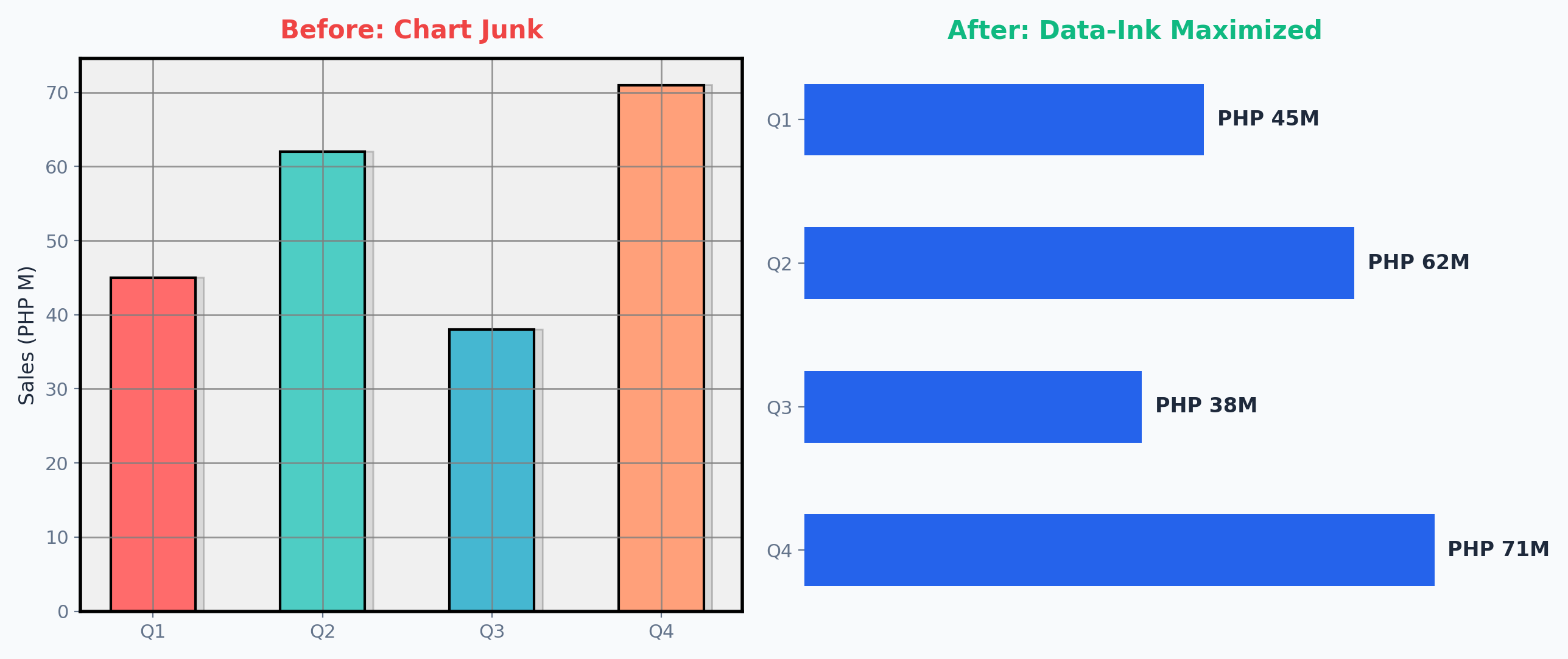
"Above all else, show the data." Maximize the share of ink dedicated to actual data points over total ink used.
Gridlines, redundant labels, 3D effects, background gradients, and decorative elements.
Stop labeling charts with "What" (e.g., "Revenue by Quarter"). Label them with "So What?"
If the title was the only thing someone read, would they get the point?
Guide the viewer's eye in a deliberate order using size, position, and color.
Source: Learning Management System database (Fall 2023). Excludes audited enrollments.
Use gray for context data and a bold accent color only for the data point you are discussing.
"Grey it out." If everything is colored, nothing is emphasized.
Which of the following elements is considered "Chart Junk" and should be erased to maximize the data-ink ratio?
Background gradients don't represent data. They are purely decorative "ink" that distracts from the actual information.
Chart selection is strategic, not aesthetic. The wrong chart can mislead even with perfectly correct data.
From bar charts to treemaps -- every form serves a distinct analytical purpose.
| Goal | Chart Types | Primary Question Answered |
|---|---|---|
| Comparison | Bar, Grouped Bar, Lollipop | "Which [category] is the highest/lowest?" |
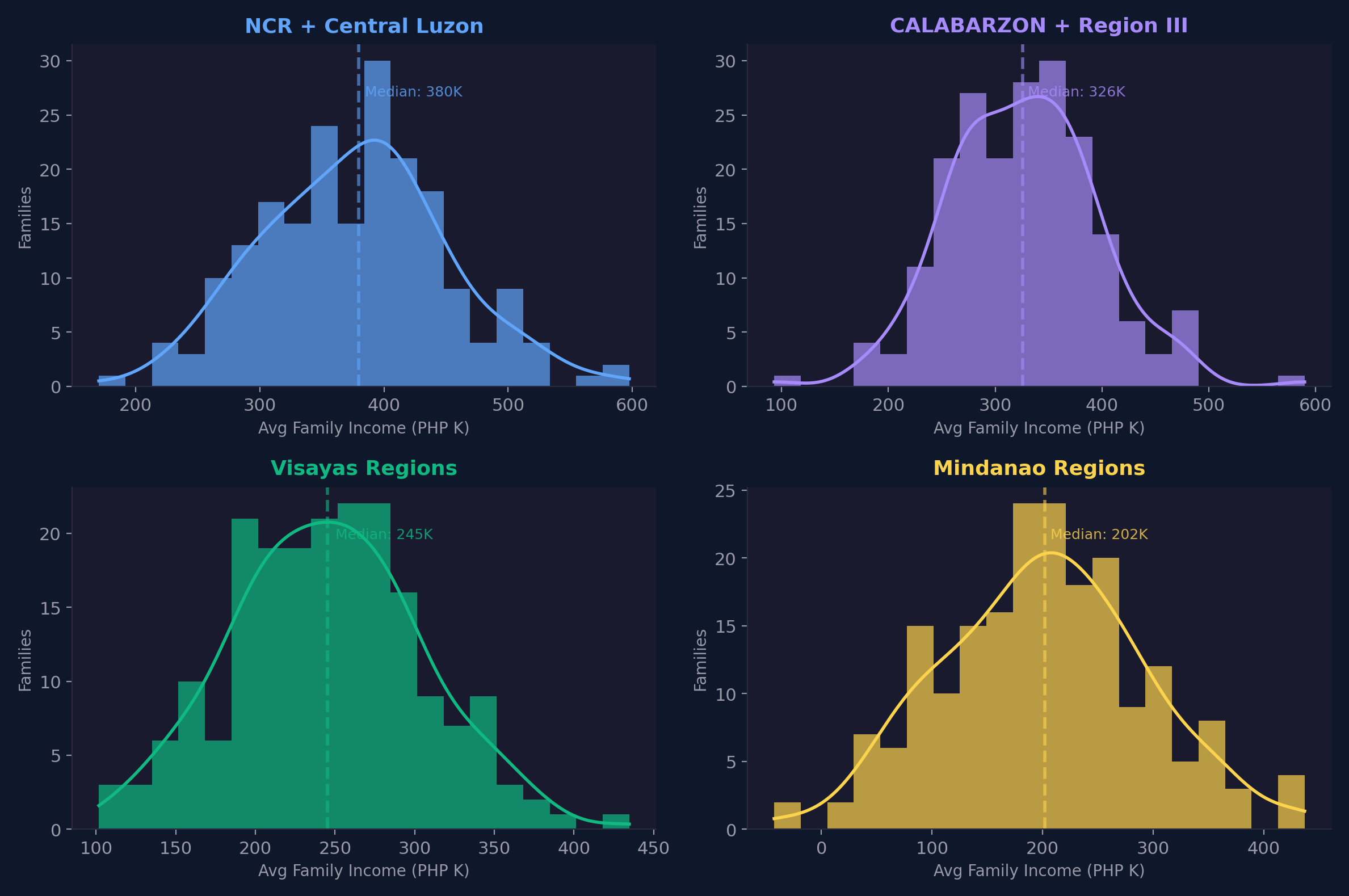
| Distribution | Histogram, Box, Violin | "How is the data shaped or spread?" |
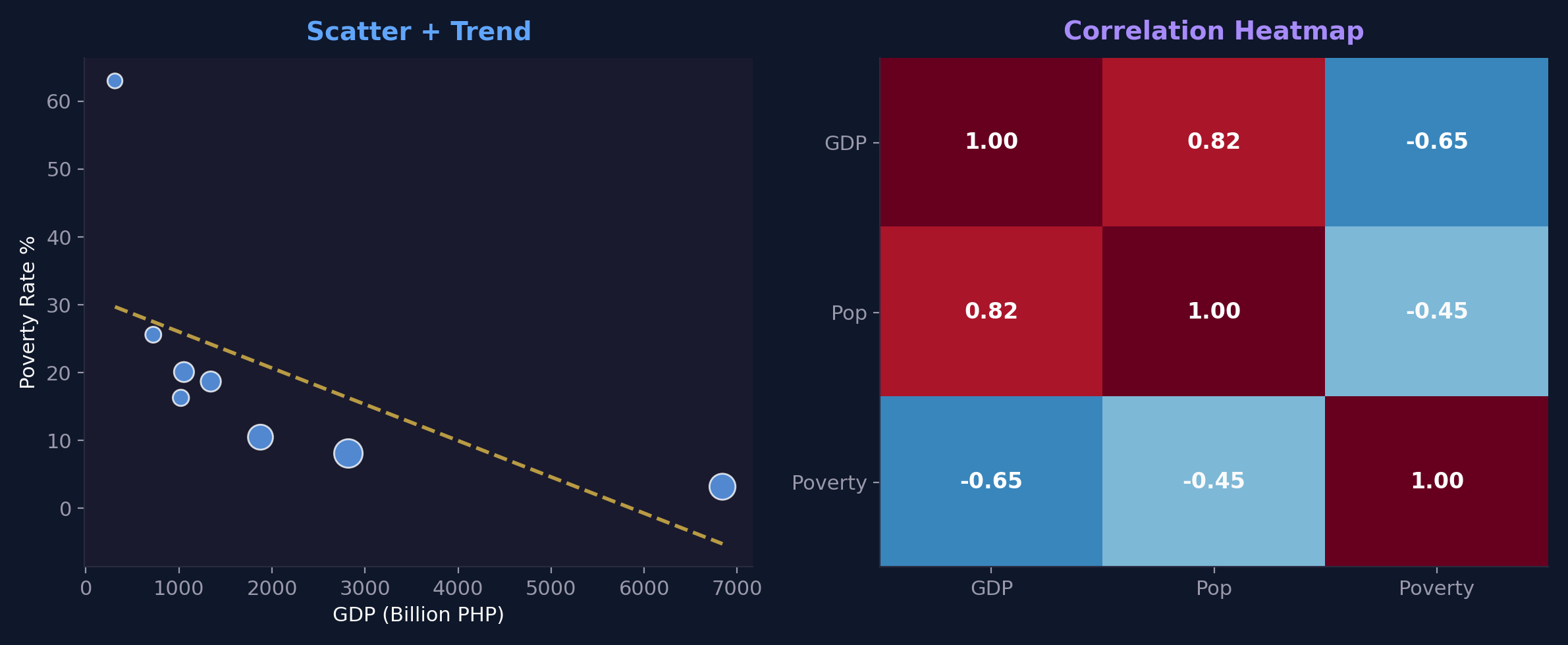
| Relationship | Scatter, Bubble, Heatmap | "Does A correlate with B?" |
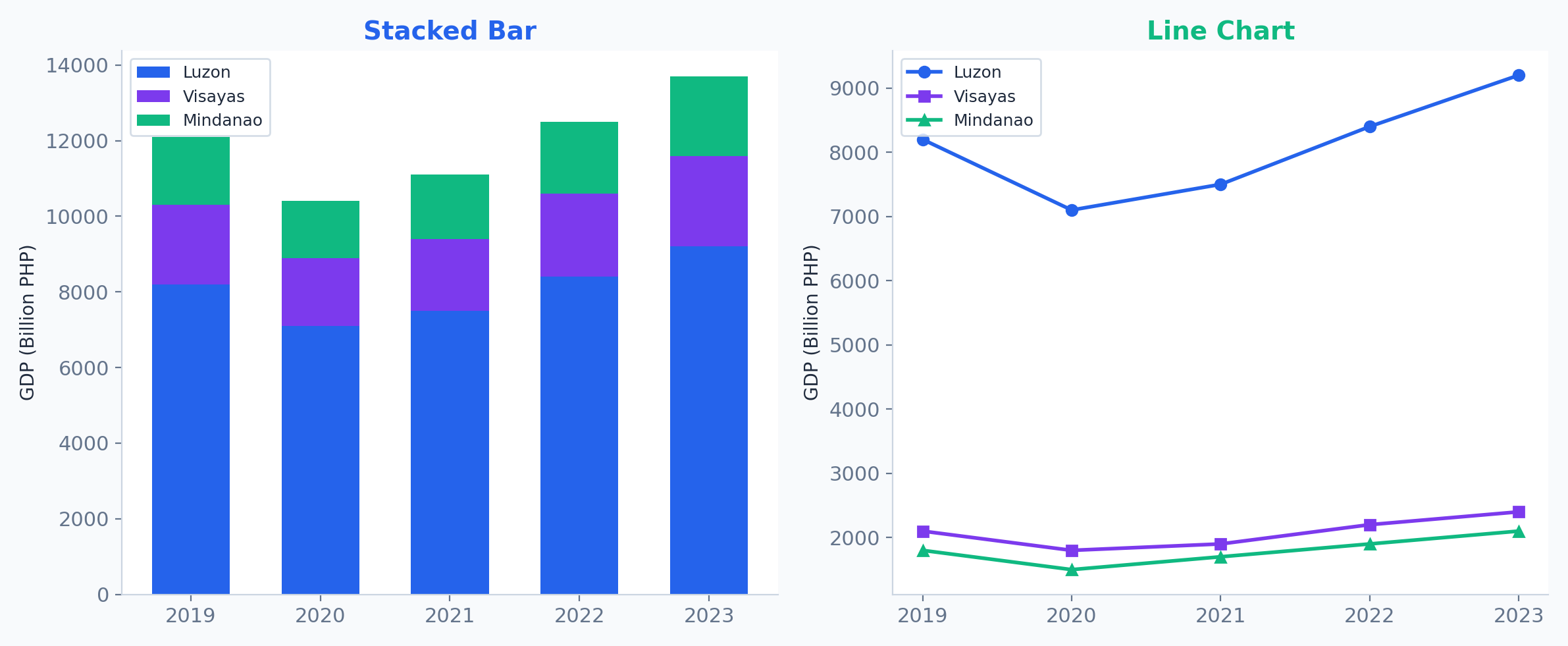
| Composition | Stacked Bar, Treemap, Donut | "What makes up the total?" |
| Trend | Line, Area, Sparkline | "How does this change over time?" |
Start with the question, then pick the chart -- never the other way around. Form follows function.
Ask: "What question does this chart answer?" If you can't answer clearly, pick a different chart.
All examples use Philippine economic data from the Philippine Statistics Authority (PSA 2023).
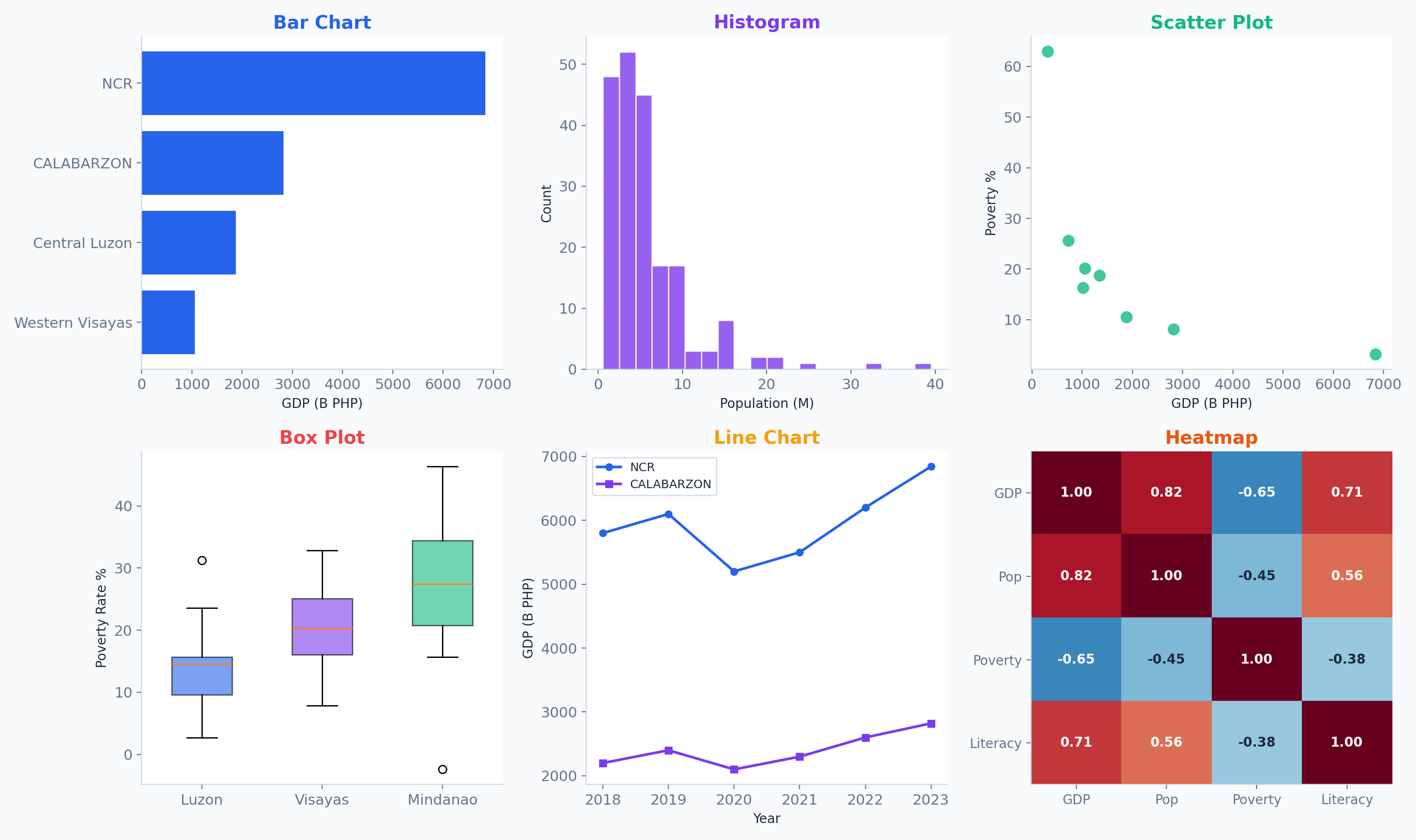
Each chart type serves a distinct analytical purpose -- they are not interchangeable.
Bar charts are the gold standard for comparing discrete values. The human eye is highly accurate at comparing lengths.
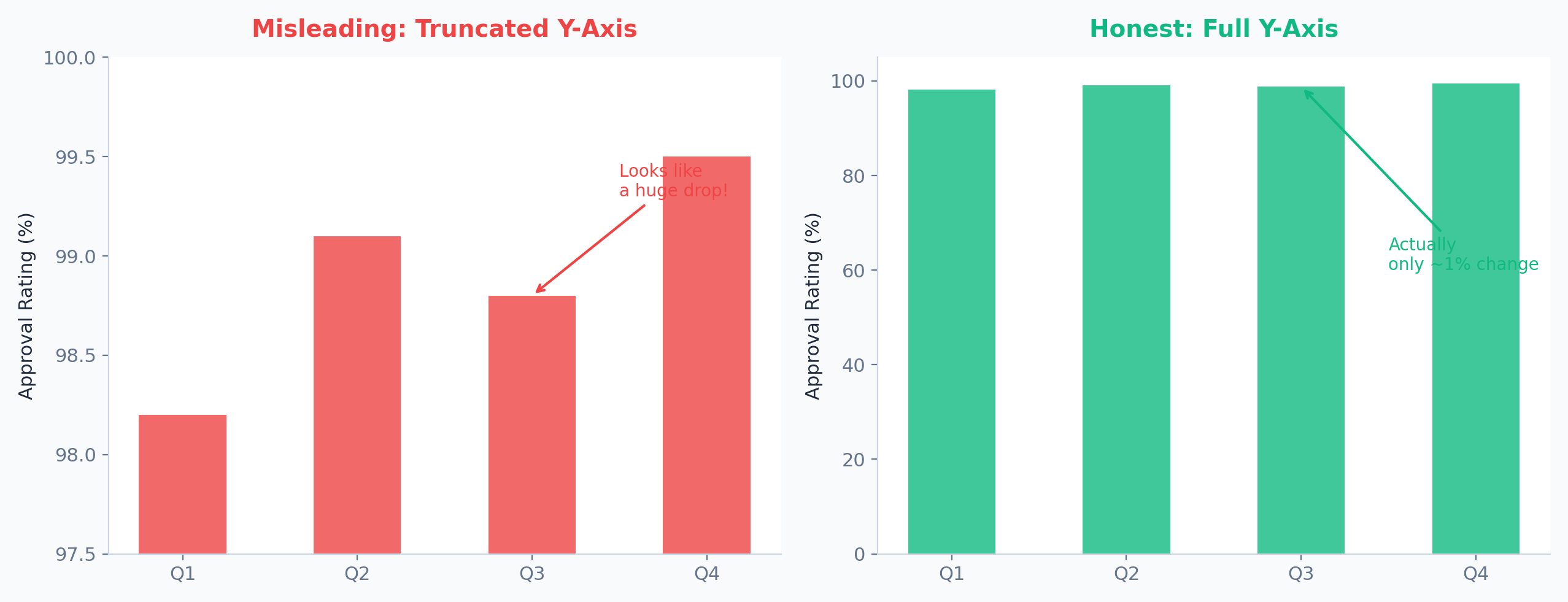
Golden Rule: Always start the Y-axis at zero for bar charts.
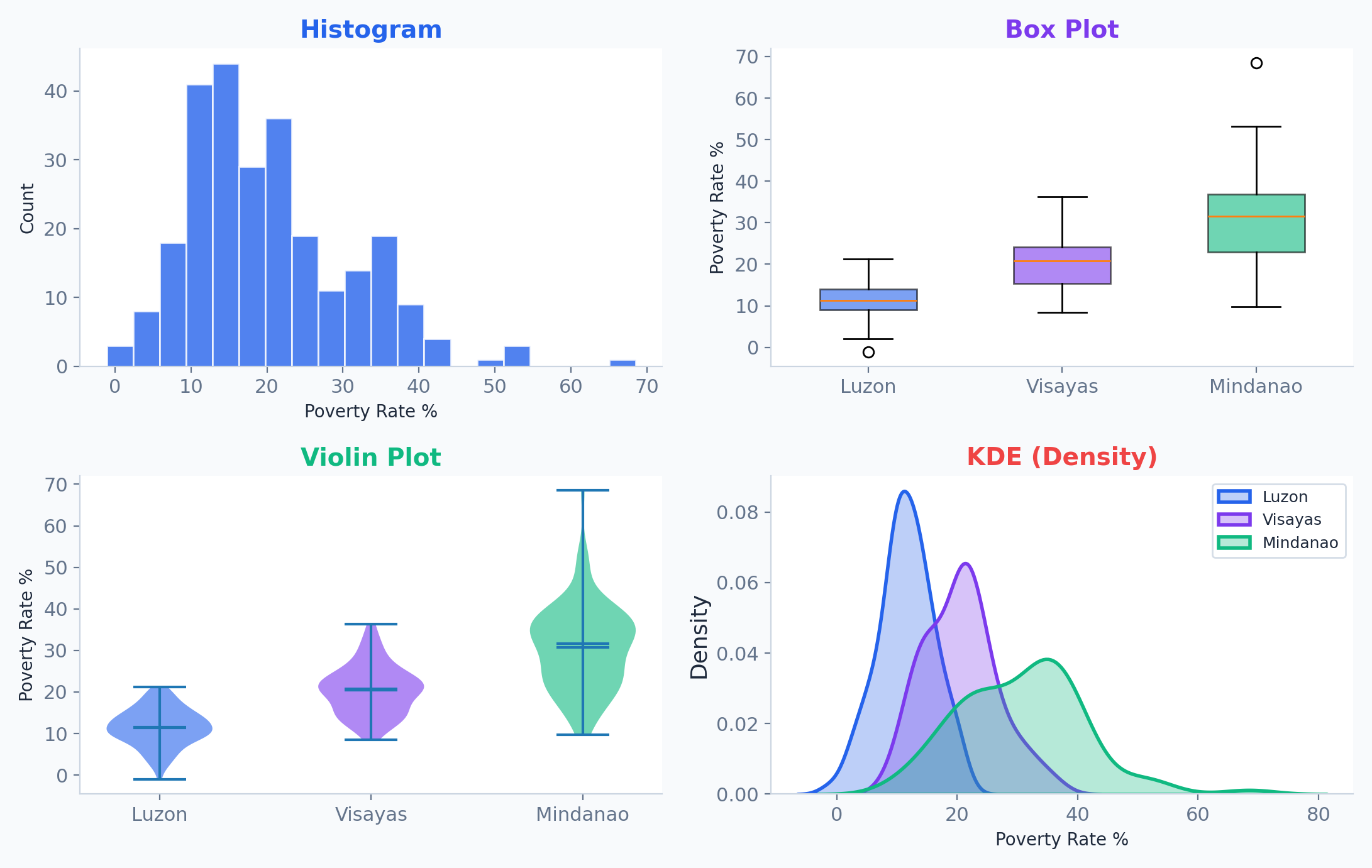
Histograms and KDE plots show the "shape" and modality of data. Is it Normal, Skewed, or Bimodal?
Distributions dictate your statistical strategy. Skewed data needs non-parametric tests.
Scatter plots reveal relationships between numeric pairs. Use hue and size to add dimensionality.
Clusters and outliers often tell a more interesting story than the trendline itself.
Stacked area and bar charts reveal how parts of a whole change across categories or over time.
Middle categories lack a common baseline, making them hard to compare. Use with caution.
The human brain is terrible at comparing angles and areas.
Horizontal bar charts or donut charts with direct labels.
Small multiples repeat the same chart across categorical slices, enabling high-dimensional comparison.
Consistent axes let the eye scan for subtle differences across groups without overlap.
Sometimes you need the raw numbers and the visual pattern.
Apply a sequential color scale to cell backgrounds to highlight high/low values instantly.
Exaggerates small differences, misleads viewers about magnitude
Creates false correlations between unrelated data series
Distorts perception, occludes data points, adds zero information
Too many slices making it impossible to compare angles and areas
Unintuitive, lacking natural order, and often not colorblind-safe
Cramming too much information without a clear visual hierarchy
The most common visualization errors fall into two categories: distorting reality (lying with data) and cognitive overload.
Truth over impact. Maintain proportional honesty in all reporting.
Truncating the Y-axis is the most common visual lie. It exaggerates small differences into false "massive" trends.
Same numbers, dramatically different impression. Context and axis range change everything.
Forces lines to cross or align, implying false causation.
Allows viewers to see trends independently.
Two completely unrelated variables can be made to look perfectly correlated simply by adjusting the scaling of dual Y-axes.
Slice A physically takes up 70% of the ink, but represents only 30% of the data.
Honest representation where visual area cleanly maps to data area.
3D rendering tilts the chart, pulling the front elements physically closer to the viewer. This violates the principle of proportional honesty.
Humans cannot accurately compare angles of similar sizes, forcing eyes to dart back and forth to the legend.
Direct translation of length allows instant, effortless ranking. Text labels are placed right beside the data.
Rule of thumb: If a pie chart has more than 4 or 5 slices, use a bar chart instead. Never make your audience do the visual math.
A trend appears in groups of data but disappears or reverses when groups are combined.
Aggregated data can lie. Always check for confounding variables that might skew the result.
You need to show the correlation between study hours and final grades for 500 students. Which chart type should you use?
A scatter plot is the standard choice for showing correlation and relationships between two continuous numeric variables.
Data is rarely precise. Don't hide the variance.
Use 95% Confidence Intervals to show the range of the true mean, not just the sample mean.
Warning: Standard Deviation (SD) and Standard Error (SE) are not the same. Know what you are plotting.
Sankey Diagrams quantify the flow of resources (budget, energy, users) through a system.
"Where did the budget go?" or "Where are users dropping off?" Width = magnitude of flow.
Pie charts fail at showing nested data with many categories. Treemaps excel at it, like showing the breakdown of a country's exports.
They use 100% of the space to show part-to-whole relationships, scaling easily to dozens of categories (like the Philippine export economy).
With 10+ categories, bar charts can feel visually heavy. Lollipop charts reduce visual weight while emphasizing the value.
The dot (value) becomes the focal point while the stem provides alignment. Less ink, same information.
Maps are powerful but dangerous. Large geographic areas dominate visually despite low data importance.
Encodes data values into geographic regions using color intensity. Works best for density-based metrics (per capita, rates).
A chart is a character; context is the plot. Without a narrative arc, data points remain static observations instead of catalysts for action.
Structure your presentations like a story -- context, conflict, resolution.
Charts are not the destination; they are the vehicle for the insight.
Annotations transform a chart from "here's data" to "here's what the data means."
Arrows for key events, shaded regions for periods, direct labels for interpretation.
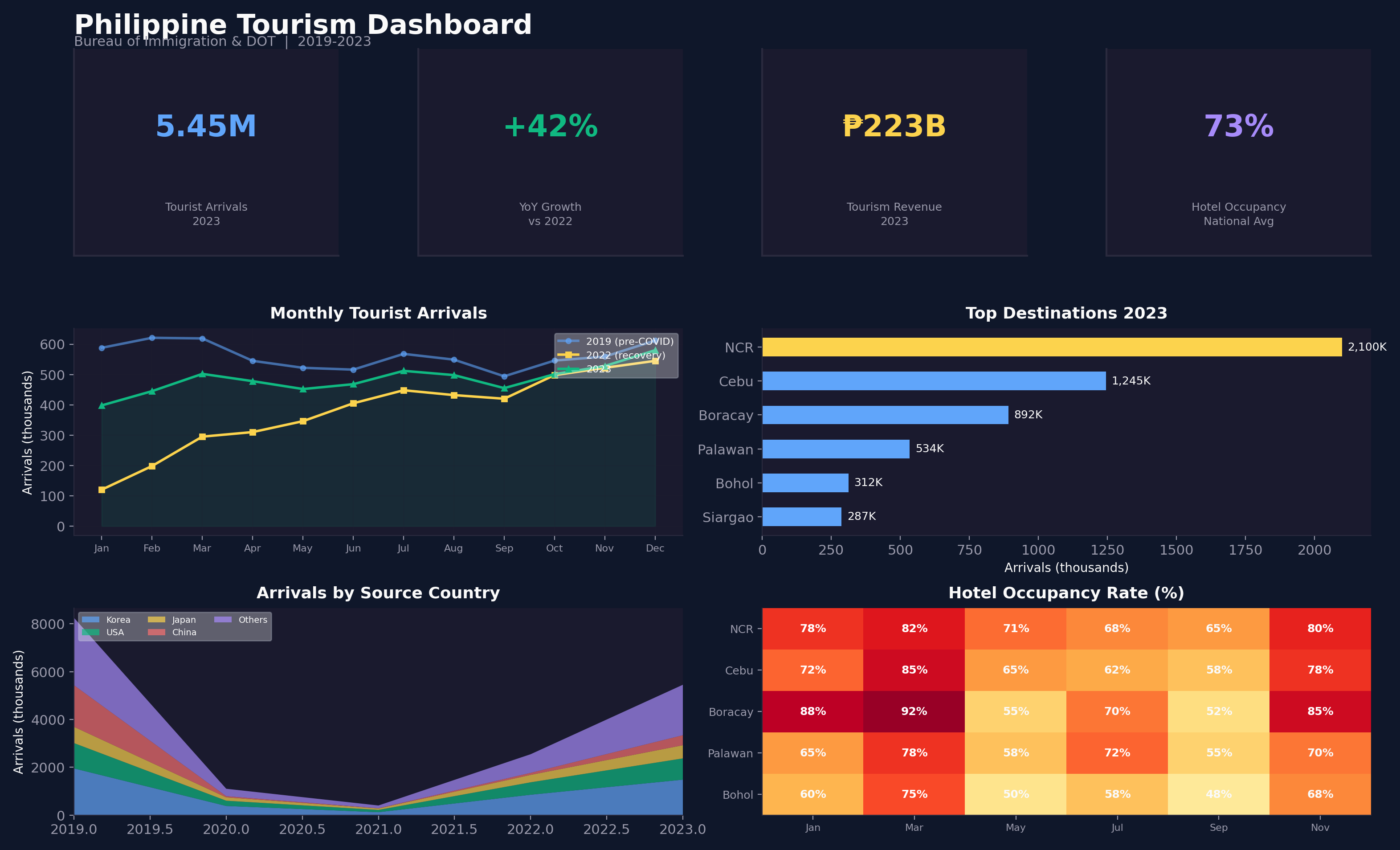
A dashboard should answer the most critical KPI question in under 5 seconds. Hierarchy is everything.
Big number (most critical metric) in the top-left -- the natural focal point of attention.
KPI cards + trend line + breakdown bars -- every panel answers one specific question.
Summary metrics at top, trends in middle, detail breakdowns at bottom.
For web presentations, static images (like Matplotlib PNGs) restrict the audience. Modern declarative tools build interactive charts natively in the browser.
Hover tooltips, click-and-drag zooming, panning, and responsive scaling come for free without writing extra interactive logic.
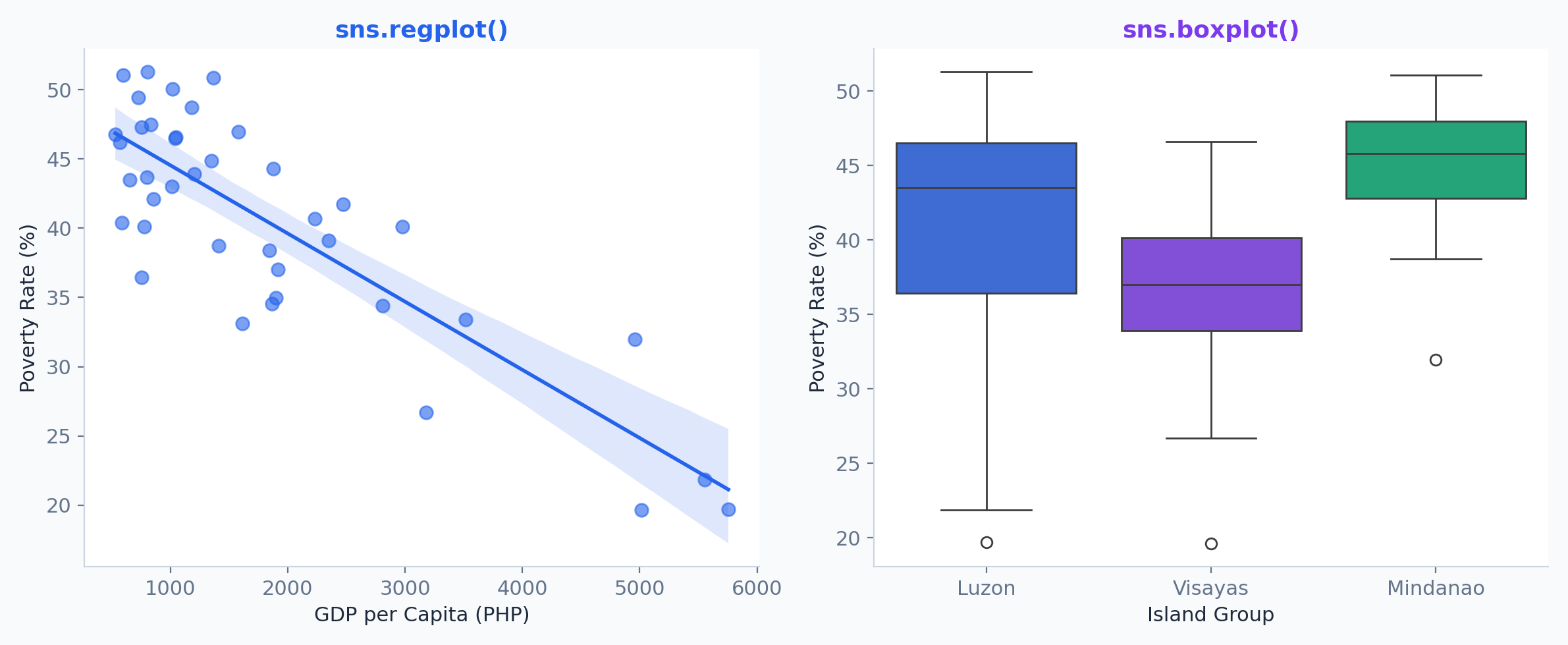
Seaborn automatically adds regression lines, confidence intervals, and statistical groupings.
Statistical plots (regplot, boxplot, violinplot) where built-in analytics add value beyond matplotlib.
See the full picture first
Narrow to areas of interest
Inspect specific data on demand
Shneiderman's Mantra: "Overview first, zoom and filter, then details-on-demand."
Plotly Express for hover tooltips, zoom, pan, and export. Dash or Streamlit for full interactive dashboards.
| Region | Share (%) |
|---|
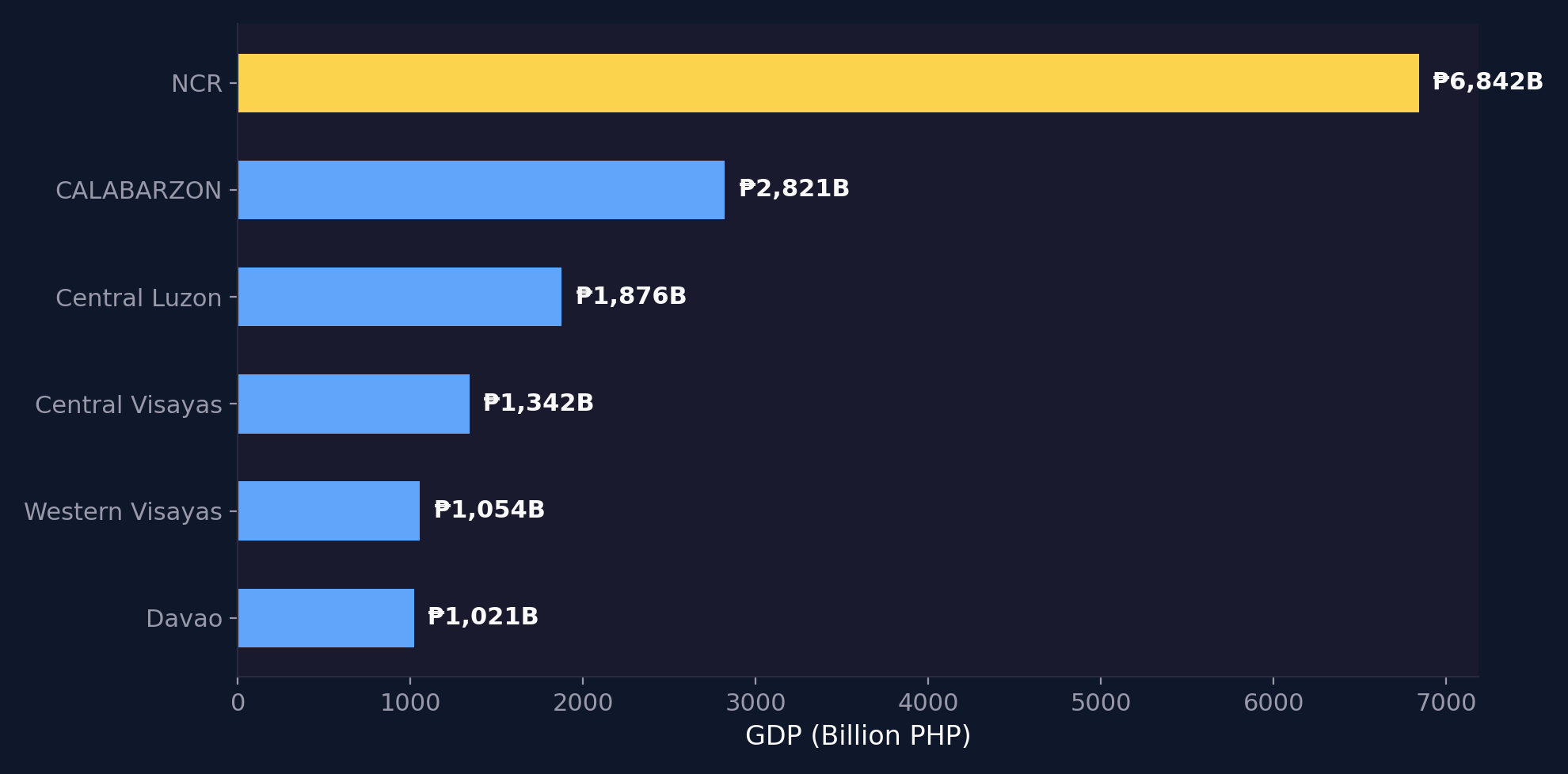
Sorted horizontal bars with direct labels -- no gridlines needed. NCR dominates at over 5x the next region.
Philippine Statistics Authority (PSA), 2023 Regional Accounts. Design: sorted, labeled, colorblind-safe.
Imagine a 3D pie chart with 12 slices, rainbow colors, no labels, and the title: "Data".
Apply everything we covered: data-ink ratio, color choice, chart selection, and active titles.
Share your redesign with a neighbor. Did you pick the same chart type?
Libraries like Matplotlib, Seaborn, and Plotly are excellent for ad-hoc analysis and data science workflows. However, deploying insights to hundreds of non-technical stakeholders requires a different toolset.
Cloud-native architecture to handle millions of rows without crashing the user's browser.
Centralized semantic models ensure everyone agrees on the definition of "Revenue" or "Active Users".
Self-service drag-and-drop filtering, cross-filtering, and exporting for business users.
BI (Business Intelligence) platforms are the enterprise standard for operational reporting.
Tableau revolutionized the BI industry by turning drag-and-drop actions into database queries.
Unmatched visual flexibility. The famous "Show Me" feature and its underlying proprietary VizQL (Visual Query Language) allow for rapid, intuitive exploratory data analysis.
Founded in 2003 by researchers from Stanford University who commercialized their Department of Defense-funded research. Acquired by Salesforce in 2019 for $15.7 Billion.
"Help people see and understand data."
The Enterprise Heavyweight
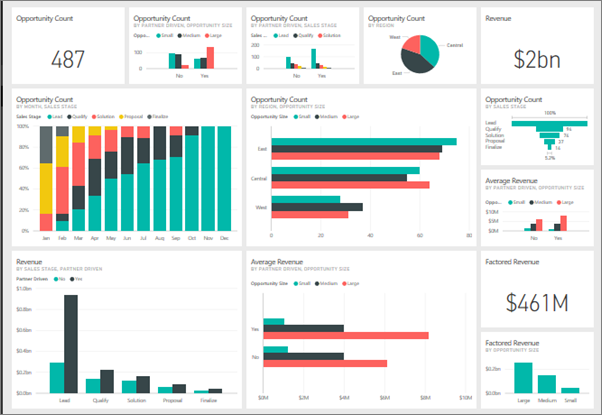
Microsoft's flagship analytics tool tightly integrated with the Azure and Office 365 ecosystem.
Incredibly powerful data modeling via DAX (Data Analysis Expressions) and Power Query (M language). Highly cost-effective for enterprises already using Microsoft E5 licenses.
Originally designed under the code name "Project Crescent". It evolved into a behemoth by combining several obscure Excel add-ins (Power Pivot, Power Query, Power View).
A 100% web-based platform that forced the industry to rethink how core metrics are governed.
Introduced LookML, a Git-version-controlled semantic layer. This ensures a metric like "Revenue" is defined exactly once in code, meaning every dashboard across the company calculates it exactly the same way.
Unlike Tableau or Power BI, Looker doesn't extract data into its own memory engine—it translates LookML into SQL and queries the data warehouse (like BigQuery or Snowflake) directly. Google Cloud acquired Looker in 2019 for $2.6 Billion.
Governance First, Viz Second
Create publication-quality charts with matplotlib & seaborn using Philippine regional data. Practice chart selection, Tufte's principles, and data storytelling.
tufte.com
seaborn.pydata.org
plotly.com