Turning data into decisions through narrative
Department of Computer Science
University of the Philippines Cebu
"Data that doesn't tell a story doesn't get remembered."
— John W. Tukey, Exploratory Data Analysis, 1977
Today's question: how do we make analysts and decision-makers notice what matters?
Narrative arc, Pyramid Principle, and the CAR structure for data presentations.
Building tension, annotation strategy, and active slide titles that drive action.
Applying storytelling to local datasets: GCash, PSA economic indicators, and more.
By the end of this session you will be able to structure any data finding into a compelling, audience-ready narrative.
Builds on: Week 5 Visualization Principles
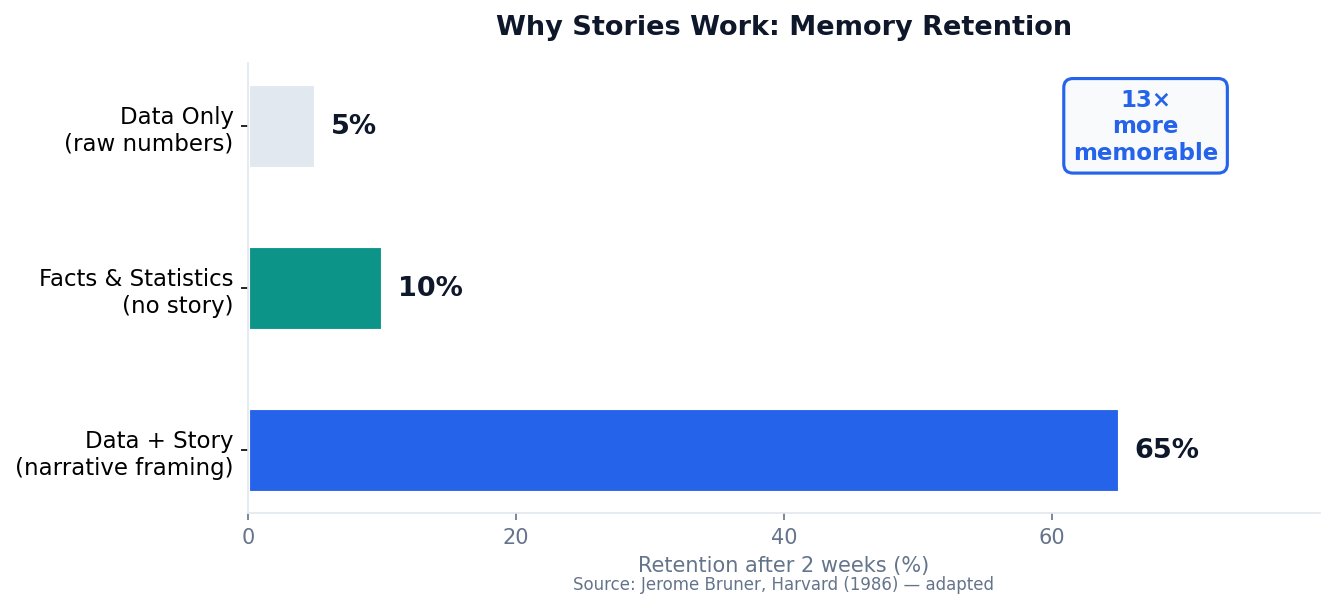
Cognitive science tells us humans remember narratives 13× better than raw facts. Let's explore why — and how to exploit it.
Two weeks after a presentation, audiences retain 65% of information delivered as a story — versus just 5% for raw numbers. The mechanism: narrative activates episodic memory, not just semantic memory.
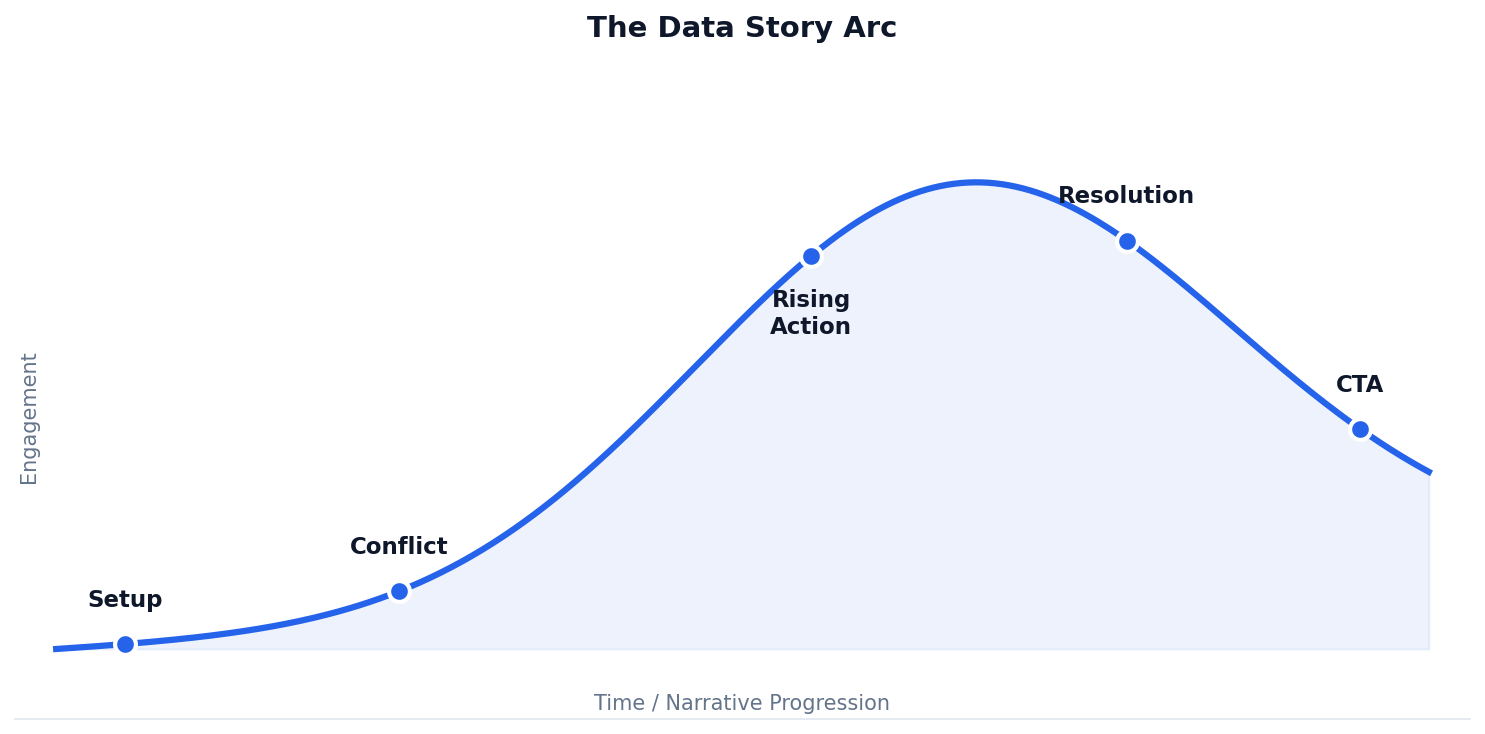
Every chart and table you produce needs a narrative wrapper: context, tension, and resolution. Without it, your insight may be forgotten before the meeting ends.
Establish the business context and introduce the problem: "Sales were expected to grow 15% — they fell 3%."
Reveal the insight, explain causation, and close with a concrete recommendation the audience can act on.
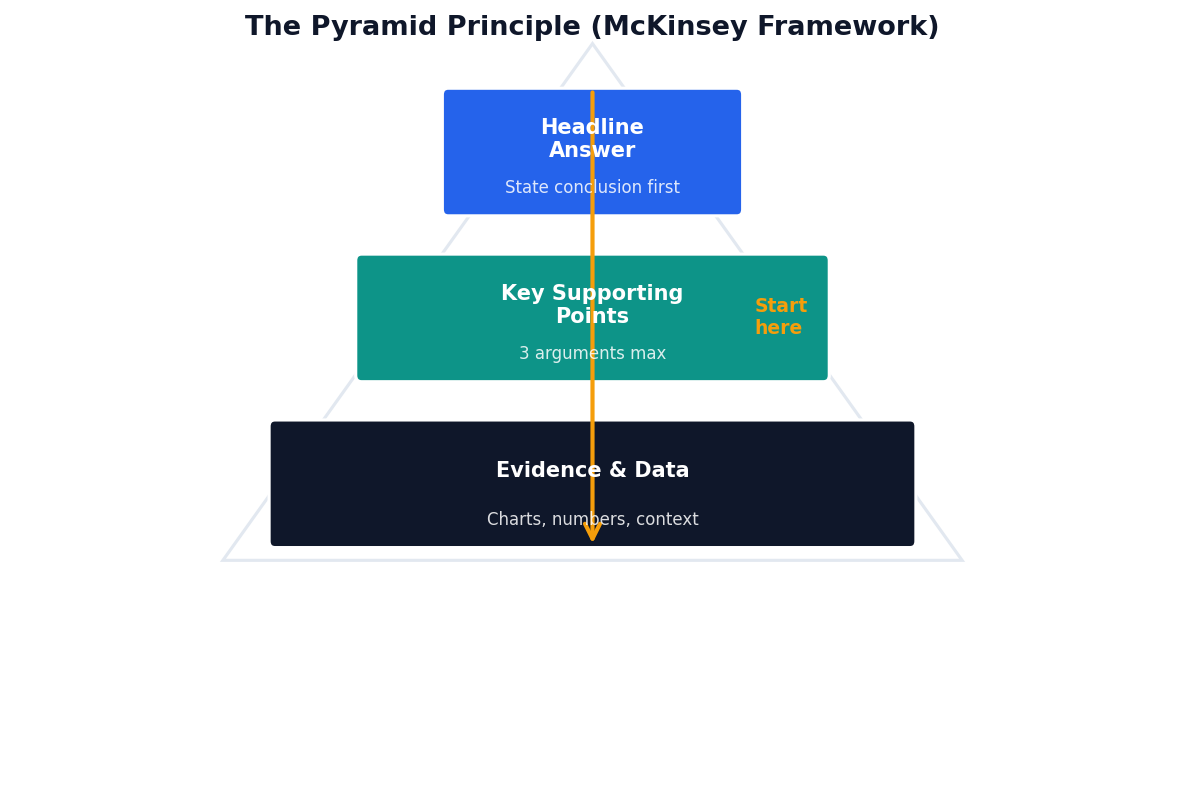
The Pyramid Principle (Barbara Minto, McKinsey) inverts the traditional academic structure: state your conclusion first, then justify it.
Decision-makers are time-poor. If they have to read to slide 10 to understand your point, they will check their phones at slide 3.
The military version of the same principle. Used universally in high-stakes briefings where attention is limited.
A three-part structure that turns any data finding into a complete story.
"NCR contributes 37% of GDP despite having only 13% of the population."
"However, this share has shrunk 4 points since 2018 as Cebu and Davao grow faster."
"Redirect infrastructure spending toward Visayas and Mindanao to sustain national growth."
C · A · R
Context → Anomaly → Recommendation
Any time your analysis has a clear "so what": executive dashboards, project status reports, research presentations.
| Time | Beat | Content |
|---|---|---|
| 0:00 – 0:30 | Hook | Surprising statistic or question that creates immediate curiosity |
| 0:30 – 1:00 | Context | Establish the situation — what was expected and why it matters |
| 1:00 – 1:45 | Conflict | Reveal the data that breaks the expectation |
| 1:45 – 2:30 | Resolution | Explain the root cause with supporting charts |
| 2:30 – 3:00 | CTA | One clear action: a decision, a budget, a next step |
If your audience can't follow your story in three minutes, the structure needs work — not more slides. Brevity forces clarity.
Take any of your EDA findings from Week 4. Time yourself telling it in 3 minutes using this structure. Record and play back.
How to build tension, annotate charts strategically, and write slide titles that drive decisions instead of just labeling content.
State the expectation before revealing the data. The gap between what should have happened and what actually happened is your hook.
"We expected [X] based on [reason]. Instead, we found [Y] — a gap first visible in [context]."
Layer 1: main insight. Layer 2: supporting detail. Layer 3: context and caveats. Most audiences won't need Layer 3.
"E-commerce transactions in NCR rose from ₱12B to ₱14B between Q1 and Q3."
"NCR e-commerce was on track to hit ₱18B by Q3 based on 2022 momentum. Instead it stalled at ₱14B — a ₱4B gap that first appeared in May and hasn't recovered."
It creates a question in the audience's mind: "Why did it stall in May?" — they lean in to find the answer rather than passively receiving data.
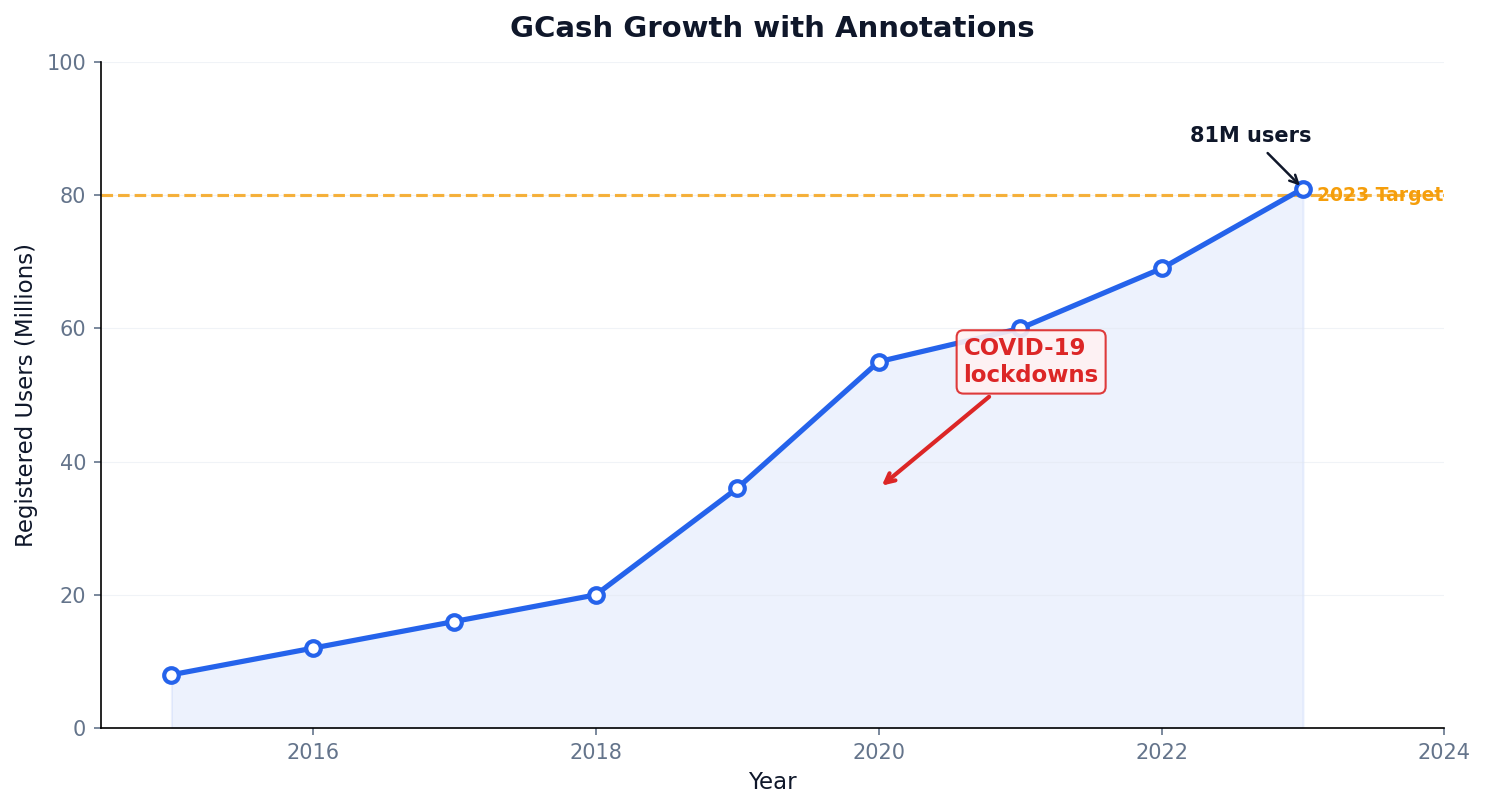
Use arrows for anomalies, labels for key data points, and reference lines for targets. Keep annotations to 3–5 per chart maximum.
A slide title is not a label. It is the main claim of that slide. Write it as the insight, not the topic.
If someone reads only your slide titles, they should be able to reconstruct your entire argument. Passive titles break this chain.
Replace your title with "In this slide, I show that ___." Whatever completes that sentence is your real title.
"Regional GDP Distribution"
Tells the audience nothing. They have to read the chart and figure out the point themselves.
"NCR's GDP share has fallen 4 points since 2018 as Visayas accelerates"
States the finding. The audience knows what to look for before they even see the chart.
Showing every metric you computed. Audiences remember nothing when given everything. Choose one insight per slide.
"Here are all 23 KPIs from this quarter's report..."
Putting the key finding on slide 15. By then, decision-makers have formed opinions based on the wrong data.
[Slides 1–14: methodology] "...and on this last slide, churn has doubled."
Presenting how you found the answer instead of what the answer is. Your methodology is context, not the story.
"First I cleaned nulls, then I ran a correlation matrix, then I built 3 models..."
The analyst's job is to translate complexity into clarity, not to expose the complexity to the audience.
1 main message, supported by 3 key points, with 1 clear call to action. Anything beyond this is an appendix.
Applying storytelling frameworks to local datasets: GCash growth, PSA economic indicators, and the Hans Rosling approach adapted for Philippine data.
The same data can land very differently depending on how it's framed.
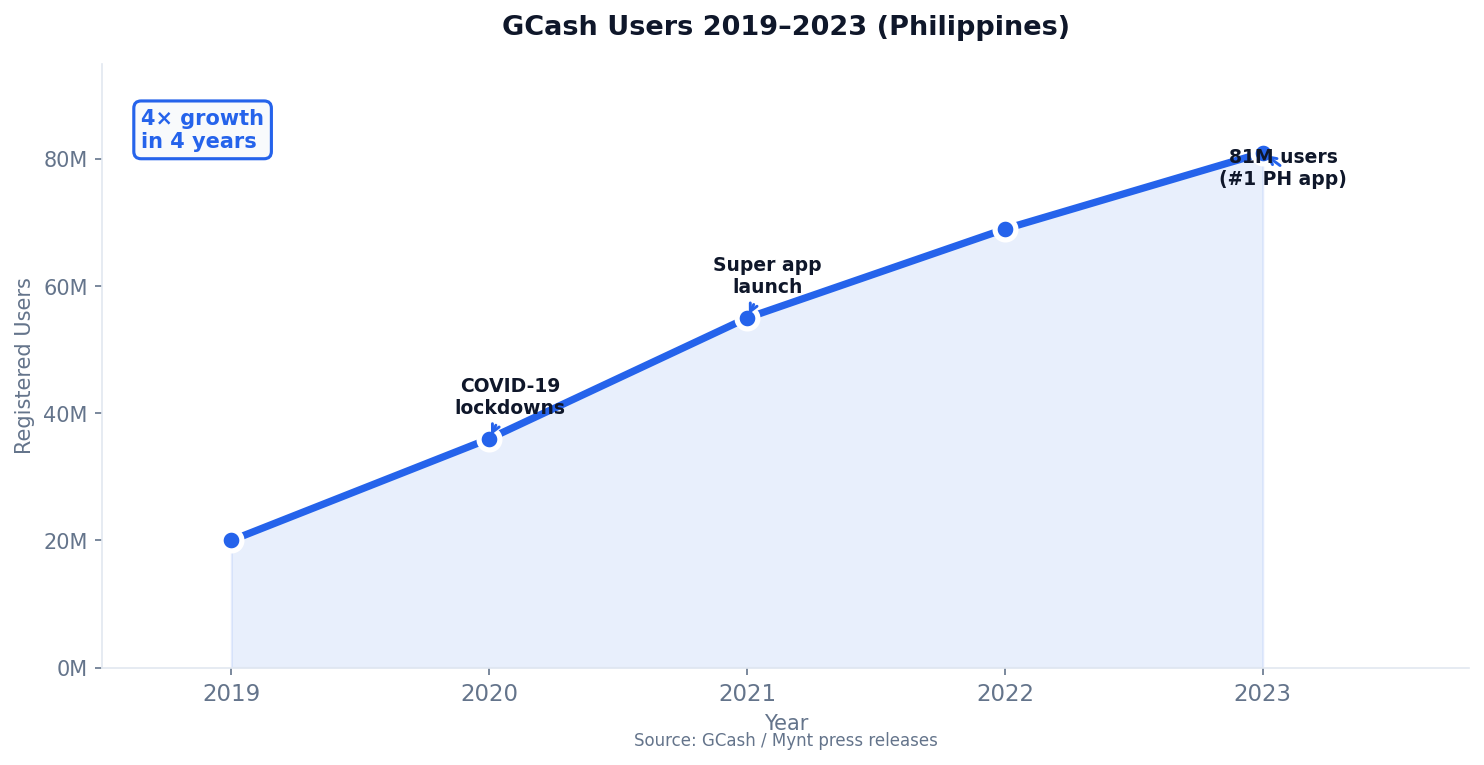
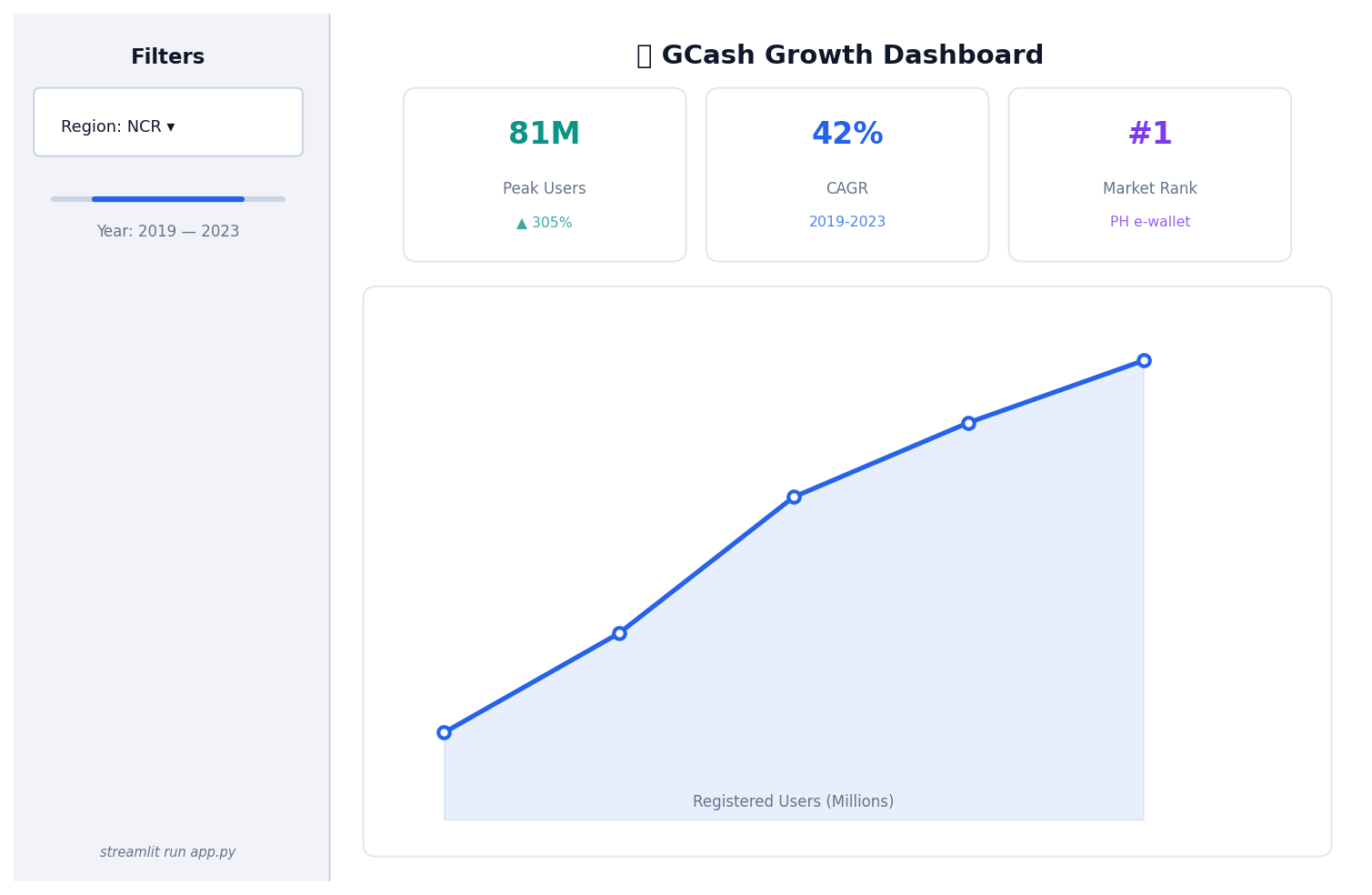
GCash had 20M users in 2019. In 2020 it had 36M. By 2023 it reached 81M. This represents a 305% increase over 4 years. The CAGR is approximately 42%.
When COVID-19 lockdowns emptied Philippine streets in 2020, millions of Filipinos opened a GCash wallet for the first time. What began as emergency access to cash became a habit: by 2023, 81 million Filipinos — more than the entire population of Germany — used GCash as their daily financial tool.
Three annotations mark pivotal narrative moments — not just data peaks. Each one answers "why did this happen?" without adding a separate text slide.
Single color, filled area for magnitude, milestone annotations in context. No legend needed — one series, one story.
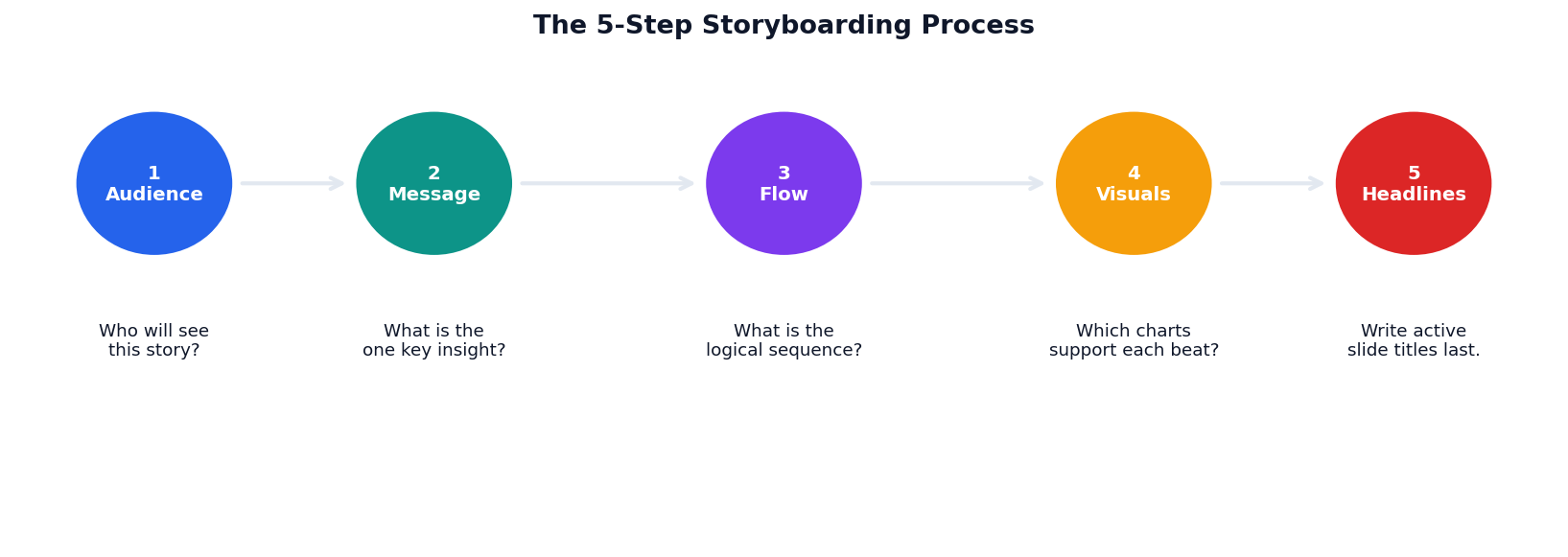
Most analysts open Python/Tableau and start making charts before knowing what story they're telling. Storyboarding forces the message decision upfront, saving hours of rework.
A napkin sketch is fine. Post-its on a whiteboard are ideal. The goal is to sequence your beats before investing in polish.
animation_frame="year" for Rosling-style motionAnimate over time with Plotly Express to reveal trends. Name outliers (NCR, BARMM) to anchor the audience's attention on the story.
Next: Session 2 — Dashboard Design & BI Tools
Design principles, BI tools, and Philippine-context examples
Department of Computer Science
University of the Philippines Cebu
"A dashboard answers key questions in under 5 seconds."
If a manager has to hunt for the answer, the dashboard has failed. Good dashboards are designed for decisions — not for displaying all available data.
5 sec
To answer the primary question
3–5
Maximum KPIs above the fold
1
Primary question per dashboard
Apply the 5-second rule, Z-pattern layout, and KPI anatomy to dashboard wireframes.
Compare Streamlit, Plotly Dash, Tableau, and Looker Studio — and know when to use each.
Apply design-decision frameworks: color strategy, interactivity guidelines, and a review checklist.
Capstone projects in Week 12 will require a working interactive dashboard — this session builds the design vocabulary you'll need.
Builds on: Session 1 Narrative Structure
What makes a dashboard effective — and how to plan one before writing a single line of code.
Not all dashboards answer the same question. Identify the type before you design.
They try to be all three types simultaneously. The result is a cluttered screen that answers no question in 5 seconds.
Long-term KPIs for executives. Low frequency (weekly/monthly). Answers: "Are we on track?"
e.g., BancNet Board KPI Dashboard — quarterly transaction volume vs target
Drill-down exploration for analysts. Answers: "Why is this happening?"
e.g., PSA Poverty Explorer — filter by region, year, and indicator to find root causes
Real-time monitoring for operations teams. Answers: "What is happening right now?"
e.g., MMDA Live Traffic Monitor — live vehicle counts and incident alerts per highway
| Dimension | Dashboard | Report |
|---|---|---|
| Primary purpose | Monitor & trigger action | Analyze & explain |
| Update frequency | Real-time to daily | Weekly, monthly, ad hoc |
| Data depth | Aggregated KPIs & trends | Detailed tables & drilldowns |
| Primary audience | Operational / executive | Analytical / technical |
| Design priority | Speed to insight (<5 sec) | Completeness & accuracy |
| Interaction | Filter, drill, alert | Read, scroll, annotate |
A dashboard that answers every question is a report. A report that fits on one screen is a dashboard. The distinction is about design intent, not technology.
Most capstone dashboards should be analytical — designed to let your audience explore a specific Philippine dataset. Know your type before Week 8.
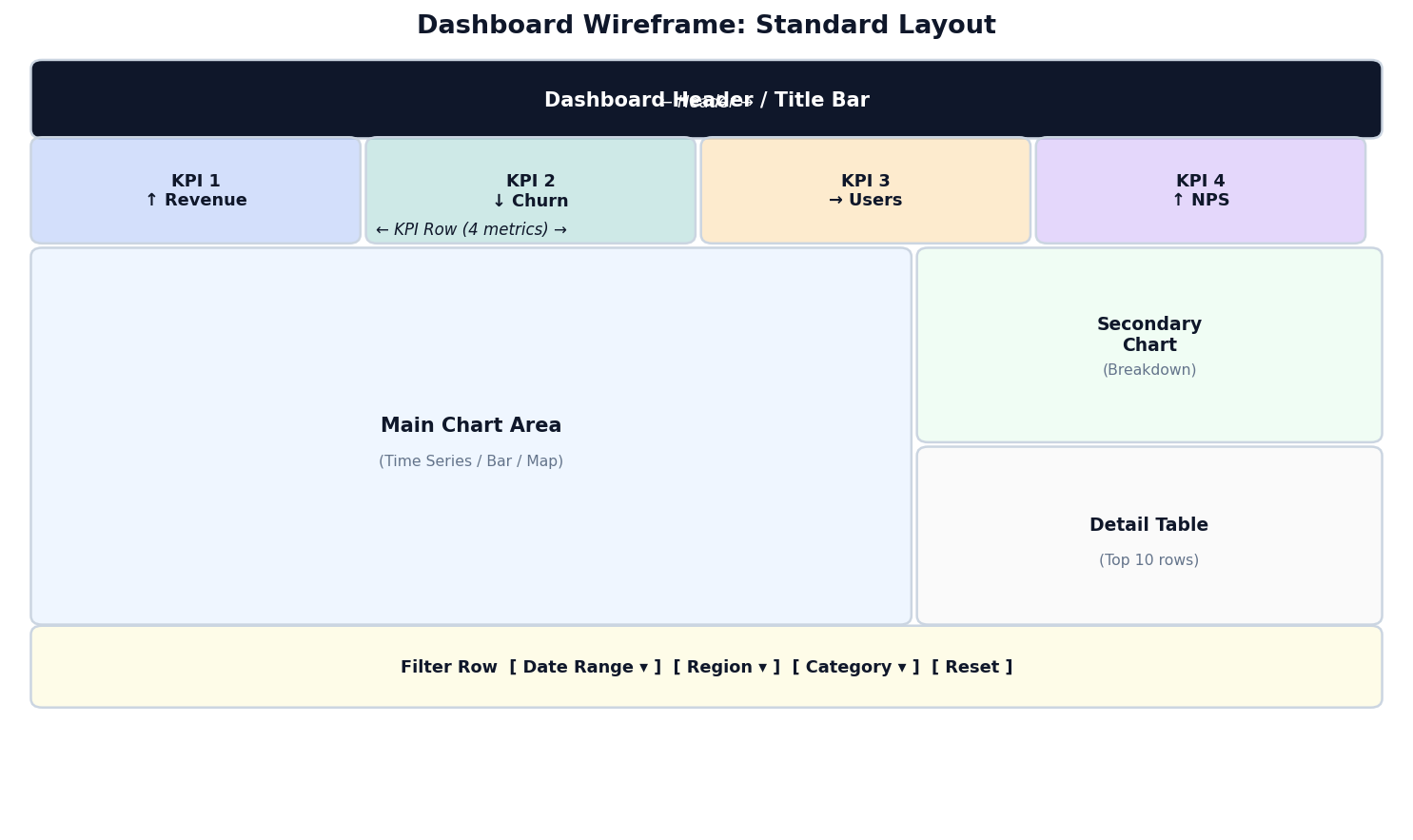
Header → KPI row (3–5 metrics) → Main chart → Secondary breakdown → Detail table → Filter row.
The primary question must be answerable without scrolling. KPIs and the main chart must both be visible on the initial load.
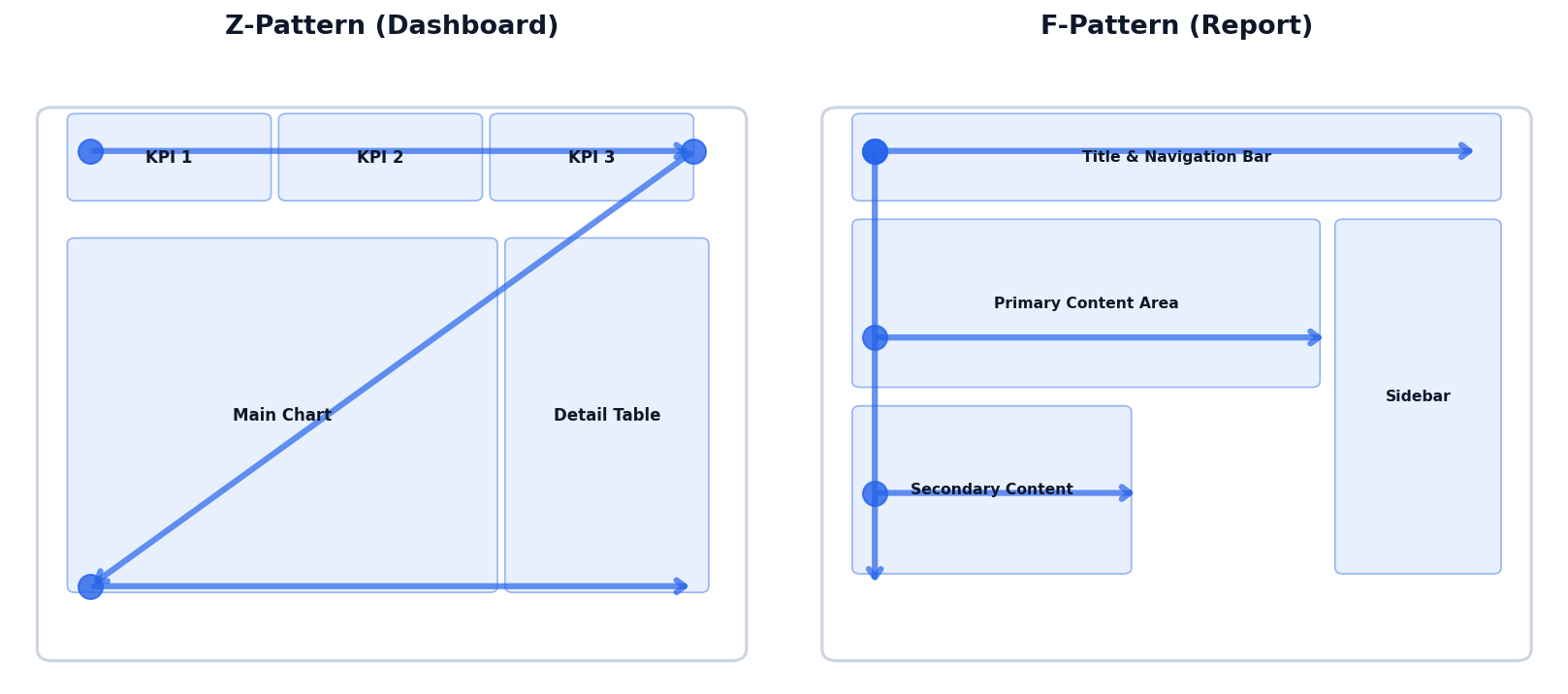
Users scan dashboards the same way they scan web pages. Place your most important content where the eye naturally lands first.
Top-left → top-right → diagonal → bottom-left → bottom-right. Use for dashboards with large visual elements.
Top band → left margin → second horizontal scan. Use for tables and text-heavy analytical dashboards.
Put your single most important KPI in the top-left. Users will see it regardless of reading pattern.
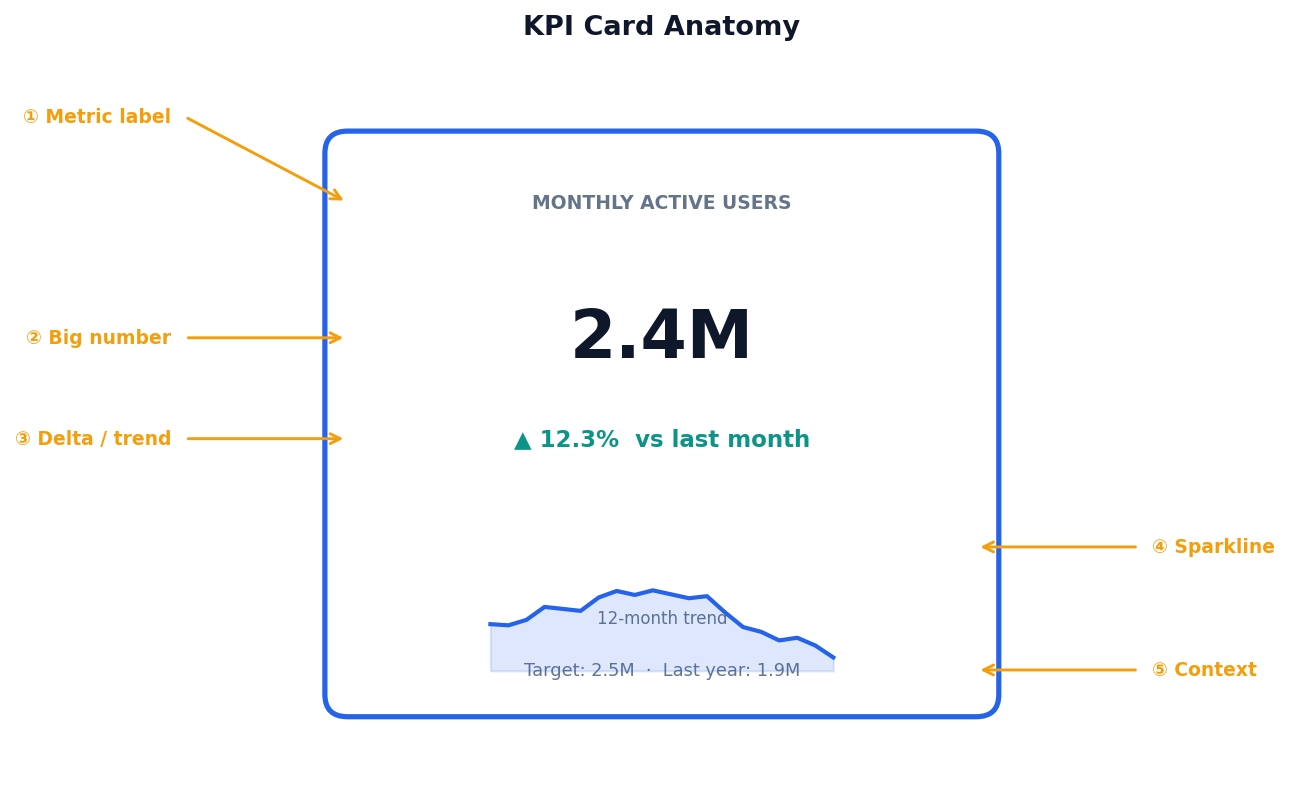
A well-designed KPI card answers five micro-questions at a glance.
Short, specific. "Monthly Active Users" not "Users".
Current value, largest text on the card. Format: 2.4M not 2,400,000.
↑ 12.3% vs last period. Color-coded: define what "bad" means for your metric.
12-month mini-trend and a reference: target, last year, or industry benchmark.
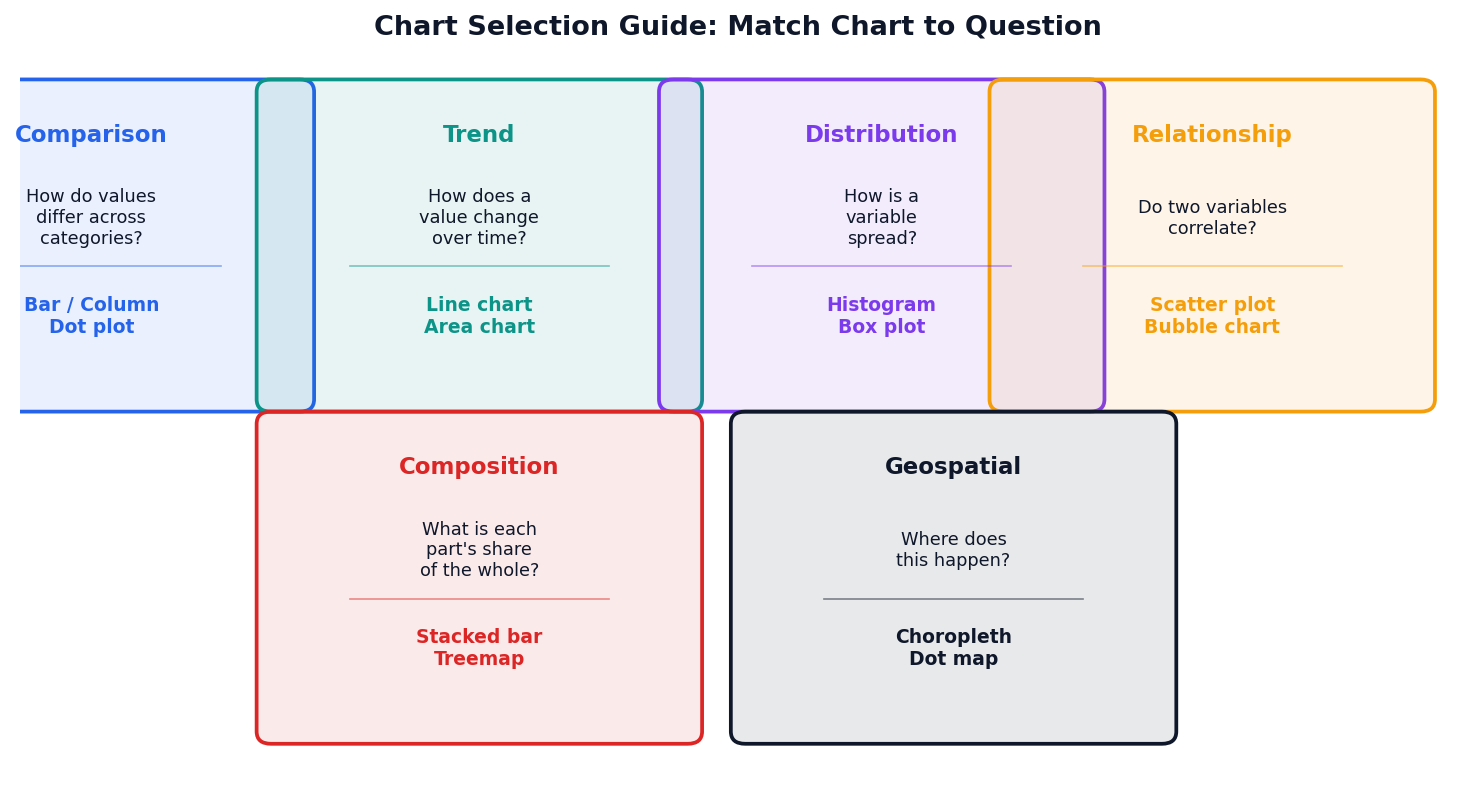
Before choosing a chart type, ask: "What question does the audience need to answer?" The question determines the chart — not the data shape.
A well-designed dashboard typically uses 2–3 chart types maximum. Variety without purpose creates cognitive load.
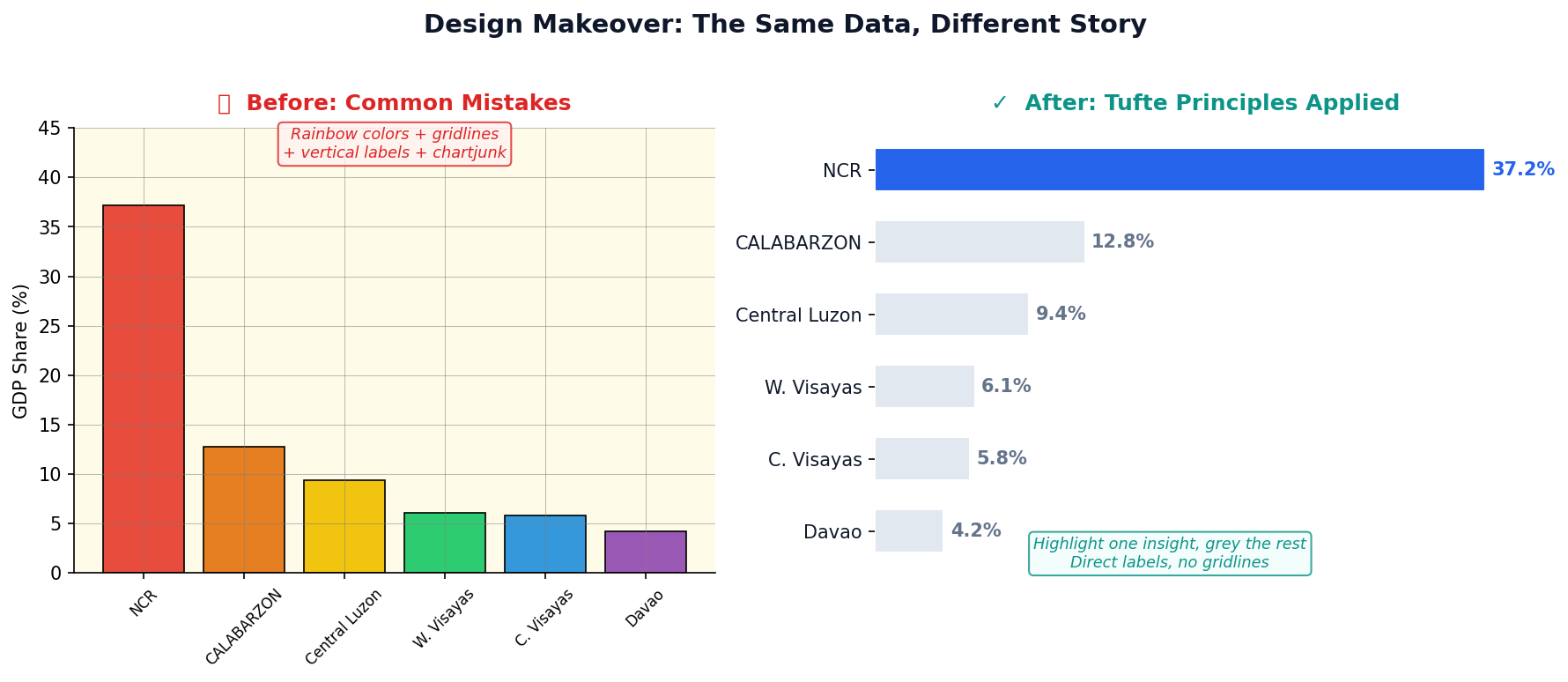
Removed gridlines, rainbow colors, and 3D effects. Added direct labels, a single accent color, and a descriptive title that states the insight.
Maximize the share of ink used to display data. Every non-data element (borders, backgrounds, decorations) should earn its place or be removed.
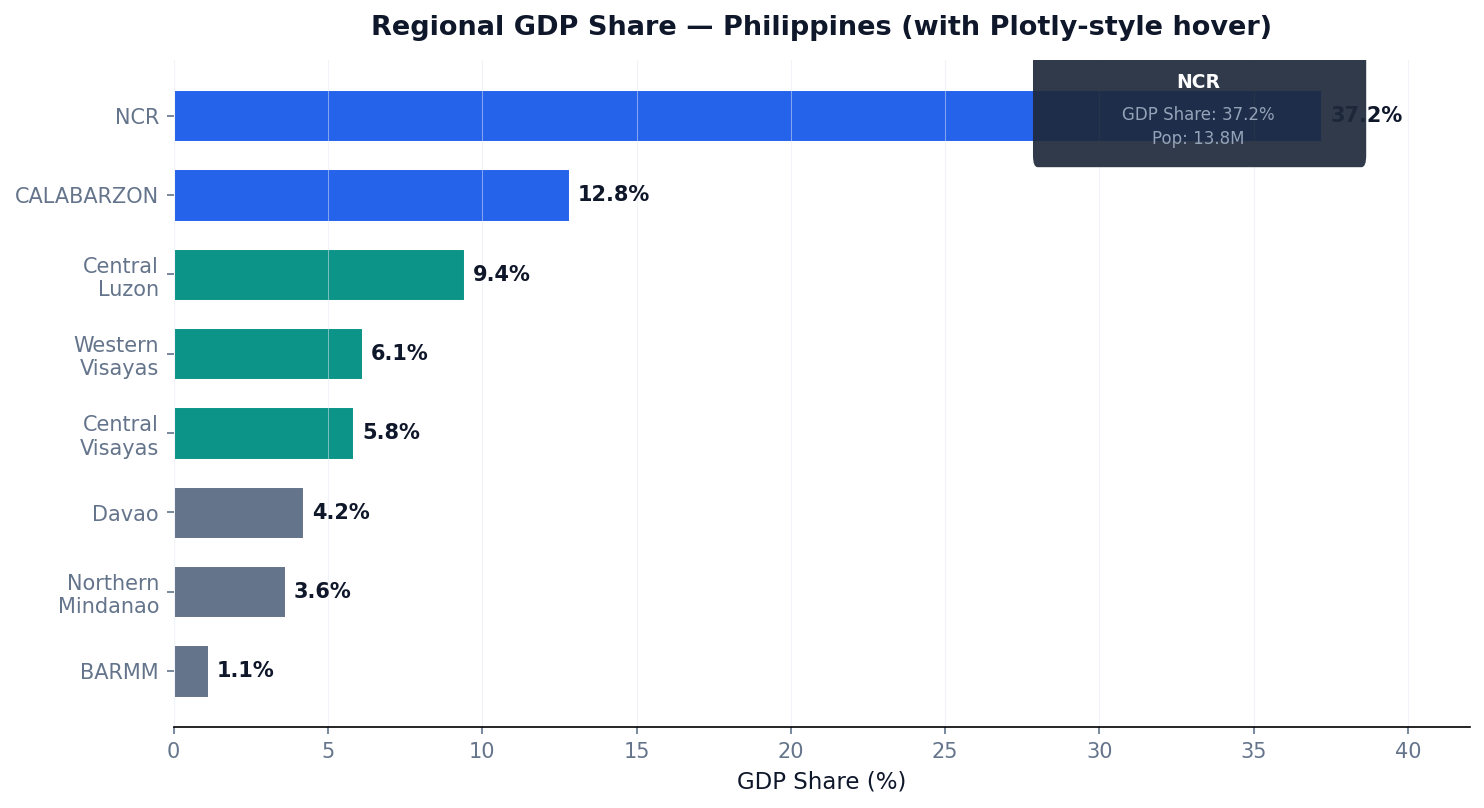
Hover tooltips reveal exact values without cluttering the chart. Users explore at their own pace — ideal for dashboards with many data points.
One-line chart creation with built-in interactivity: hover, zoom, pan, and export. No JavaScript required — works in Jupyter, Streamlit, and Dash.
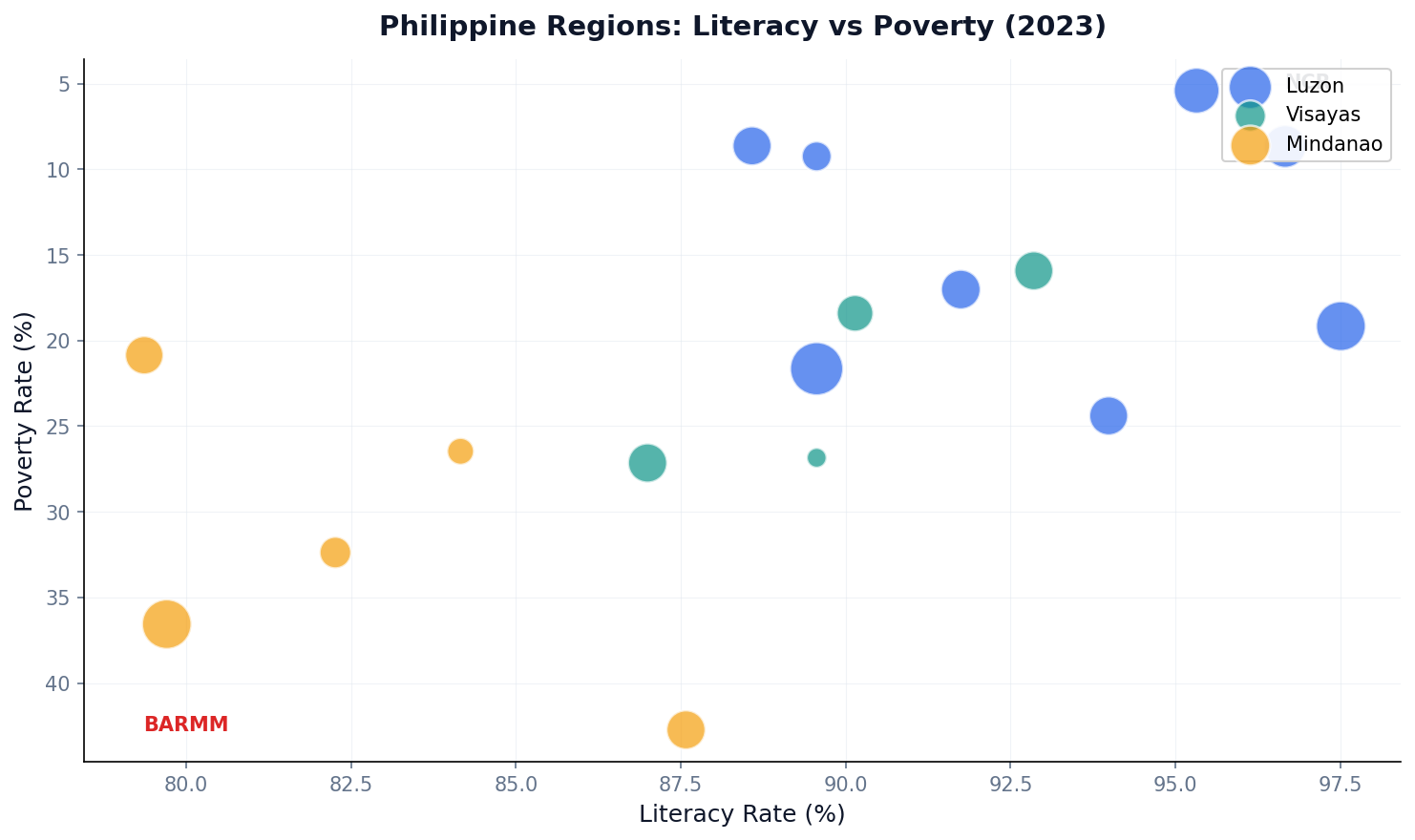
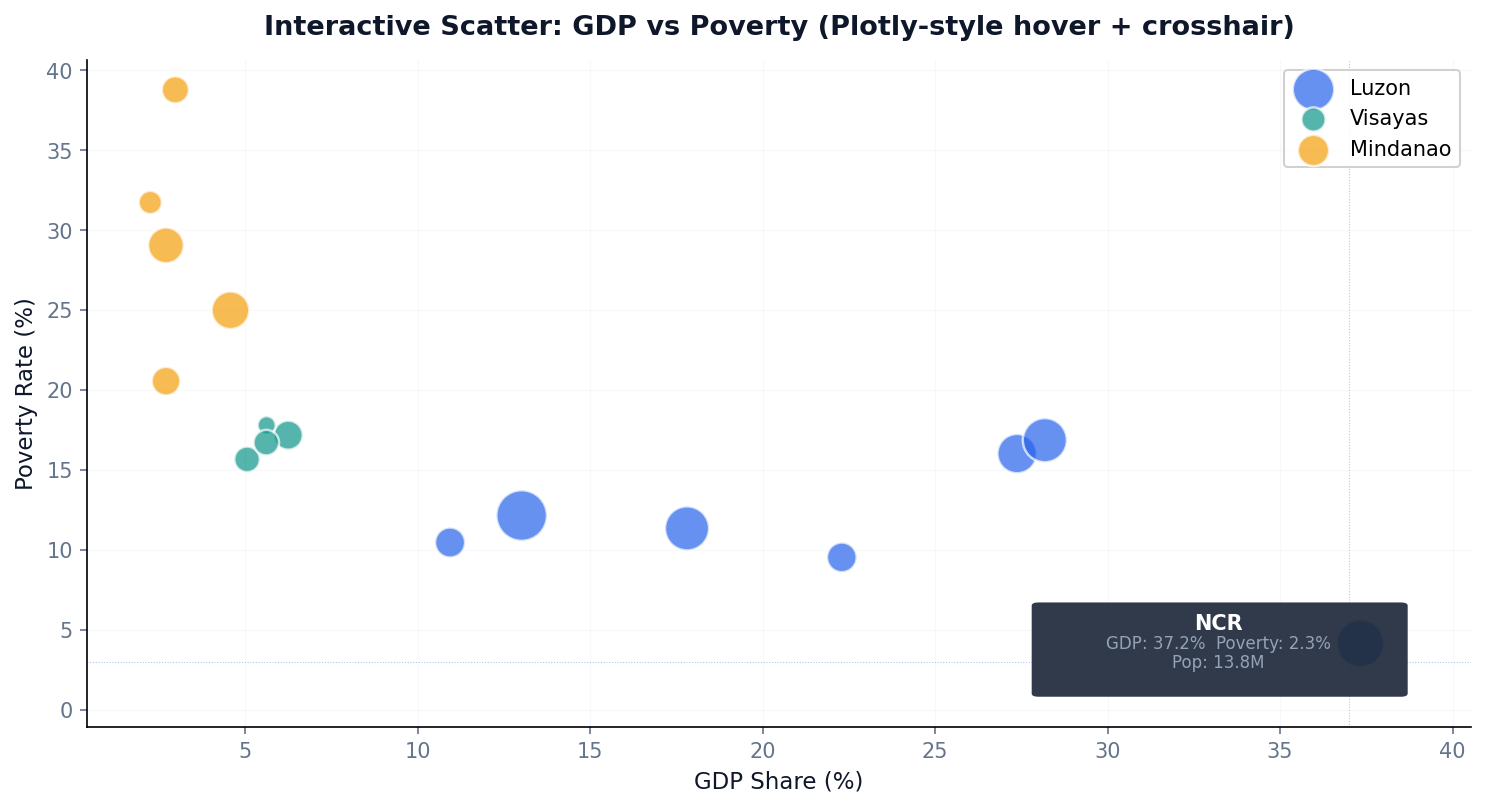
Position (x, y) shows the relationship. Color encodes island group. Size encodes population. Hover reveals the region name — 4 dimensions in one chart.
Scatter plots with hover are the backbone of analytical dashboards. Users identify outliers visually, then hover for details — no separate table needed.
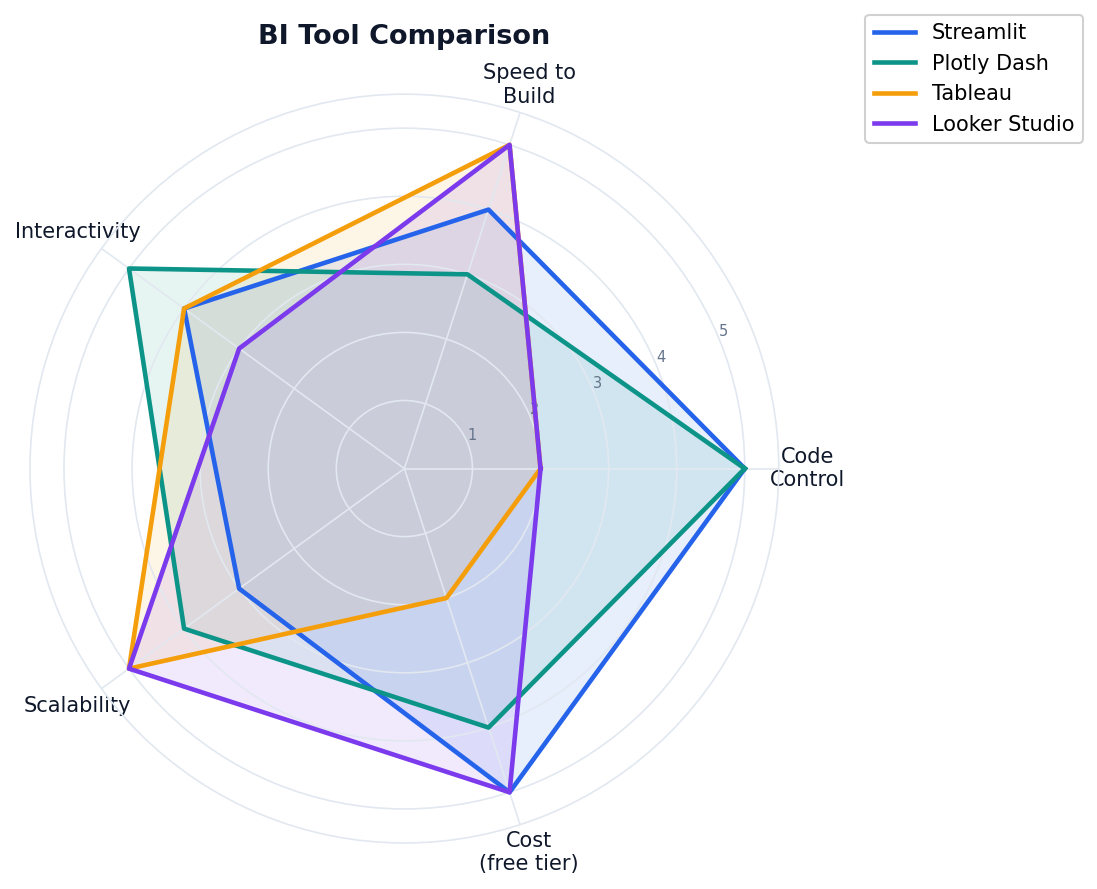
Streamlit, Plotly Dash, Tableau, and Looker Studio — what each does best, and how to choose for your capstone project.
Each tool optimizes for different trade-offs: code control, build speed, scalability, and cost. Your choice depends on audience, data source, and team skills.
Streamlit is recommended for the capstone: Python-native, fast prototyping, free hosting on Streamlit Community Cloud.
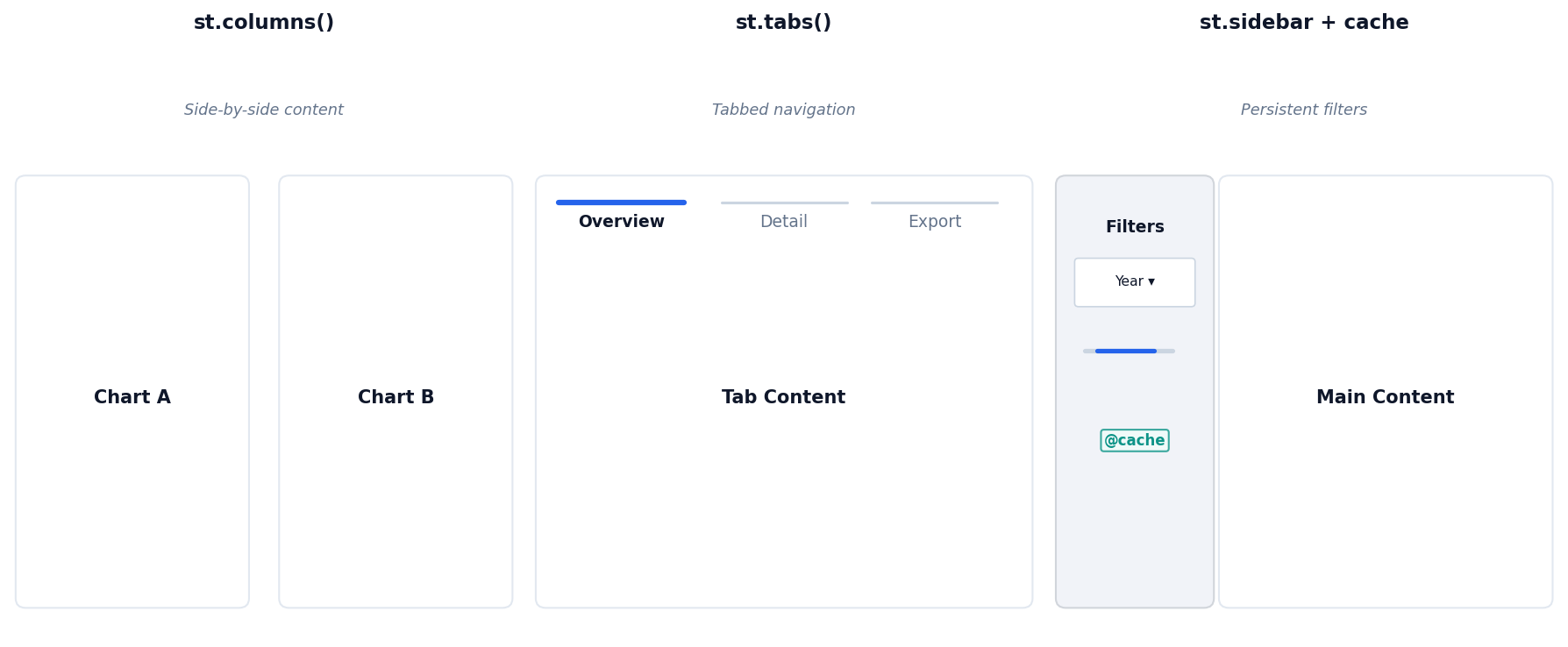
Sidebar for filters, columns for KPI metrics, and Plotly charts for interactive visuals — all in pure Python with reactive auto-rerun.
Rapid prototyping, ML demos, data exploration. Not ideal for pixel-perfect design or high-traffic consumer apps.
Use @st.cache_data on data loading functions. Without caching, Streamlit reruns the entire script on every interaction — slow for large datasets.
st.session_state persists values across reruns. Use it for multi-step workflows, pagination, or storing user selections between interactions.
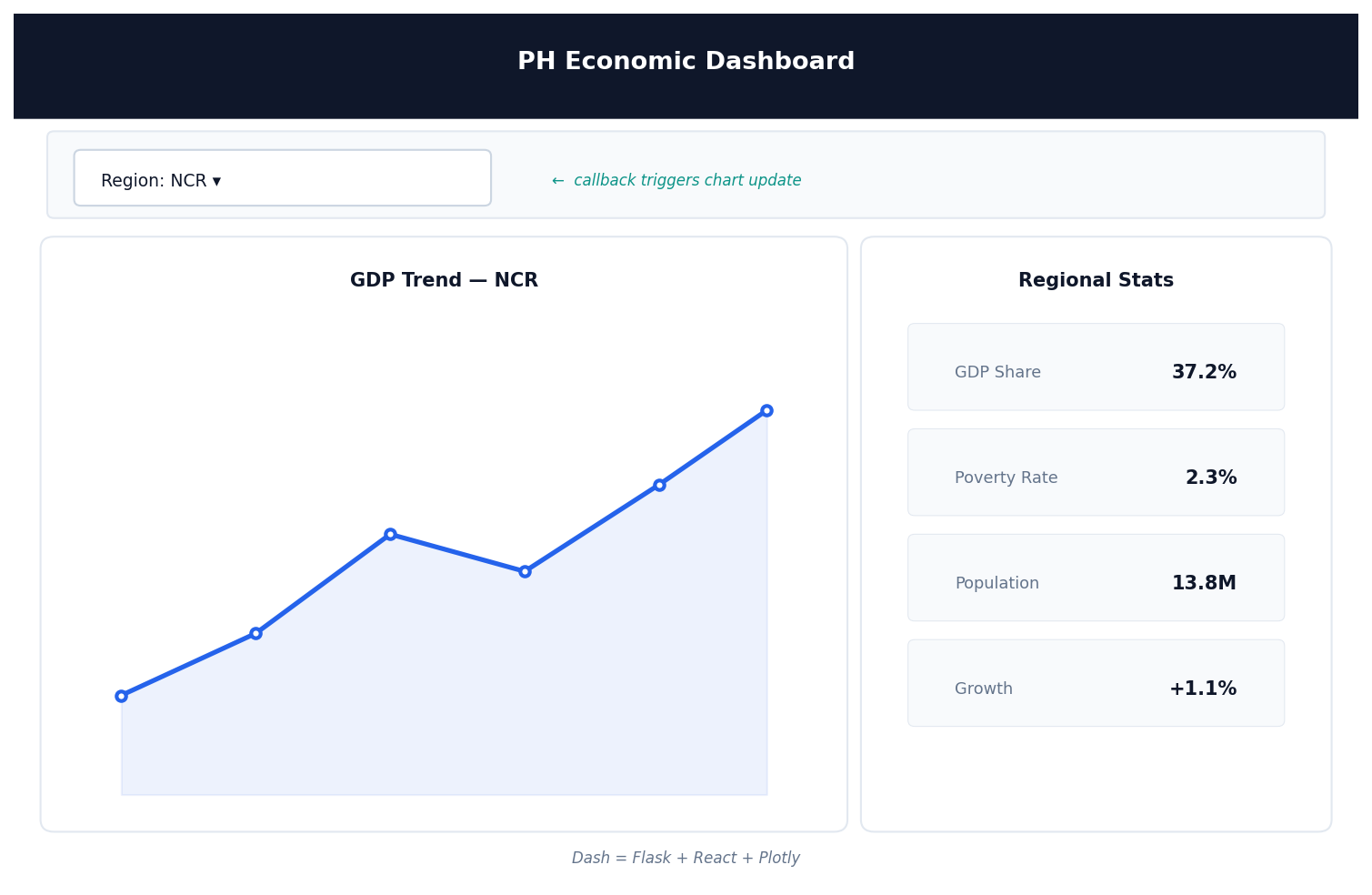
Dash uses decorator-based callbacks: wire inputs (dropdowns, sliders) to outputs (charts, tables). More boilerplate than Streamlit, but fully predictable data flow.
Dash = Flask + React + Plotly.js. Callbacks wire inputs to outputs with decorators. More boilerplate, but predictable.
Tableau is the dominant enterprise BI tool in Southeast Asian corporations. If you work in industry, you will encounter it.
Rows / Columns shelves → Marks card → Filters → Pages shelf. No code required, but LOD expressions unlock analytical power.
LOD = Level of Detail. Lets you aggregate at a different granularity than the current view.
Example: compare each region's poverty rate against the island group average — even when filters hide other regions. Essential for benchmarking dashboards.
Two free tools widely used in Philippine government, NGO, and BPO contexts.
Color strategy, interactivity guidelines, and a practical checklist before your dashboard goes live.
Distinct hues for category membership. Limit to 7 categories — beyond that, use faceting.
ColorBrewer Set2 / Tableau 10 — colorblind safe
Single-hue gradient for magnitude. Use for heatmaps and choropleths (e.g., poverty rate by province).
Blues palette — light = low, dark = high
Two-hue gradient from a neutral midpoint. Use when data has a meaningful center (e.g., growth vs decline).
RdBu — red = below target, blue = above target
Reserve your primary accent color for the one thing you want the audience to notice. Grey out everything else. Color draws the eye — use it strategically.
8% of men have red-green color vision deficiency. Verify with Coblis or seaborn colorblind palette. Use shape/pattern as redundant encodings.
Every interactive control adds cognitive load. Add interactivity only when it enables a question the static version cannot answer.
For each filter or control, ask: "What question does this let the user answer that they couldn't before?" If you can't articulate it, remove the control.
Built with Streamlit + Plotly Express: sidebar filter for year range, metric cards for KPIs, and a line chart with milestone annotations.
Replace GCash data with your PSA/BSP dataset. Add a second tab for regional breakdown. Deploy free on Streamlit Community Cloud.
Design
Interactivity & Build
@st.cache_data)Next Week: Regression Analytics — from narrative to predictive models