Image Types, Storage Formats, Coding & Compression
CMSC 178IP - Module 02
Noel Jeffrey Pinton
Department of Computer Science
University of the Philippines Cebu
Today's Learning Objectives
Core Concepts
- Image Types: Binary, grayscale, color, indexed
- Bit Depth: 1-bit, 8-bit, 16-bit, 24-bit systems
- Color Models: RGB, CMYK, HSV representations
- Resolution: Spatial vs. intensity resolution
Real-world Applications:
- Web graphics, mobile photography
- Medical imaging systems
- Satellite imagery processing
- Social media platforms
Storage & Compression
- Formats: BMP, JPEG, PNG, GIF, TIFF
- Compression: Lossless vs. lossy techniques
- Algorithms: Huffman, LZW, DCT, wavelets
- Trade-offs: Quality vs. file size analysis
Course Context - Where We Are
| Raw Image Capture | Image Types & Storage | Enhancement | Analysis | Applications |
|---|---|---|---|---|
| Sensors CCD/CMOS | Formats, Compression | Filtering, Correction | Feature Detection | Recognition, AI |
Key Questions We'll Answer Today:
- How are different image types represented in memory?
- What are the advantages/disadvantages of each storage format?
- How do compression algorithms reduce file sizes?
- When should we use lossless vs. lossy compression?
Foundation knowledge for all subsequent image processing techniques
What is a Digital Image?
Mathematical Foundation
- Image function: $f(x, y)$
- Spatial coordinates: $x \in [0, M-1], y \in [0, N-1]$
- Intensity levels: $L = 2^k$ (k = bit depth)
- Pixel values: $0 \leq f(x,y) \leq L-1$
Digital Characteristics
- Discrete: Finite pixel locations
- Quantized: Limited intensity levels
- Rectangular: Grid-based sampling
- Finite: Bounded image dimensions
Common Bit Depths & Ranges
- 1-bit: Binary (0-1)
File size = M × N bits - 8-bit: Grayscale (0-255)
File size = M × N bytes - 24-bit: RGB Color (16.7M colors)
File size = 3 × M × N bytes
Knowledge Check
Think About It
What is the file size formula for an uncompressed digital image?
Click the blurred area to reveal the answer
Image Types - Detailed Classification
1. Binary Images (1-bit)
- Values: 0 (black), 1 (white)
- Applications: OCR, barcode scanning
- Size: Smallest storage requirement
2. Grayscale Images (8-16 bit)
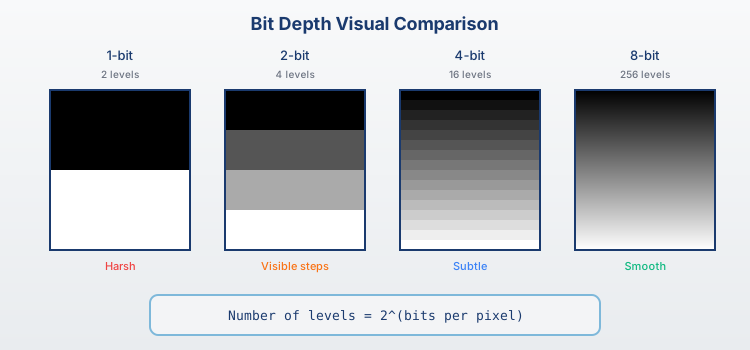
- 8-bit: 256 gray levels (0-255)
- 16-bit: 65,536 levels (medical imaging)
- Size: 1/3 of equivalent color image
3. Color Images (24-32 bit)
- RGB: 8 bits per channel (16.7M colors)
- RGBA: Additional alpha channel
- Size: Largest uncompressed storage
4. Indexed Color (8-bit)
- Palette-based: 256 colors max
- Color lookup table (CLUT)
- Applications: GIF animations, icons
Binary Images - Detailed Analysis
Technical Specifications
- Pixel values: $f(x,y) \in \{0, 1\}$
- Storage: $\frac{M \times N}{8}$ bytes
- Memory efficiency: 8:1 vs grayscale
- Bit packing: 8 pixels per byte
Creation Methods
- Thresholding: $f(x,y) = \begin{cases} 1 & \text{if } g(x,y) > T \\ 0 & \text{otherwise} \end{cases}$
- Dithering: Floyd-Steinberg algorithm
- Edge detection: Canny, Sobel operators
Applications
- OCR systems
- Barcode reading
- Medical bone analysis
- Industrial inspection
Trade-offs
Advantages: Fast processing, minimal storage, simple algorithms
Disadvantages: Loss of detail, limited applications, threshold sensitivity
Knowledge Check
Think About It
How many bytes are needed to store a 1024×768 binary image?
Click the blurred area to reveal the answer
Grayscale Images - Comprehensive Analysis
Bit Depth Comparison
- 8-bit: 0-255, standard photography
- 12-bit: 0-4095, digital cameras
- 16-bit: 0-65535, scientific imaging
- 32-bit: Floating point, HDR
RGB Conversion
- Luminance: $Y = 0.299R + 0.587G + 0.114B$
- Average: Gray = $\frac{R+G+B}{3}$
Applications
- Medical X-rays
- Satellite imagery
- Security systems
- Scientific imaging
Critical for scientific applications
Color Images - RGB Color Model
Technical Specifications
- Each channel: 0-255 (8-bit)
- Total colors: $256^3 = 16,777,216$
- Storage: $3 \times M \times N$ bytes
- Memory layout: Interleaved/planar
Extended Formats
- RGB565: Mobile displays (16-bit)
- RGB888: Standard 24-bit
- ARGB8888: 32-bit with alpha
- RGB48: Professional (16-bit/channel)
Advantage: Direct display compatibility
Challenge: Large file sizes
Alternative Color Models - Beyond RGB
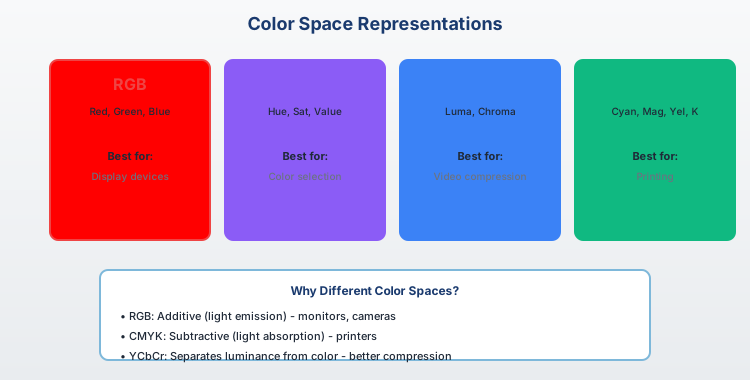
CMYK (Subtractive Model)
- Channels: Cyan, Magenta, Yellow, Black
- Application: Printing industry
- Color mixing: Ink absorption
- Smaller gamut than RGB
HSV/HSB (Perceptual Model)
- Hue: Color wheel (0-360°)
- Saturation: Purity (0-100%)
- Value: Brightness (0-100%)
- Intuitive color selection
Specialized Spaces
- YUV: Video compression (luminance/chrominance)
- LAB: Perceptually uniform
- XYZ: CIE standard foundation
RGB to HSV Conversion
Model Selection
- Display: RGB color model
- Print: CMYK color model
- Perception: HSV color model
- Compression: YUV color model
Knowledge Check
Think About It
Why is YUV preferred for video compression over RGB?
Click the blurred area to reveal the answer
Indexed Color & Palette Systems
Technical Structure
- Pixel values: 0-255 (indices)
- Palette: Up to 256 colors
- Storage: $M \times N + 256 \times 3$ bytes
- Effective when colors < 256
Palette Algorithms
- Median Cut: Recursive division
- Octree: Tree-based quantization
- K-means: Color space clustering
Applications
- GIF animations
- Retro games
- Scientific visualization
- Embedded systems
Trade-offs
- + Reduced file size
- + Fast palette swaps
- - Limited color range
- - Posterization effects
Image Storage Formats - Overview
Format Classification
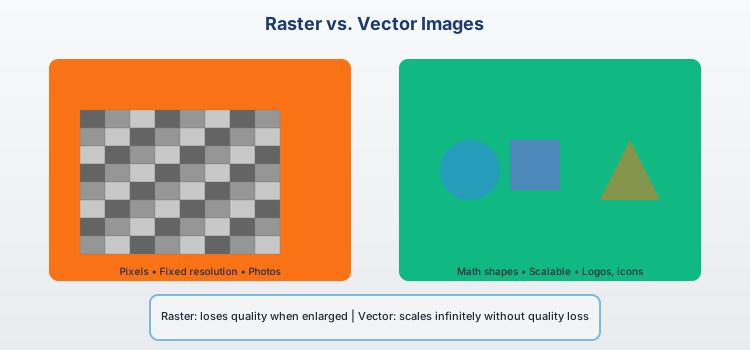
- Raster vs Vector: Pixel-based vs mathematical shapes
- Compressed vs Uncompressed: File size optimization
- Lossless vs Lossy: Quality preservation approach
- Single vs Multi-frame: Static images vs animations
Key Selection Criteria
- File Size: Storage and bandwidth requirements
- Quality: Acceptable degradation level
- Compatibility: Software and device support
- Features: Transparency, animation, metadata
Common Format Categories
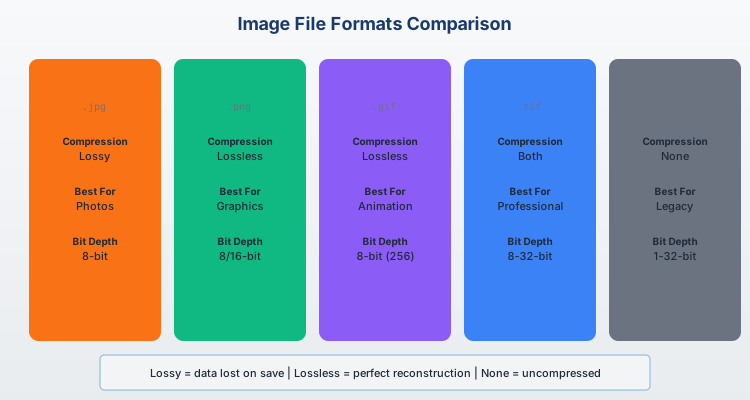
- Uncompressed: BMP, PPM
Maximum quality, large files - Lossless Compressed: PNG, GIF, TIFF
Quality preserved, moderate compression - Lossy Compressed: JPEG, WebP
High compression, quality trade-offs - Professional: RAW, TIFF, PSD
Maximum flexibility and quality
Context determines the best choice
Storage Formats - File Size Comparison
Key Insights
- BMP: Largest file size, no compression, maximum quality
- PNG: Moderate size, lossless compression, preserves quality
- JPEG: Smallest size, lossy compression, quality trade-offs
BMP Format - Windows Bitmap
Technical Specifications
- File Structure: Header + Pixel data
- Color Support: 1, 4, 8, 16, 24, 32-bit
- Compression: Usually none (RLE available)
- Max Dimensions: Limited by 32-bit integers
- Byte Order: Little-endian (Intel format)
File Structure Details
- File Header: 14 bytes (signature, file size)
- Info Header: 40+ bytes (dimensions, bit depth)
- Color Palette: Optional for ≤8-bit images
- Pixel Data: Row-by-row, bottom-to-top
- Row Padding: Aligned to 4-byte boundaries
Advantages
- Simple structure
- No compression artifacts
- Universal Windows support
- Fast loading
Disadvantages
- Very large file sizes
- Limited web support
- No transparency support
- Minimal metadata
JPEG Format - Lossy Compression
Compression Pipeline
- Color Space: RGB → YCbCr conversion
- Subsampling: Reduce chrominance resolution
- DCT Transform: 8×8 block frequency analysis
- Quantization: Discard high-frequency data
- Huffman Coding: Entropy-based compression
Quality Control
- Quality Setting: 1-100 scale (higher = better)
- Quantization Tables: Control frequency removal
- Compression Ratio: 10:1 to 50:1 typical
- Artifacts: Blocking, ringing, mosquito noise
Technical Features
- Progressive: Interlaced loading capability
- EXIF Data: Camera metadata support
- Color Profiles: ICC profile embedding
Advantages
- Excellent compression ratios
- Universal support
- Adjustable quality
- Suitable for photographs
Disadvantages
- Lossy compression
- Compression artifacts
- Poor for text/graphics
- No transparency
JPEG Compression - Quality Comparison
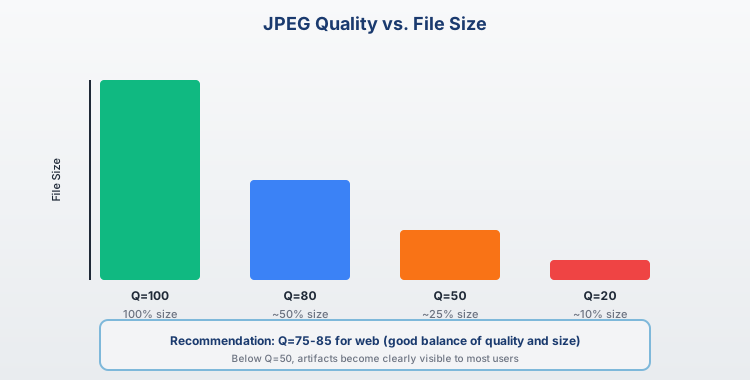
Quality vs File Size Trade-offs
- Quality 10%: Smallest file, visible artifacts, suitable for thumbnails
- Quality 30%: Moderate compression, some artifacts, web use
- Quality 60%: Good balance, minimal artifacts, general photography
- Quality 90%: High quality, larger files, professional use
Knowledge Check
Think About It
Why does JPEG produce artifacts on images with sharp edges or text?
Click the blurred area to reveal the answer
JPEG Compression - Artifacts Analysis
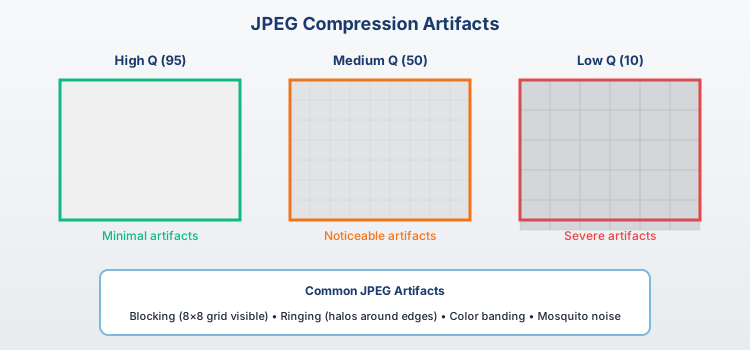
Common JPEG Artifacts
- Blocking: 8×8 DCT block boundaries become visible
- Ringing: Oscillations near sharp edges
- Mosquito Noise: Random variations around edges
- Color Bleeding: Chrominance subsampling effects
JPEG Compression - Step-by-Step Procedure
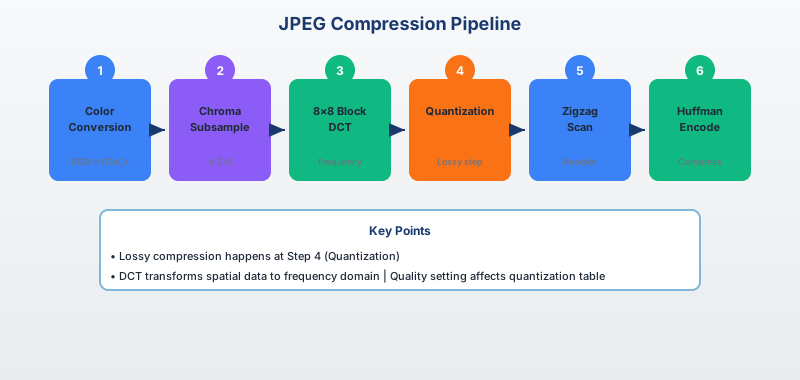
PNG Format - Portable Network Graphics
Technical Specifications
- Color Types: Grayscale, RGB, Palette, Grayscale+Alpha, RGB+Alpha
- Bit Depths: 1, 2, 4, 8, 16 bits per channel
- Compression: DEFLATE algorithm (LZ77 + Huffman)
- Interlacing: Adam7 progressive display
- Transparency: Full alpha channel support
PNG Chunk Structure
- Critical Chunks: IHDR, PLTE, IDAT, IEND
- Ancillary Chunks: tEXt, gAMA, cHRM, tIME
- CRC Protection: Error detection for each chunk
Compression Techniques
- Filtering: Pre-processing for better compression
- DEFLATE: Dictionary-based compression
- Palette Optimization: Reduce colors when possible
Advantages
- Lossless compression
- Full transparency support
- Robust error detection
- Wide format support
Disadvantages
- Larger than JPEG for photos
- No animation support
- Limited metadata
PNG Compression - Lossless Procedure
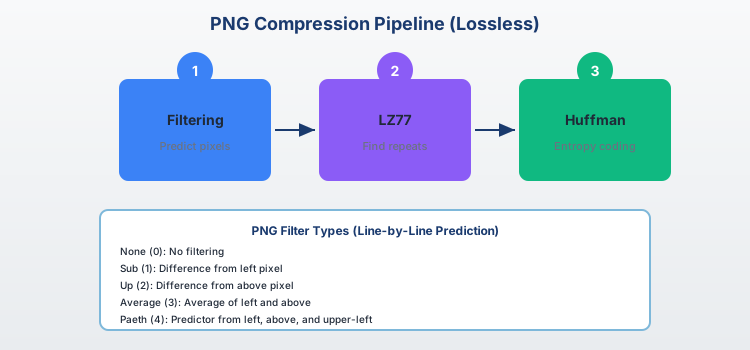
GIF & TIFF Formats - Specialized Applications
GIF - Graphics Interchange Format
Legacy format with 256-color limitation, famous for animation support and LZW compression.
GIF Characteristics
- Color Limit: 256 colors per frame
- Compression: LZW lossless algorithm
- Animation: Multiple frame support
- Transparency: 1-bit (on/off only)
- Interlacing: Progressive display
TIFF - Tagged Image File Format
Professional format supporting multiple compression methods, extensive metadata, and multi-page documents.
TIFF Features
- Flexibility: Multiple compression options
- Color Support: 1-bit to 32-bit per channel
- Metadata: Extensive tag system
- Multi-page: Document scanning support
- Compression: None, LZW, ZIP, JPEG, PackBits
Applications
- GIF: Web animations, simple graphics, logos
- TIFF: Professional photography, medical imaging, document archival, scientific data
Compression Fundamentals
Types of Redundancy
- Spatial: Neighboring pixels often similar
- Spectral: Color channels correlated
- Temporal: Video frame similarities
- Psychovisual: Human eye limitations
Compression Classification
- Lossless: Perfect reconstruction possible
- Lossy: Some information permanently lost
- Near-lossless: Small controlled loss
- Visually lossless: Imperceptible quality loss
Performance Metrics
- Compression Ratio: Original size / Compressed size
- Bit Rate: Bits per pixel (bpp)
- PSNR: Peak Signal-to-Noise Ratio
- SSIM: Structural Similarity Index
Higher compression = smaller file but lower quality
Knowledge Check
Think About It
What are the four types of redundancy that compression algorithms exploit?
Click the blurred area to reveal the answer
Lossless Compression - Perfect Reconstruction
Huffman Coding
- Principle: Variable-length codes based on frequency
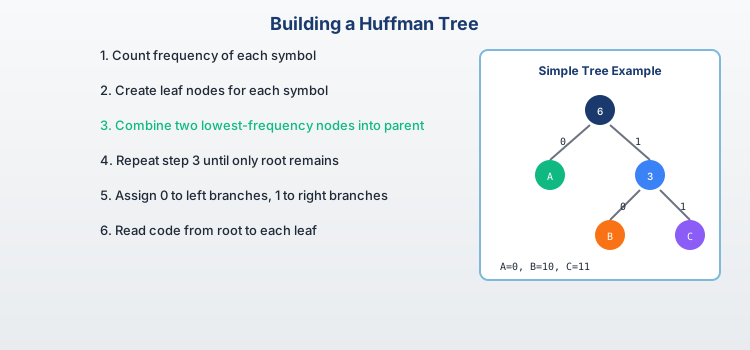
- Algorithm: Build binary tree from symbol probabilities
- Efficiency: Optimal for symbol-by-symbol coding
- Applications: JPEG (AC coefficients), PNG
LZW (Lempel-Ziv-Welch)
- Principle: Dictionary-based pattern matching
- Algorithm: Build dictionary during encoding
- Advantage: Adaptive, no prior knowledge needed
- Applications: GIF, TIFF, PostScript
Run-Length Encoding (RLE)
- Principle: Replace repeated values with count
- Example: AAABBBBCC → 3A4B2C
- Efficiency: Excellent for binary images
- Applications: BMP, PCX, some TIFF variants
Other Methods
- Arithmetic Coding: Better than Huffman
- DEFLATE: LZ77 + Huffman (PNG)
- LZMA: Advanced dictionary compression
Moderate compression ratios
Huffman Encoding - Algorithm Demonstration
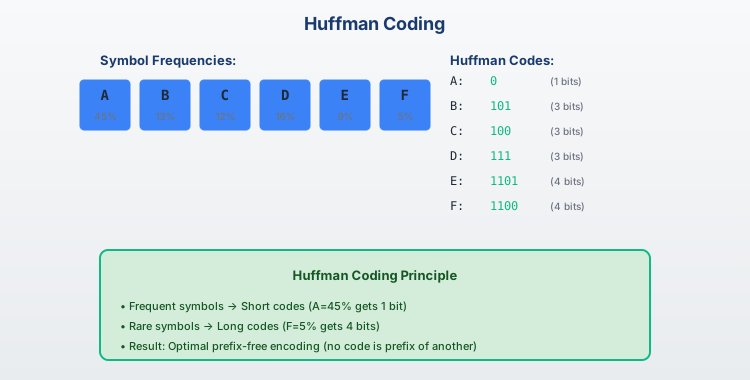
Key Benefits
- Optimal: Minimizes average code length for given symbol frequencies
- Variable Length: Frequent symbols get shorter codes
- Prefix-Free: No code is prefix of another (unambiguous decoding)
Huffman Encoding - Complete Procedure
Run Length Encoding - Simple but Effective
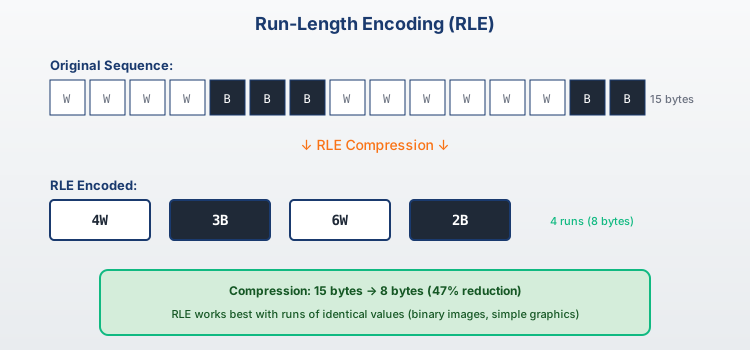
Best Applications
- Binary Images: Excellent compression for text, line art
- Simple Graphics: Images with large uniform areas
- Preprocessing: Often combined with other algorithms
- Fax Machines: Standard for document transmission
Lossy Compression - Quality vs Size
Transform-Based Compression
- DCT (Discrete Cosine Transform): JPEG standard
- Principle: Convert spatial to frequency domain
- 8×8 Blocks: Process image in small segments
- Quantization: Remove high-frequency components
- Entropy Coding: Huffman encode remaining data
Wavelet-Based Compression
- JPEG 2000: Modern wavelet standard
- Multi-resolution: Analyze multiple scales
- Better Quality: Less blocking artifacts
- Progressive: Quality/resolution scalability
- Applications: Medical, satellite imagery
Quantization Strategies
- Uniform: Equal step sizes
- Non-uniform: Perceptually-based steps
- Adaptive: Content-dependent adjustment
Advantages
- High compression ratios
- Adjustable quality
- Suitable for photos
Disadvantages
- Irreversible loss
- Compression artifacts
- Quality degradation
DCT (Discrete Cosine Transform) - JPEG Foundation
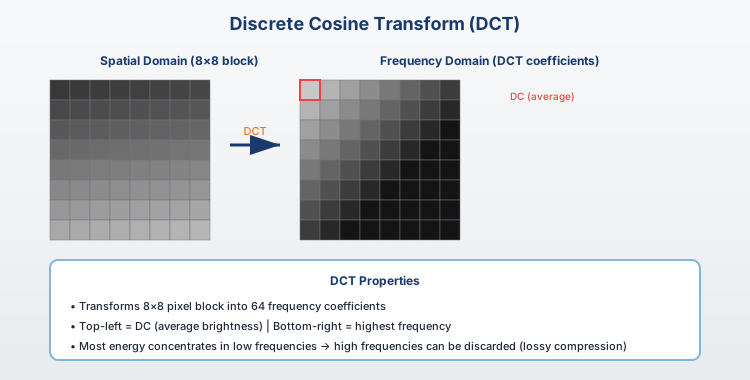
DCT Process Steps
- Spatial → Frequency: Transform 8×8 pixel blocks to frequency domain
- Energy Compaction: Most energy concentrated in low frequencies (top-left)
- Quantization: Remove high-frequency details (human vision less sensitive)
- Reconstruction: Inverse DCT with some information loss
Knowledge Check
Think About It
Why does DCT concentrate most image energy in the top-left corner of the frequency block?
Click the blurred area to reveal the answer
Advanced Compression - Modern Standards
Next-Generation Formats
- WebP: Google's VP8-based format
- HEIF: High Efficiency (H.265-based)
- AVIF: AV1-based open standard
- JPEG XL: Latest JPEG committee standard
Performance Comparison
- Compression Ratio: AVIF > HEIF > WebP > JPEG
- Quality (SSIM): JPEG XL > AVIF > HEIF > WebP
- Encode Speed: JPEG > WebP > HEIF > AVIF
- Decode Speed: JPEG > WebP > HEIF > AVIF
- Browser Support: JPEG > WebP > AVIF > HEIF
Specialized Applications
- Medical Imaging: JPEG-LS, JPEG 2000 (lossless)
- Satellite Data: Custom wavelets, CCSDS standards
- Mobile Photography: HEIF with computational photography
Future Trends
- AI-based compression
- Perceptual quality metrics
- Real-time optimization
- Edge computing integration
Real-World Applications & Case Studies
Medical Imaging Systems
- DICOM Standard: JPEG-LS, JPEG 2000 lossless
- Requirements: No diagnostic information loss
- Storage: Petabytes of patient data
- Transmission: PACS networks, telemedicine
- Example: 16-bit CT scans, 12-bit X-rays
Social Media Platforms
- Facebook: WebP for web, HEIF mobile uploads
- Instagram: Aggressive JPEG compression with AI enhancement
- TikTok: H.264 video, JPEG thumbnails
- Challenges: Billions of images, mobile bandwidth
- Innovation: Neural super-resolution post-processing
E-commerce & Product Photography
- Amazon: Multi-format delivery (WebP, JPEG, AVIF)
- Requirements: Fast loading, zoom capability
- Progressive Loading: Low-quality → high-quality
- Mobile Optimization: Responsive images, lazy loading
Scientific & Satellite Imagery
- NASA: Custom wavelets, lossless compression
- Google Earth: Multi-resolution pyramids
- Weather Services: Real-time compression for radar
From medical diagnosis to social media
Summary - Key Takeaways
What We've Learned Today
Comprehensive understanding of digital image representation, storage formats, and compression techniques that form the foundation of modern digital imaging.
Core Concepts Mastered
- Image Types: Binary, grayscale, color, indexed representations
- Storage Formats: BMP, JPEG, PNG, GIF, TIFF characteristics
- Color Models: RGB, YUV, color space conversions
- Compression: Lossless vs lossy trade-offs and algorithms
Critical Decision Framework
- Quality Requirements: Medical = lossless, Web = acceptable loss
- Storage Constraints: Mobile vs server storage capabilities
- Processing Power: Real-time vs offline compression
- Compatibility: Universal support vs cutting-edge efficiency
Practical Guidelines
- Photography: JPEG for sharing, RAW+lossless for archival
- Graphics/Logos: PNG for transparency, SVG for scalability
- Web Development: Progressive enhancement (AVIF→WebP→JPEG)
- Scientific Data: Always preserve original, compress copies
End of Module 02
Image Types, Storage Formats, Coding & Compression
Questions?