Image Processing Fundamentals
CMSC 178IP - Module 03
Noel Jeffrey Pinton
Department of Computer Science
University of the Philippines Cebu
Image Processing Fundamentals
CMSC 178IP - Module 03
Noel Jeffrey Pinton
Department of Computer Science
University of the Philippines Cebu
Learning Objectives
By the end of this module, you will be able to:
- Apply point operations and intensity transformations to images
- Perform histogram equalization for contrast enhancement
- Understand and implement 2D convolution operations
- Distinguish between convolution and correlation
- Apply the 2D Fourier Transform for frequency analysis
- Perform basic frequency domain filtering
Point Operations
Pixel-wise intensity transformations
What are Point Operations?
Point Operation: A transformation where each output pixel depends only on the corresponding input pixel.
$$g(x,y) = T[f(x,y)]$$
- No spatial context needed
- Highly parallelizable
- Examples: brightness, contrast, gamma correction
Knowledge Check
Think About It
Why are point operations highly parallelizable?
Click the blurred area to reveal the answer
Intensity Transformations
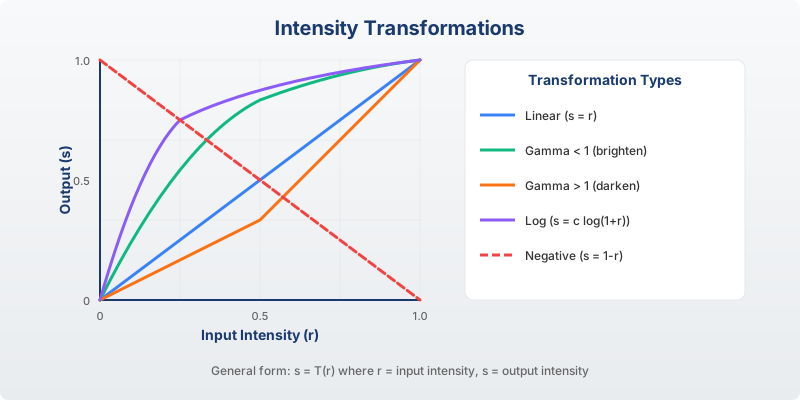
Common intensity transformation functions: linear, logarithmic, power-law (gamma)
Common Point Operations
Linear Transformations
$$g = \alpha \cdot f + \beta$$
- α > 1: Increase contrast
- α < 1: Decrease contrast
- β > 0: Increase brightness
- β < 0: Decrease brightness
Power-Law (Gamma)
$$g = c \cdot f^\gamma$$
- γ < 1: Brighten dark regions
- γ > 1: Darken bright regions
- γ = 1: Identity transform
Point Operations Demo
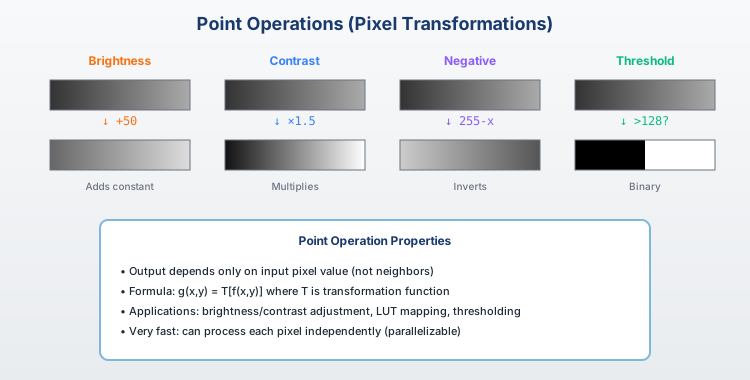
Effects of brightness, contrast, and gamma adjustments on an image
Histogram Processing
Enhancing contrast through histogram manipulation
Image Histograms
Histogram: A graphical representation of the distribution of pixel intensities in an image.
- X-axis: Intensity values (0-255 for 8-bit)
- Y-axis: Number of pixels at each intensity
- Reveals contrast, brightness, and exposure information
Low contrast images have narrow histograms; high contrast images span the full range.
Histogram Equalization
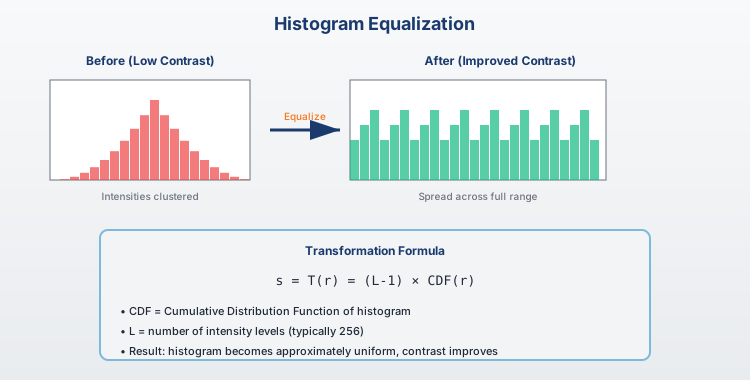
Histogram equalization spreads intensities to utilize the full dynamic range
Knowledge Check
Think About It
What is the goal of histogram equalization?
Click the blurred area to reveal the answer
Histogram Equalization Algorithm
Steps
- Compute histogram h(k)
- Compute CDF: $C(k) = \sum_{j=0}^{k} h(j)$
- Normalize CDF to [0, L-1]
- Map intensities: $g = round(\frac{(L-1)\cdot C(f)}{N})$
import cv2
import numpy as np

# Equalize histogram
img = cv2.imread('image.jpg', 0)
eq = cv2.equalizeHist(img)

# Using NumPy
hist, bins = np.histogram(img.flatten(), 256, [0,256])
cdf = hist.cumsum()
cdf_normalized = cdf * 255 / cdf.max()
Adaptive Histogram Equalization (CLAHE)
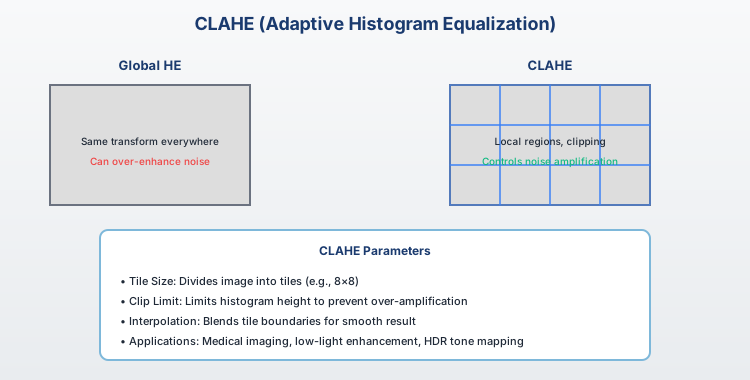
CLAHE applies equalization locally, preventing over-amplification of noise
CLAHE Implementation
CLAHE: Contrast Limited Adaptive Histogram Equalization - divides image into tiles and applies equalization with clipping.
import cv2

# Create CLAHE object
clahe = cv2.createCLAHE(clipLimit=2.0, tileGridSize=(8,8))

# Apply to grayscale image
img = cv2.imread('image.jpg', 0)
cl_img = clahe.apply(img)

# For color images, apply to L channel in LAB
lab = cv2.cvtColor(color_img, cv2.COLOR_BGR2LAB)
lab[:,:,0] = clahe.apply(lab[:,:,0])
result = cv2.cvtColor(lab, cv2.COLOR_LAB2BGR)
Convolution
The fundamental operation in image filtering
What is Convolution?
2D Convolution: A mathematical operation that combines an image with a kernel (filter) to produce a filtered output.
$$g(x,y) = \sum_{i=-k}^{k} \sum_{j=-k}^{k} f(x-i, y-j) \cdot h(i,j)$$
- f: Input image
- h: Kernel/filter
- g: Output image
Convolution Step by Step
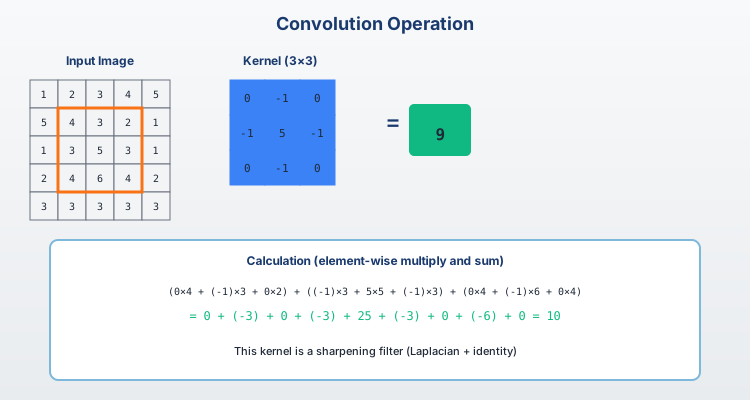
The kernel slides over the image, computing weighted sums at each position
Knowledge Check
Think About It
What happens at each position during convolution?
Click the blurred area to reveal the answer
Convolution vs Correlation
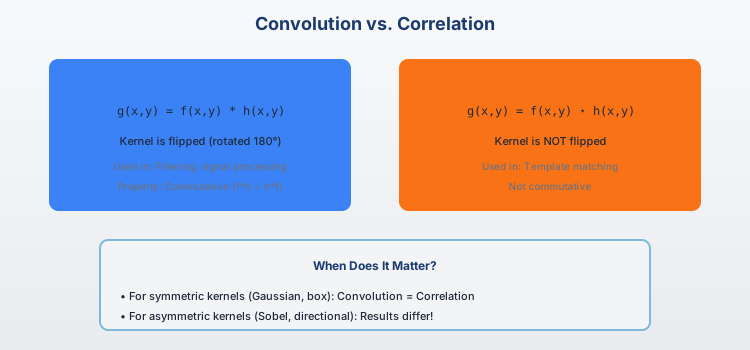
Convolution
Kernel is flipped (180°)
$g = f * h$
Correlation
Kernel is not flipped
$g = f \star h$
Padding Strategies
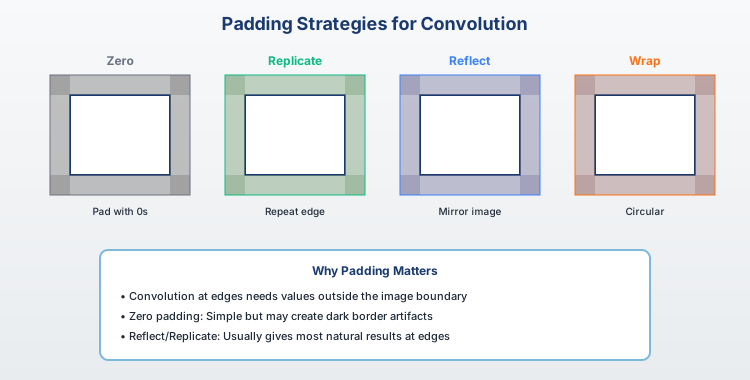
Different padding strategies: zero, replicate, reflect, wrap
Padding Effects
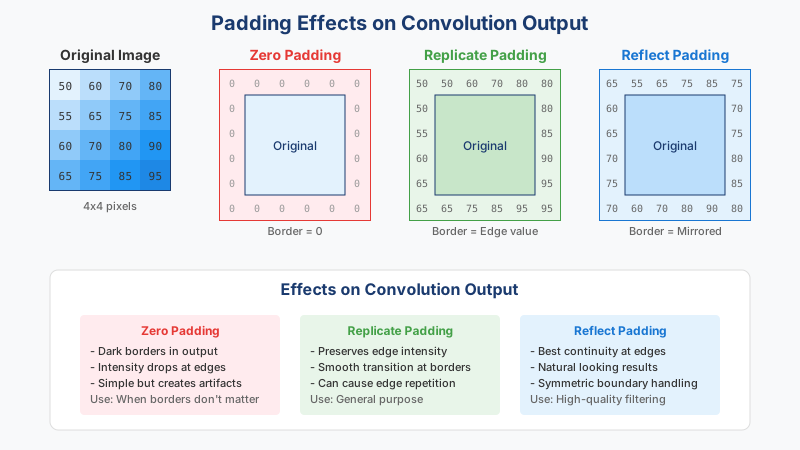
Separable Convolution
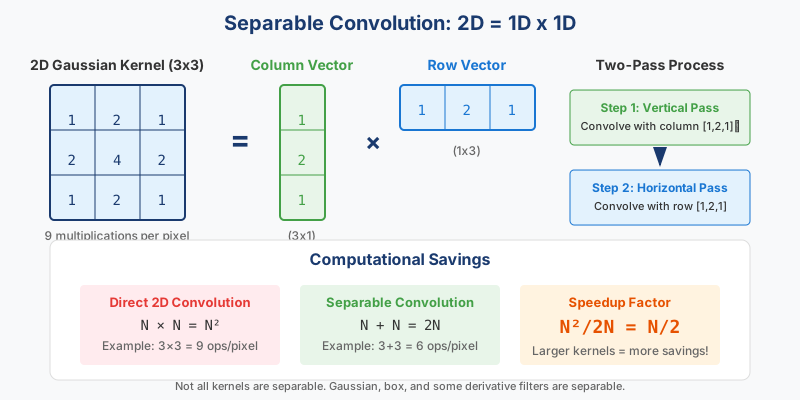
Example: 9×9 kernel: 81 operations → 18 operations
The Convolution Theorem
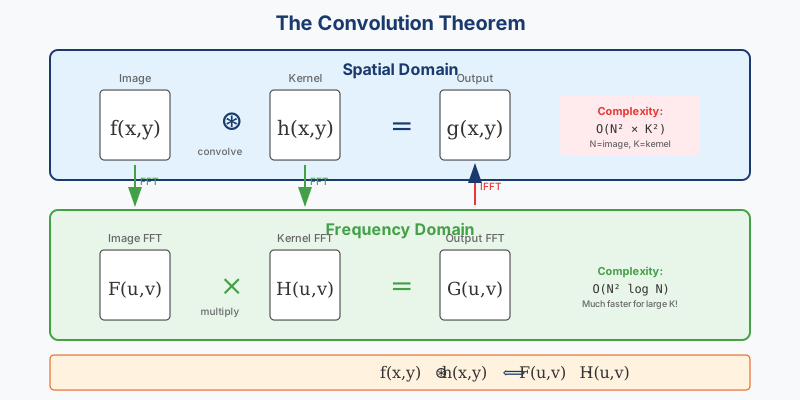
Convolution Theorem:
$$f * h = \mathcal{F}^{-1}\{\mathcal{F}\{f\} \cdot \mathcal{F}\{h\}\}$$
Convolution in spatial domain = Multiplication in frequency domain
Knowledge Check
Think About It
Why is the convolution theorem useful for large kernels?
Click the blurred area to reveal the answer
Fourier Transform
Frequency domain analysis of images
The 2D Fourier Transform
2D DFT: Decomposes an image into its constituent frequency components (sinusoidal patterns).
$$F(u,v) = \sum_{x=0}^{M-1} \sum_{y=0}^{N-1} f(x,y) \cdot e^{-j2\pi(ux/M + vy/N)}$$
- Low frequencies: Slow intensity changes (smooth regions)
- High frequencies: Rapid intensity changes (edges, noise)
2D Fourier Transform Visualization
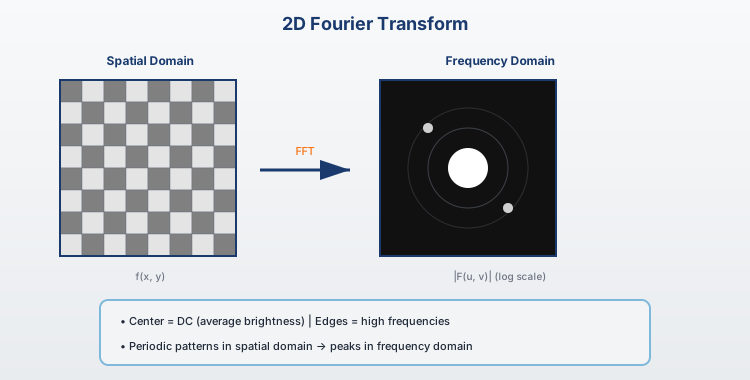
Image and its magnitude spectrum (log scale, centered)
Fourier Transform Properties
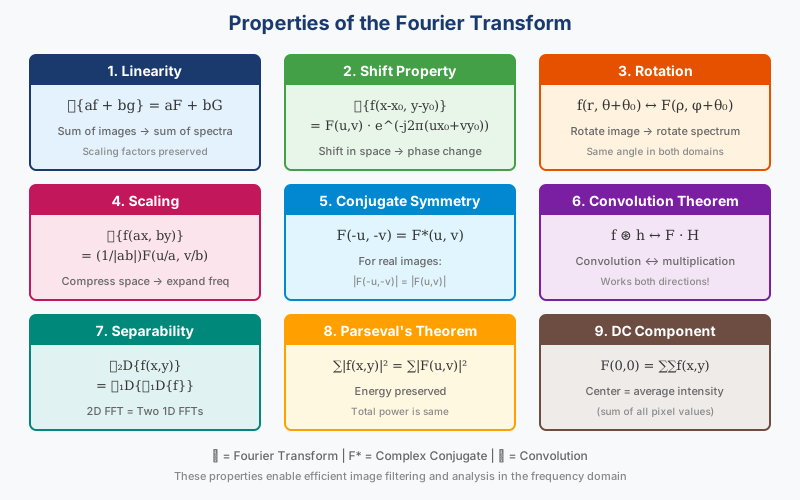
Key properties: linearity, shift, rotation, scaling
Frequency Components
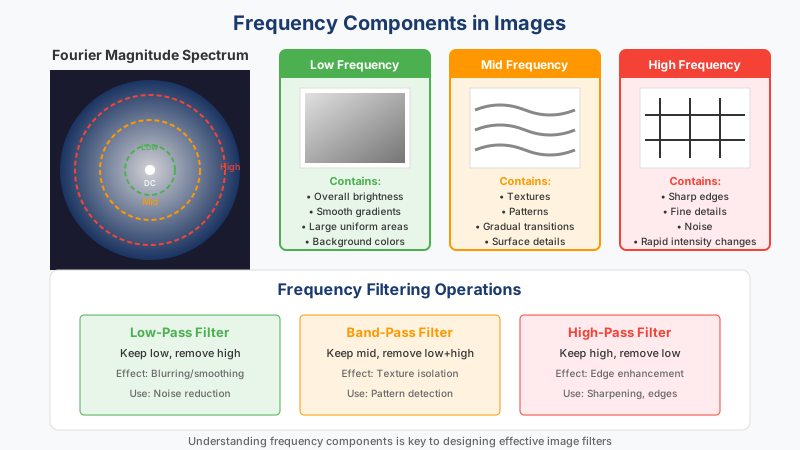
Decomposing an image into low and high frequency components
Knowledge Check
Think About It
What image features correspond to high frequencies?
Click the blurred area to reveal the answer
Frequency Domain Filtering
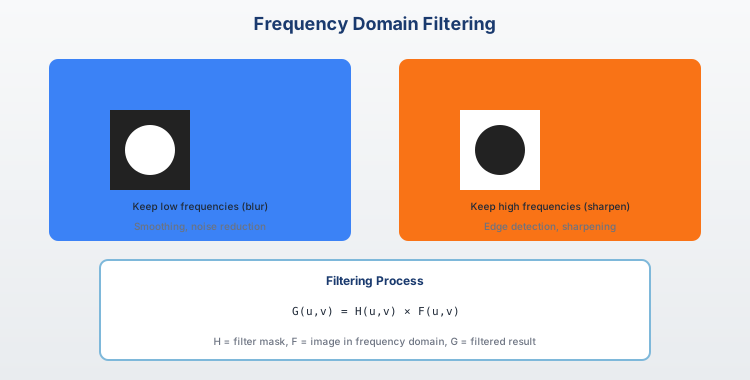
Keeps low frequencies
Blurs/smooths image
Keeps high frequencies
Enhances edges
FFT in Python
import numpy as np
import cv2

# Read grayscale image
img = cv2.imread('image.jpg', 0)

# Compute 2D FFT
f = np.fft.fft2(img)
fshift = np.fft.fftshift(f)  # Center the spectrum

# Magnitude spectrum (log scale for display)
magnitude = 20 * np.log(np.abs(fshift) + 1)

# Apply a simple low-pass filter
rows, cols = img.shape
crow, ccol = rows//2, cols//2
mask = np.zeros((rows, cols), np.uint8)
mask[crow-30:crow+30, ccol-30:ccol+30] = 1

# Apply filter and inverse FFT
filtered = fshift * mask
f_ishift = np.fft.ifftshift(filtered)
result = np.abs(np.fft.ifft2(f_ishift))
Sampling and Aliasing
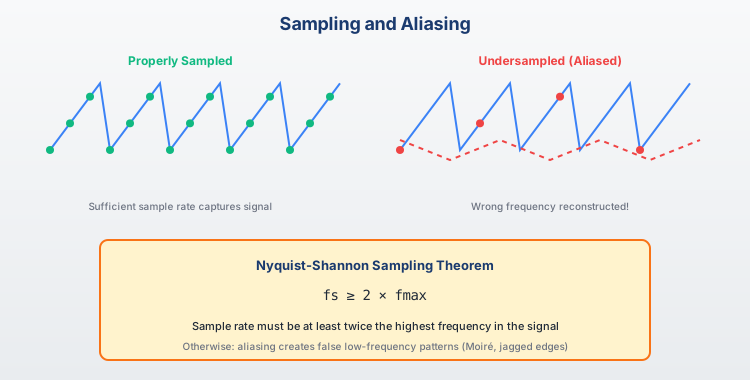
Summary
Key Takeaways
Key Takeaways
- Point operations transform pixels independently (brightness, contrast, gamma)
- Histogram equalization enhances contrast by redistributing intensities
- CLAHE applies adaptive equalization to avoid noise amplification
- Convolution applies a kernel to compute weighted neighborhood sums
- Separable kernels reduce computational complexity from O(n²) to O(2n)
- Fourier Transform reveals frequency content of images
- Frequency filtering enables smoothing (low-pass) and edge enhancement (high-pass)
Next Module Preview
Module 04: Image Enhancement and Filtering
- Noise models and types
- Spatial domain filters (mean, median, Gaussian)
- Edge-preserving filters (bilateral)
- Sharpening and edge detection
Questions?
Thank you for your attention!
Interactive notebook available for hands-on practice
End of Module 03
Image Processing Fundamentals
Questions?