Image Enhancement and Filtering
CMSC 178IP - Module 04
Noel Jeffrey Pinton
Department of Computer Science
University of the Philippines Cebu
Image Enhancement and Filtering
CMSC 178IP - Module 04
Noel Jeffrey Pinton
Department of Computer Science
University of the Philippines Cebu
Learning Objectives
By the end of this module, you will be able to:
- Identify different types of image noise
- Apply spatial domain smoothing filters
- Implement frequency domain filtering
- Use edge-preserving filters for denoising
- Apply sharpening techniques to enhance edges
Noise in Images
Understanding image degradation
Types of Image Noise

Additive, bell-shaped distribution
Random black/white pixels
Noise Characteristics
Additive Noise
$$g(x,y) = f(x,y) + n(x,y)$$
- Gaussian noise
- Uniform noise
Multiplicative Noise
$$g(x,y) = f(x,y) \cdot n(x,y)$$
- Speckle noise
- Film grain
Knowledge Check
Think About It
What type of noise is best removed by a median filter?
Click the blurred area to reveal the answer
Smoothing Filters
Spatial domain noise reduction
Smoothing Filters Comparison
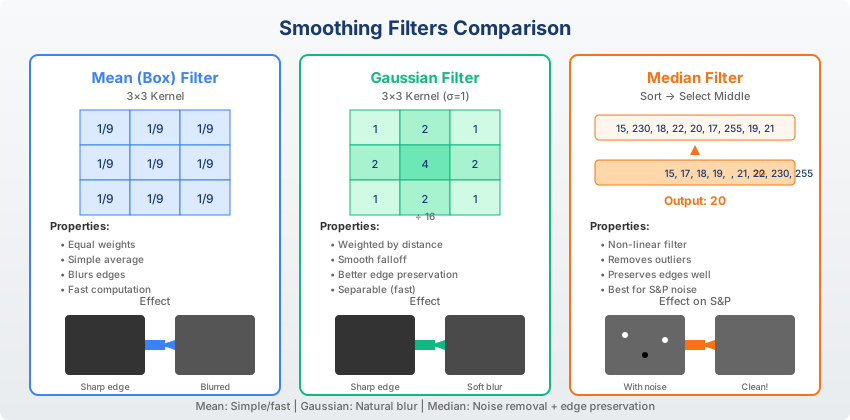
Comparison of mean, Gaussian, and median filters
Low-Pass Filters
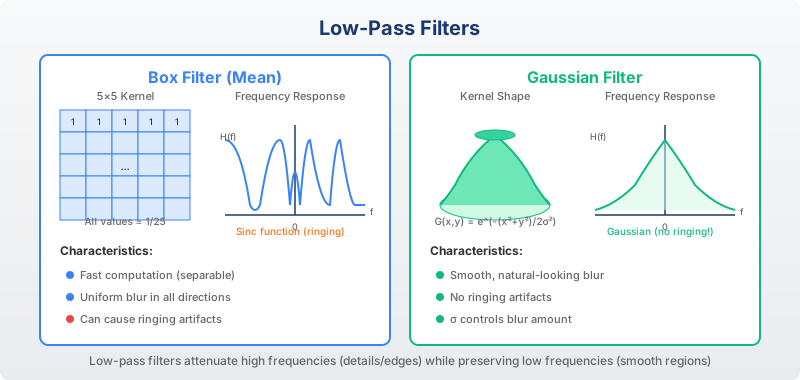
1/9 * [[1,1,1],
       [1,1,1],
[1,1,1]]1/16 * [[1,2,1],
[2,4,2],
[1,2,1]]Denoising Results
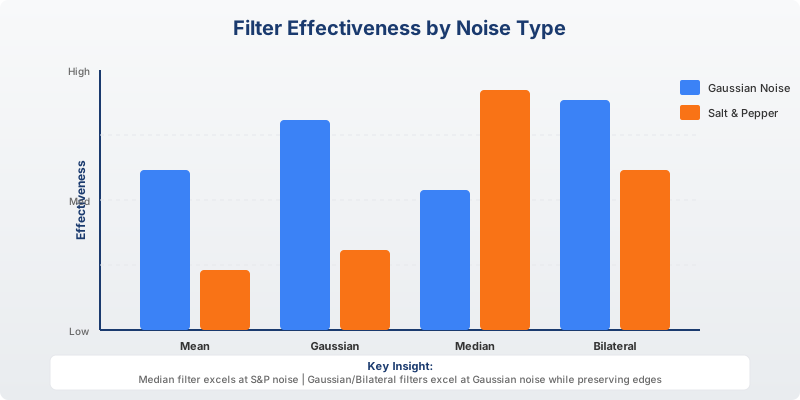
Different filters have different strengths for various noise types
Edge-Preserving Filters
Smoothing without blurring edges
Bilateral Filter
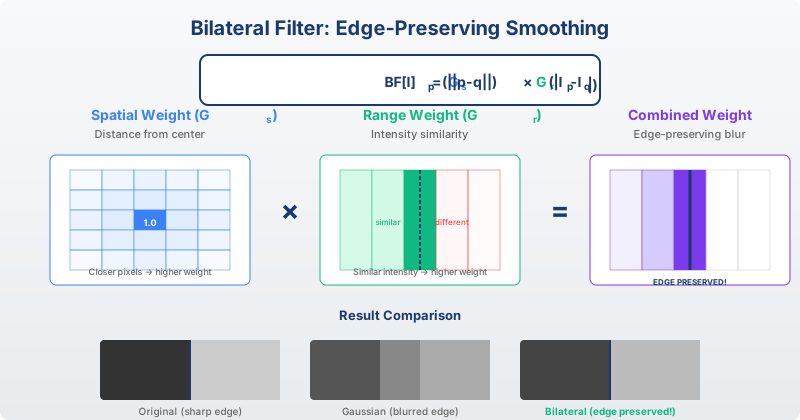
Bilateral Filter: Combines spatial proximity AND intensity similarity weights.
$$w(i,j,k,l) = \exp\left(-\frac{(i-k)^2+(j-l)^2}{2\sigma_s^2}\right) \cdot \exp\left(-\frac{|I(i,j)-I(k,l)|^2}{2\sigma_r^2}\right)$$
Knowledge Check
Think About It
Why does the bilateral filter preserve edges while smoothing?
Click the blurred area to reveal the answer
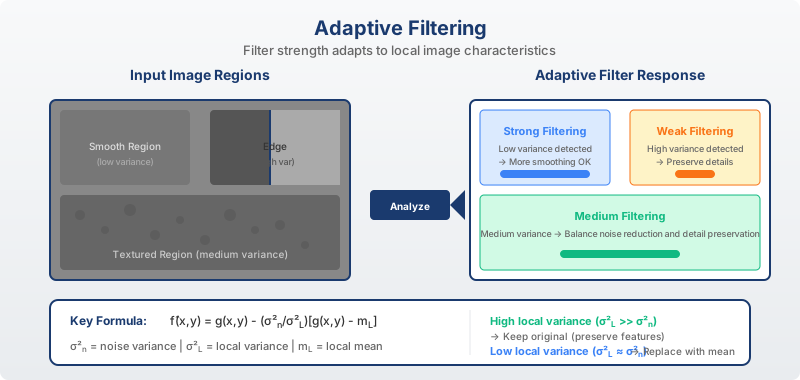
Adaptive Filtering
Sharpening Filters
Enhancing edges and fine details
High-Pass Filters
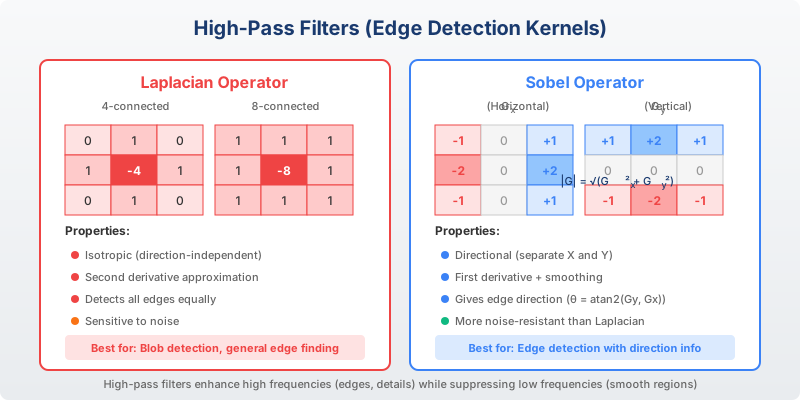
[[ 0,-1, 0],
 [-1, 4,-1],
[ 0,-1, 0]][[-1, 0, 1],
[-2, 0, 2],
[-1, 0, 1]]Sharpening Techniques
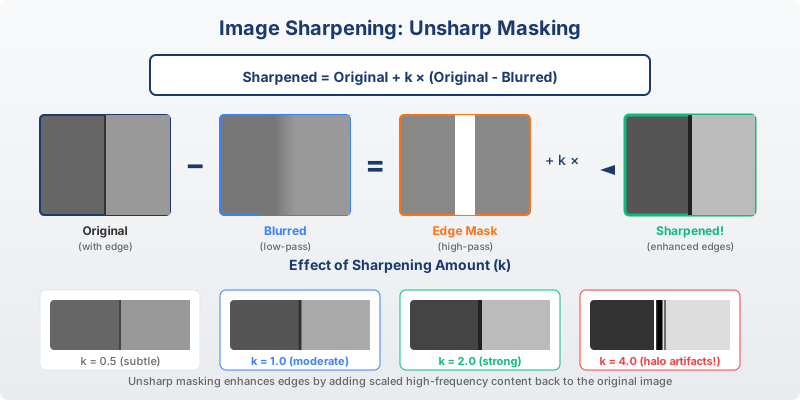
$$g = f + k \cdot (f - f_{blurred})$$
where k controls sharpening strength
Edge Detection
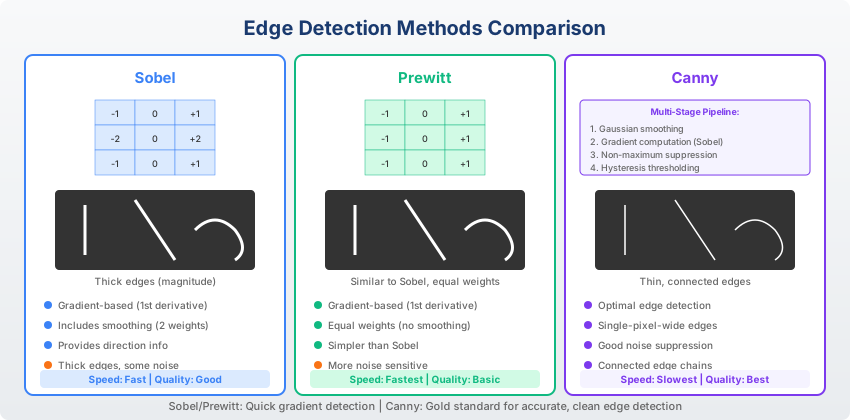
Comparison of Sobel, Prewitt, and Canny edge detectors
Knowledge Check
Think About It
What makes the Canny edge detector superior to simple gradient methods?
Click the blurred area to reveal the answer
Filter Implementation
import cv2
import numpy as np

img = cv2.imread('image.jpg', 0)

# Gaussian blur
blurred = cv2.GaussianBlur(img, (5,5), 1.5)

# Median filter (good for salt & pepper)
median = cv2.medianBlur(img, 5)

# Bilateral filter (edge-preserving)
bilateral = cv2.bilateralFilter(img, 9, 75, 75)

# Sharpening with Laplacian
laplacian = cv2.Laplacian(img, cv2.CV_64F)
sharpened = img - 0.5 * laplacian
Summary
Key Takeaways
Key Takeaways
- Noise types: Gaussian (additive), salt & pepper (impulse), speckle (multiplicative)
- Smoothing filters: Mean, Gaussian, median - trade-off between noise reduction and blur
- Low-pass: Removes high frequencies (noise, edges)
- Bilateral filter: Edge-preserving smoothing using intensity similarity
- High-pass/sharpening: Enhances edges using Laplacian or unsharp masking
- Edge detection: Canny provides best results with non-maximum suppression
Questions?
Thank you for your attention!
Next: Module 05 - Image Restoration
End of Module 04
Image Enhancement and Filtering
Questions?