Geometric Transformations
CMSC 178IP - Module 06
Noel Jeffrey Pinton
Department of Computer Science
University of the Philippines Cebu
Geometric Transformations
CMSC 178IP - Module 06
Noel Jeffrey Pinton
Department of Computer Science
University of the Philippines Cebu
Learning Objectives
By the end of this module, you will be able to:
- Apply basic geometric transformations (translation, rotation, scaling)
- Understand homogeneous coordinates and transformation matrices
- Implement affine and projective transformations
- Choose appropriate interpolation methods
- Perform image registration and alignment
Basic Transformations
Translation, rotation, and scaling
Basic Geometric Transformations
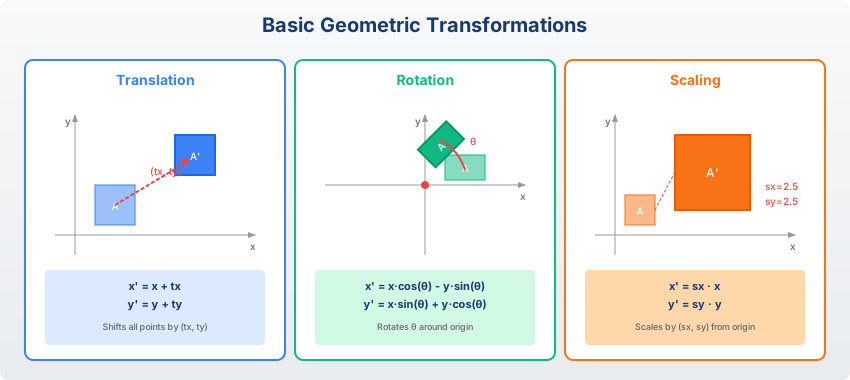
Translation, rotation, and scaling are the fundamental building blocks
Rotation Visualization
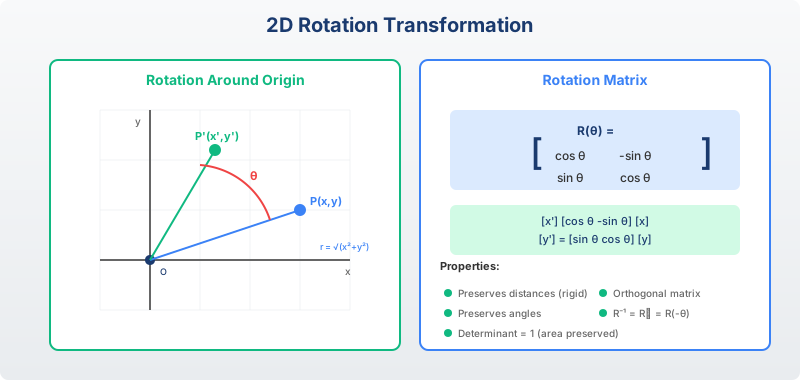
$$\begin{bmatrix} x' \\ y' \end{bmatrix} = \begin{bmatrix} \cos\theta & -\sin\theta \\ \sin\theta & \cos\theta \end{bmatrix} \begin{bmatrix} x \\ y \end{bmatrix}$$
Rotation by angle θ around the origin
Homogeneous Coordinates
Unified representation for all transformations
Homogeneous Coordinates
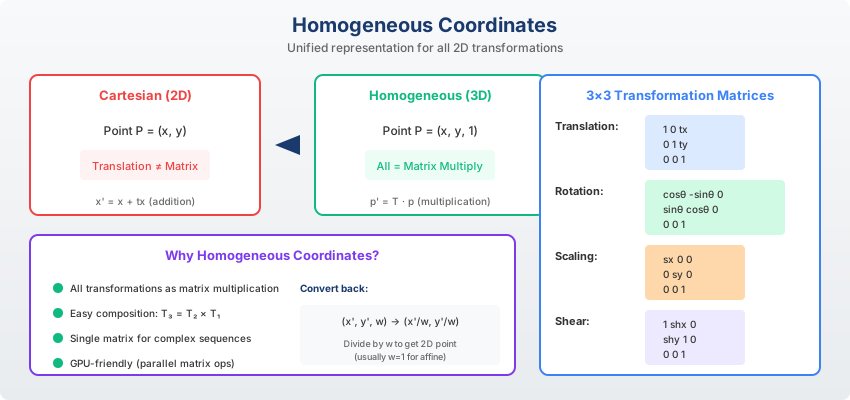
Homogeneous Coordinates: Add an extra dimension to represent 2D points as 3D vectors.
$$(x, y) \rightarrow (x, y, 1)$$
Enables all transformations (including translation) as matrix multiplication.
Knowledge Check
Think About It
Why do we use homogeneous coordinates in computer graphics?
Click the blurred area to reveal the answer
Affine Transformations
Preserving parallel lines
Affine Transformation Matrix
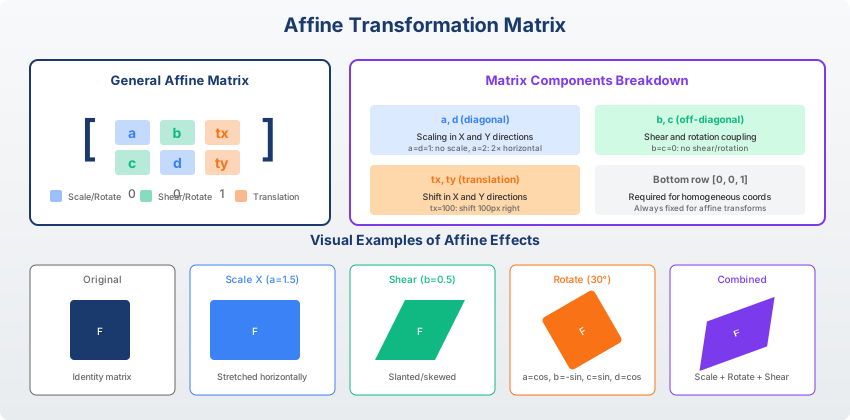
$$\begin{bmatrix} x' \\ y' \\ 1 \end{bmatrix} = \begin{bmatrix} a & b & t_x \\ c & d & t_y \\ 0 & 0 & 1 \end{bmatrix} \begin{bmatrix} x \\ y \\ 1 \end{bmatrix}$$
Combines rotation, scaling, shearing, and translation
Transformation Hierarchy
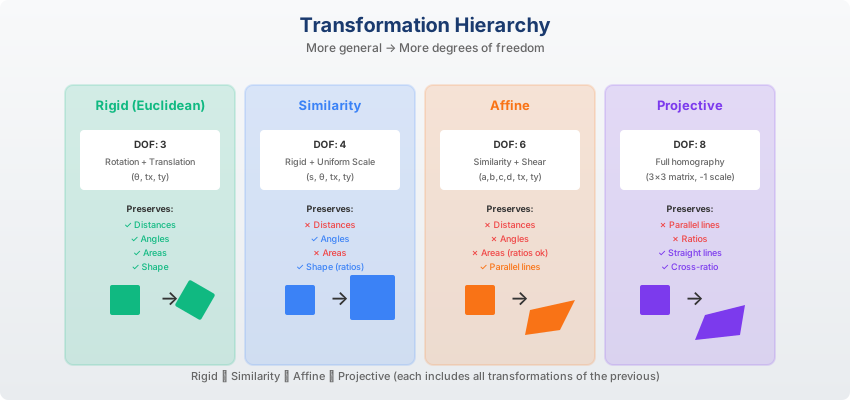
From rigid to projective: each level adds more degrees of freedom
Transformation Composition
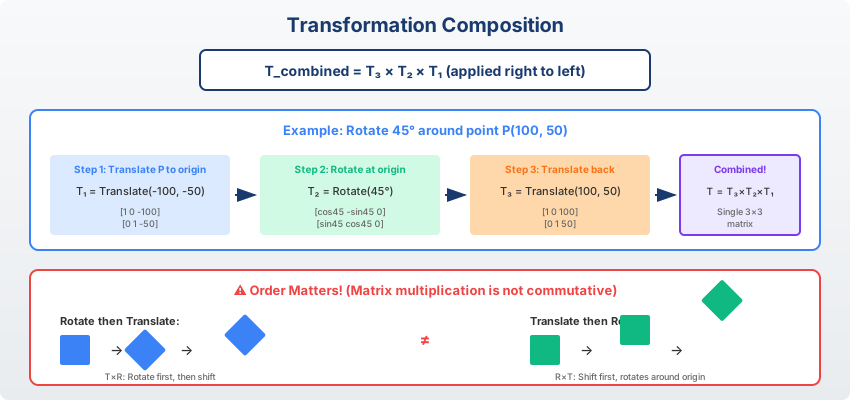
$$T_{combined} = T_3 \cdot T_2 \cdot T_1$$
Order matters! Transformations are applied right-to-left.
Knowledge Check
Think About It
If you want to rotate an image around its center, what sequence of transformations is needed?
Click the blurred area to reveal the answer
Projective Transformations
Homography and perspective
Projective Transformation
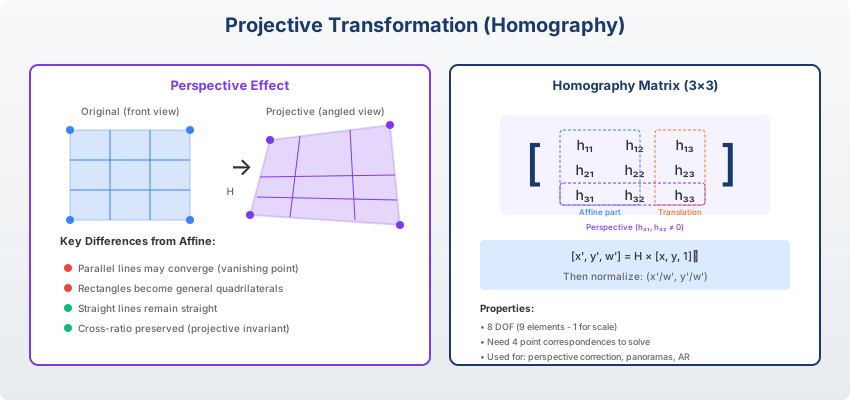
Homography (8 DOF):
$$\begin{bmatrix} x' \\ y' \\ w \end{bmatrix} = \begin{bmatrix} h_{11} & h_{12} & h_{13} \\ h_{21} & h_{22} & h_{23} \\ h_{31} & h_{32} & 1 \end{bmatrix} \begin{bmatrix} x \\ y \\ 1 \end{bmatrix}$$
Final coordinates: $(x'/w, y'/w)$
Perspective Correction
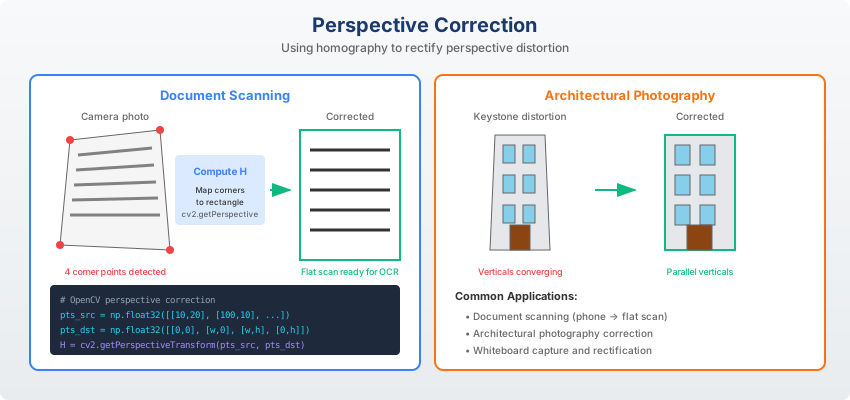
Correcting perspective distortion in document scanning and photography
Interpolation
Resampling pixel values
Interpolation Methods
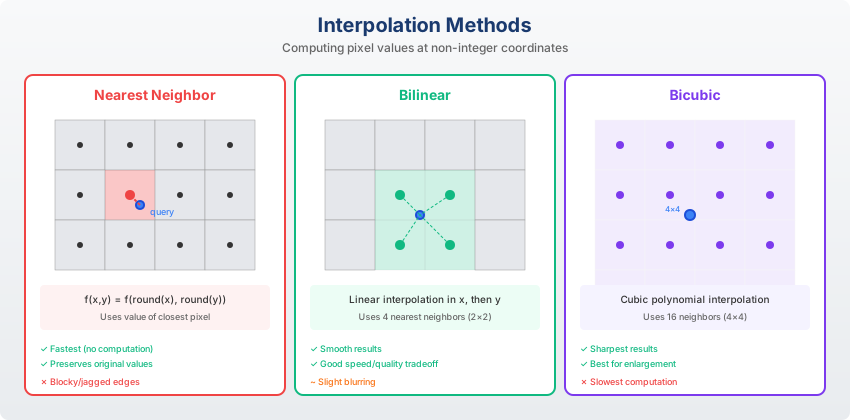
Fast, blocky artifacts
Smooth, slight blur
High quality, slower
Best quality, slowest
Interpolation Artifacts
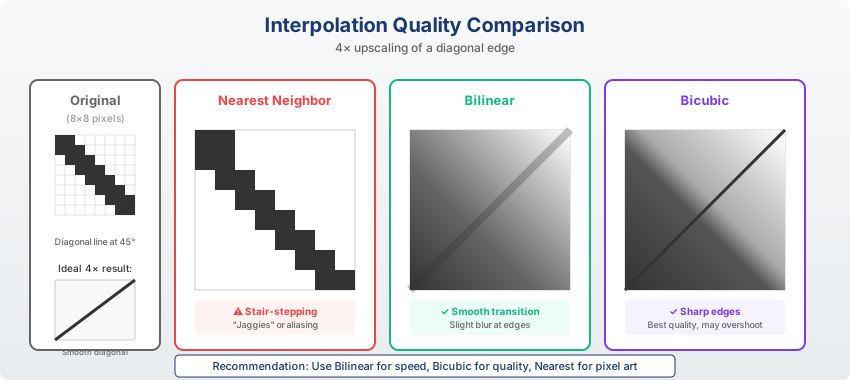
Knowledge Check
Think About It
When would you prefer nearest-neighbor over bicubic interpolation?
Click the blurred area to reveal the answer
Image Warping
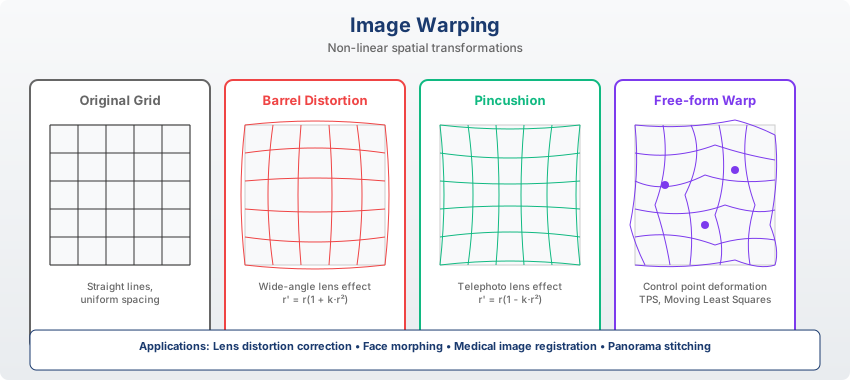
Non-linear transformations for artistic effects and correction
Polar Transforms
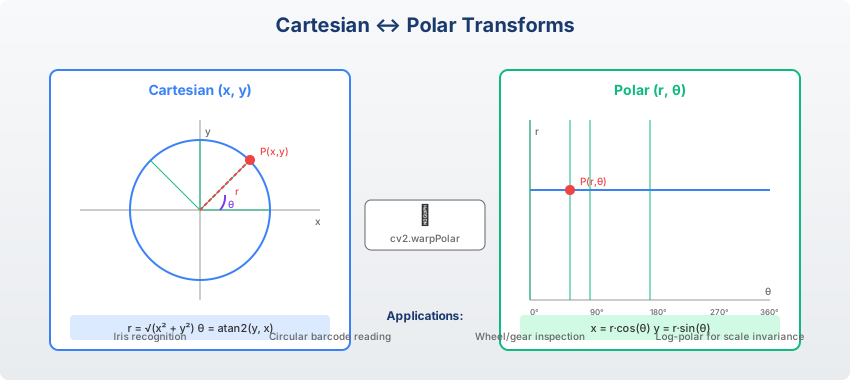
Polar Transform: Convert from Cartesian to polar coordinates.
$$r = \sqrt{x^2 + y^2}, \quad \theta = \arctan(y/x)$$
Useful for analyzing circular patterns and rotational symmetry.
Image Registration
Aligning images from different sources
Registration Pipeline

- Feature detection
- Feature matching
- Transformation estimation
- Image warping
Feature Matching for Registration
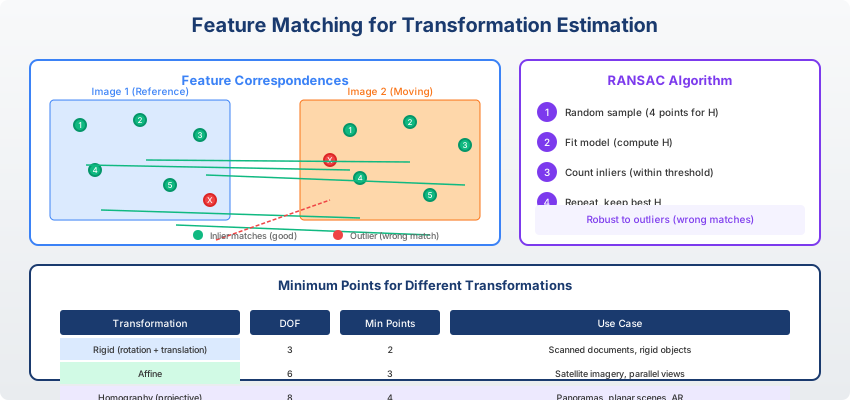
Corresponding points are used to estimate the transformation
Image Registration Applications
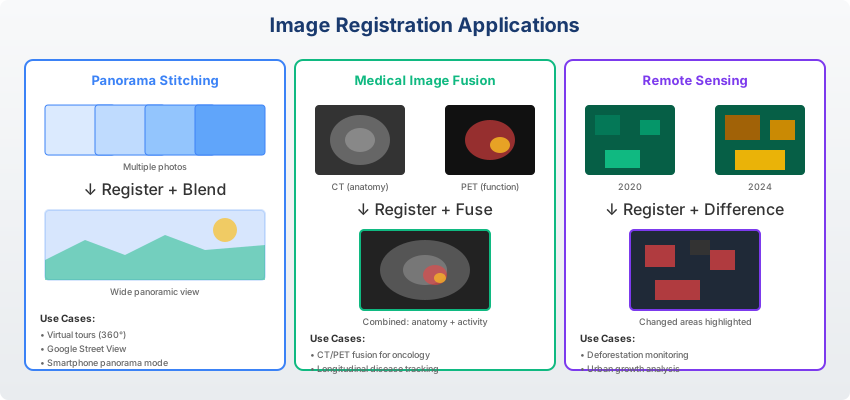
Medical imaging, satellite imagery, panorama stitching
Implementation
import cv2
import numpy as np

img = cv2.imread('image.jpg')
rows, cols = img.shape[:2]

# Rotation matrix (center, angle, scale)
M = cv2.getRotationMatrix2D((cols/2, rows/2), 45, 1.0)
rotated = cv2.warpAffine(img, M, (cols, rows))

# Perspective transform
pts1 = np.float32([[0,0], [300,0], [0,300], [300,300]])
pts2 = np.float32([[0,0], [300,0], [50,300], [250,300]])
H = cv2.getPerspectiveTransform(pts1, pts2)
warped = cv2.warpPerspective(img, H, (cols, rows))
Summary
Key Takeaways
Key Takeaways
- Basic transforms: Translation, rotation, scaling
- Homogeneous coordinates: Unified matrix representation
- Affine: Preserves parallel lines (6 DOF)
- Projective: Homography for perspective (8 DOF)
- Interpolation: Nearest, bilinear, bicubic - trade speed vs quality
- Registration: Feature detection → matching → transform → warp
Questions?
Thank you for your attention!
Next: Module 07 - Feature Extraction
End of Module 06
Geometric Transformations
Questions?