Segmentation and Morphology
CMSC 178IP - Module 08
Noel Jeffrey Pinton
Department of Computer Science
University of the Philippines Cebu
Segmentation and Morphology
CMSC 178IP - Module 08
Noel Jeffrey Pinton
Department of Computer Science
University of the Philippines Cebu
Learning Objectives
By the end of this module, you will be able to:
- Apply thresholding techniques (global, Otsu, adaptive)
- Implement region-based segmentation methods
- Use the watershed algorithm for complex segmentation
- Apply morphological operations (erosion, dilation, opening, closing)
- Use morphology for noise removal and object extraction
Thresholding
Converting grayscale to binary
Global Thresholding
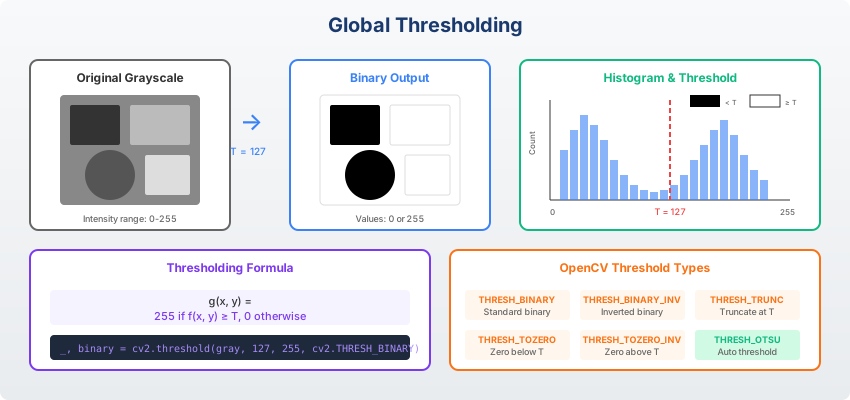
Binary Thresholding:
$$g(x,y) = \begin{cases} 1 & \text{if } f(x,y) > T \\ 0 & \text{otherwise} \end{cases}$$
Simple but requires manual threshold selection.
Otsu's Thresholding
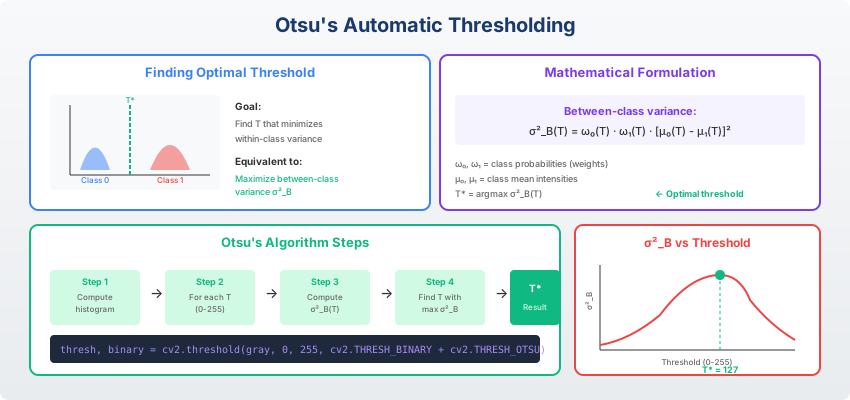
Otsu's Method: Automatically find optimal threshold by maximizing between-class variance.
$$\sigma^2_B = \omega_0 \omega_1 (\mu_0 - \mu_1)^2$$
Works well for bimodal histograms.
Knowledge Check
Think About It
When does Otsu's method work well, and when might it fail?
Click the blurred area to reveal the answer
Adaptive Thresholding
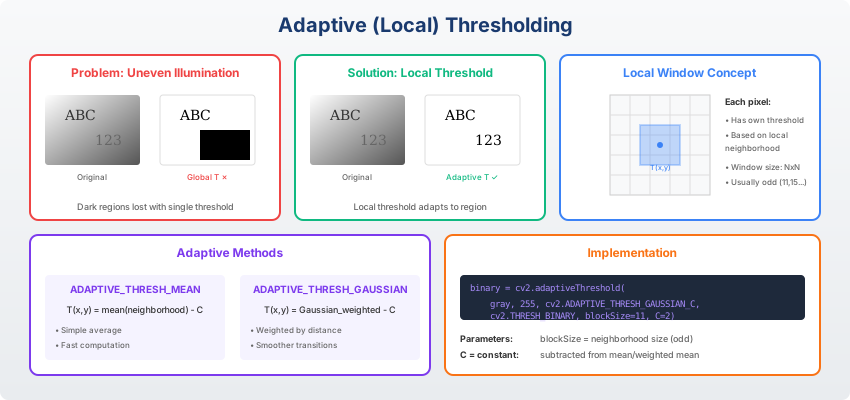
Compute threshold for each pixel based on local neighborhood. Handles uneven illumination.
Region-Based Segmentation
Grouping similar pixels
Region Growing
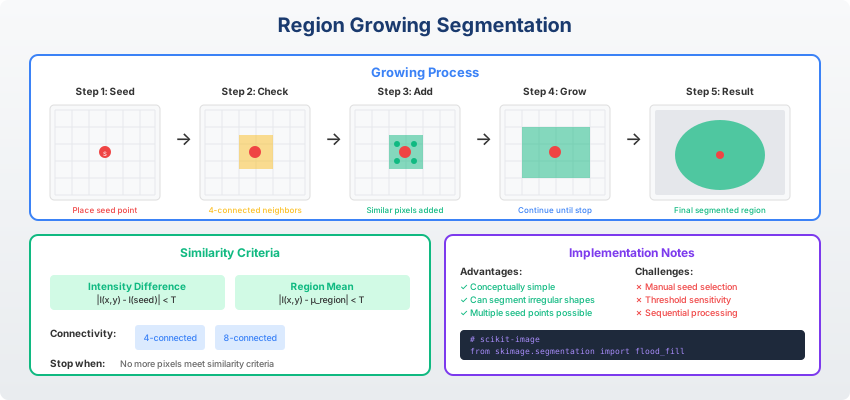
Region Growing Algorithm:
- Start from seed point(s)
- Examine neighboring pixels
- Add if similar (within threshold)
- Repeat until no more pixels can be added
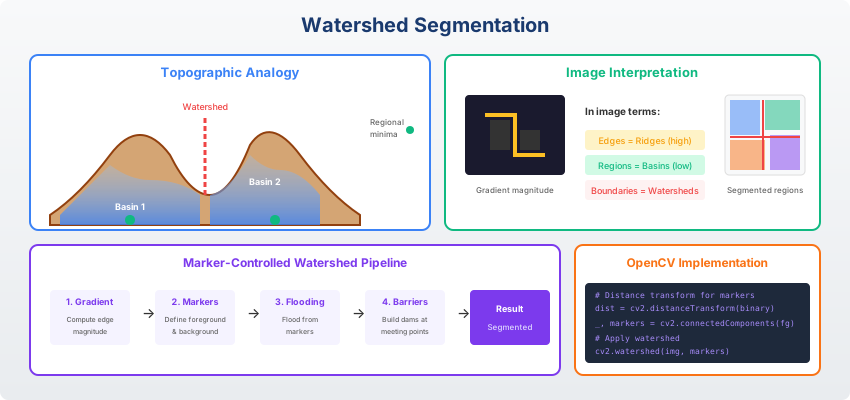
Watershed Segmentation
Knowledge Check
Think About It
What is over-segmentation in watershed, and how can it be addressed?
Click the blurred area to reveal the answer
Morphological Operations
Shape-based image processing
Structuring Elements
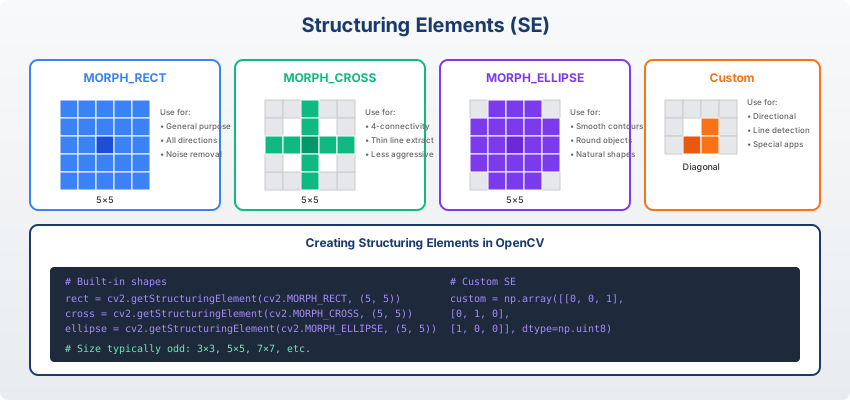
Structuring Element: Small shape used as a probe. Common shapes: square, disk, cross, diamond.
Erosion and Dilation
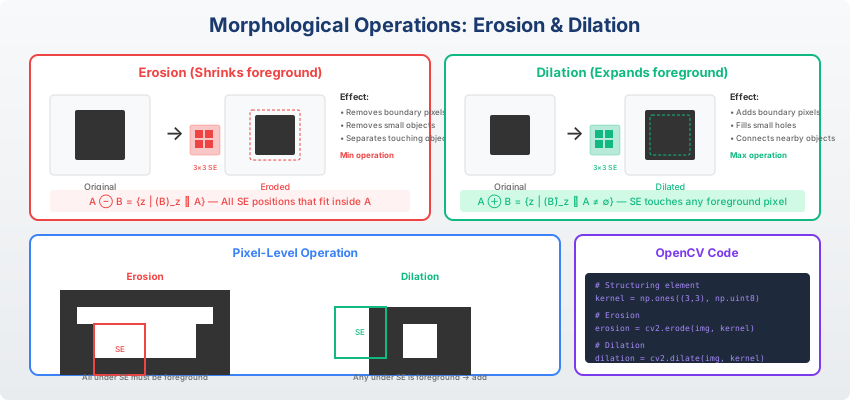
$$A \ominus B$$
Shrinks objects, removes small protrusions
$$A \oplus B$$
Expands objects, fills small holes
Opening and Closing
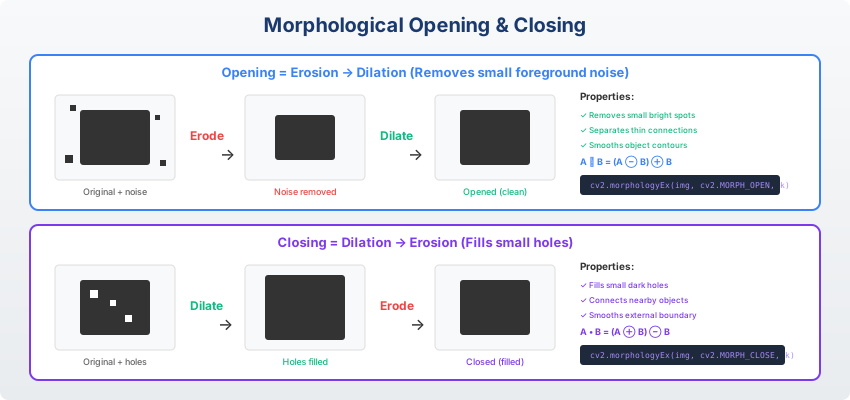
$$A \circ B = (A \ominus B) \oplus B$$
Removes small objects, smooths contours
$$A \bullet B = (A \oplus B) \ominus B$$
Fills small holes, connects nearby objects
Knowledge Check
Think About It
What is the difference between erosion and opening?
Click the blurred area to reveal the answer
Morphological Gradient
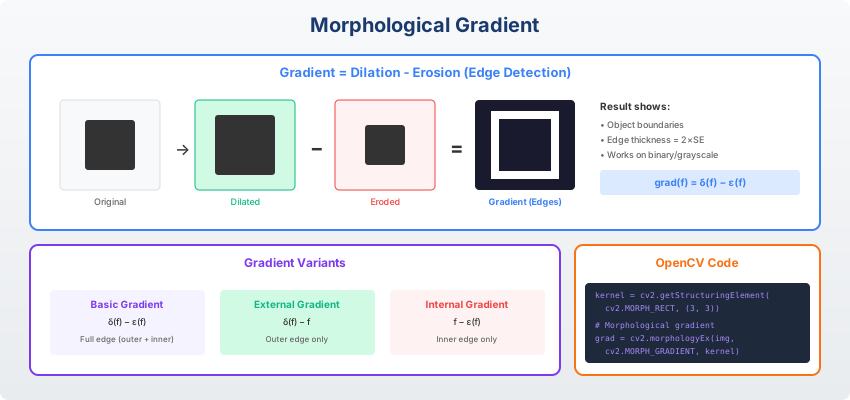
Morphological Gradient:
$$G = (A \oplus B) - (A \ominus B)$$
Dilation minus erosion = edge detection using morphology
Grayscale Morphology
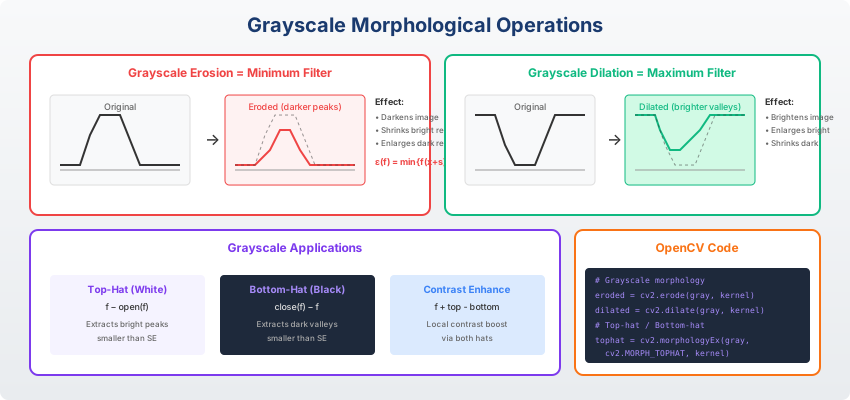
Applications
Practical uses of segmentation and morphology
Noise Removal Pipeline
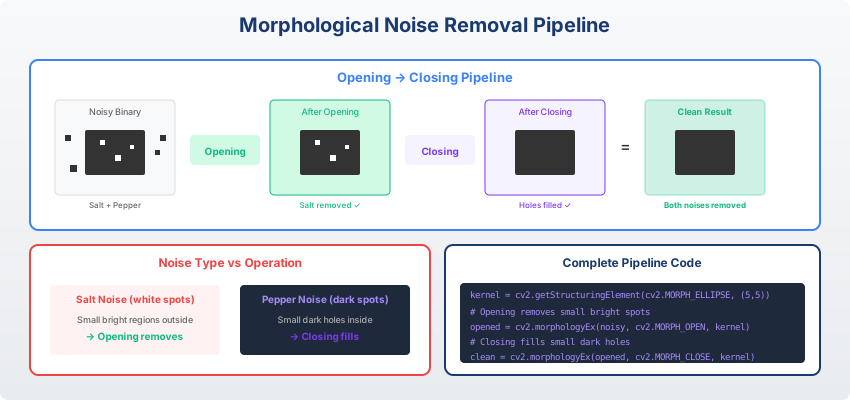
Edge Detection with Morphology
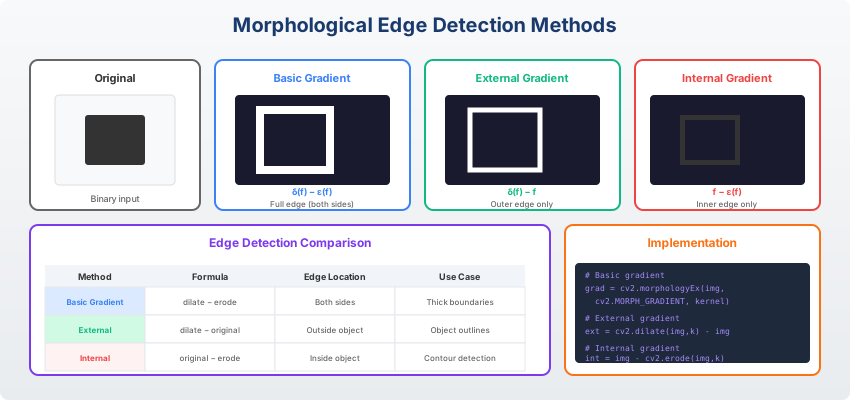
Comparing morphological gradient with other edge detection methods
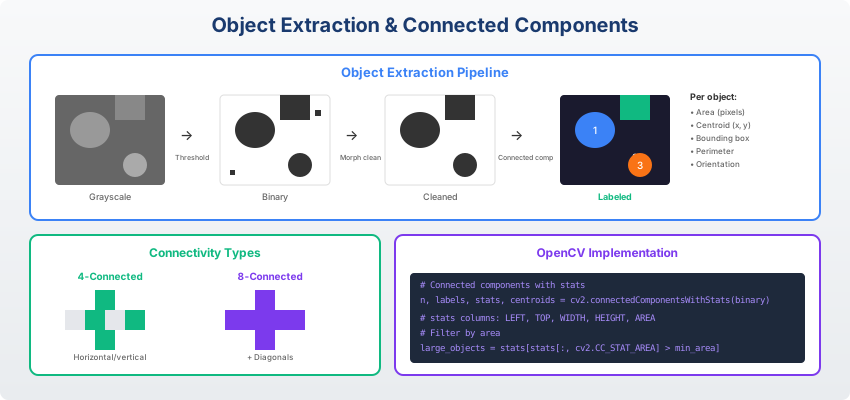
Object Extraction
Texture Enhancement
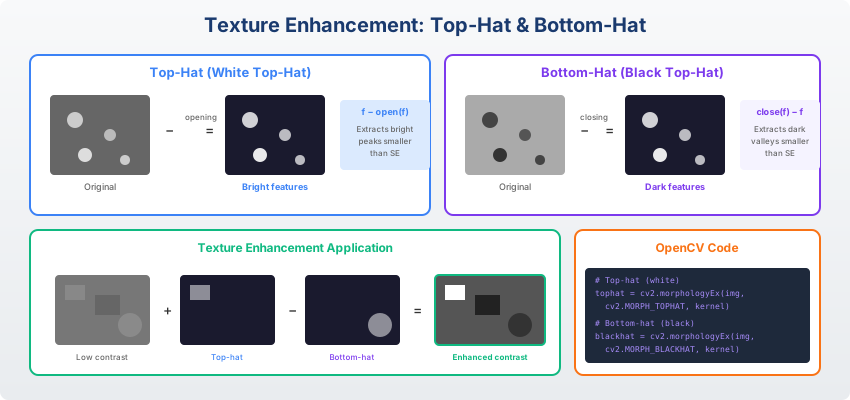
Top-hat and bottom-hat transforms for texture analysis
Multi-Scale Segmentation
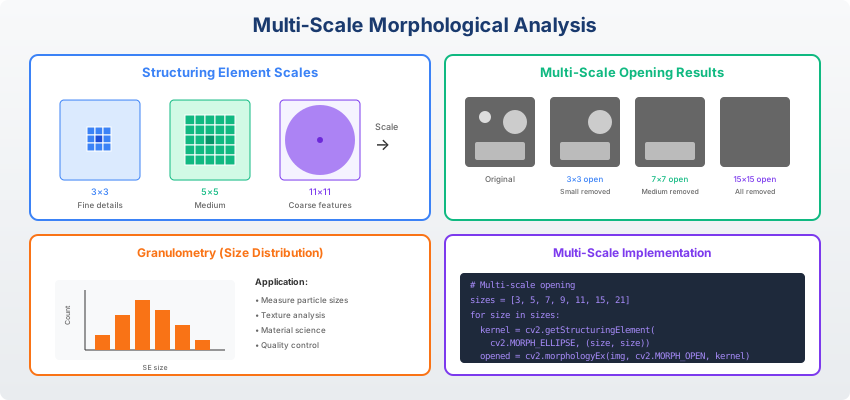
Different structuring element sizes capture features at different scales
Implementation
import cv2
import numpy as np

img = cv2.imread('image.jpg', 0)

# Otsu's thresholding
_, binary = cv2.threshold(img, 0, 255,
    cv2.THRESH_BINARY + cv2.THRESH_OTSU)

# Adaptive thresholding
adaptive = cv2.adaptiveThreshold(img, 255,
    cv2.ADAPTIVE_THRESH_GAUSSIAN_C, cv2.THRESH_BINARY, 11, 2)

# Morphological operations
kernel = cv2.getStructuringElement(cv2.MORPH_ELLIPSE, (5,5))
opened = cv2.morphologyEx(binary, cv2.MORPH_OPEN, kernel)
closed = cv2.morphologyEx(binary, cv2.MORPH_CLOSE, kernel)
Summary
Key Takeaways
Key Takeaways
- Thresholding: Global, Otsu (automatic), adaptive (local)
- Region growing: Expand from seeds based on similarity
- Watershed: Separate touching objects using markers
- Erosion/Dilation: Basic morphological operations
- Opening/Closing: Remove noise, fill holes
- Applications: Noise removal, edge detection, object extraction
Questions?
Thank you for your attention!
Next: Module 09 - Computer Vision & Deep Learning I
End of Module 08
Segmentation and Morphology
Questions?